Debt Payoff Calculator: Calculate Your Debt-Free Date Using the Snowball Method
You check your account, make the minimum payment, and the balance barely moves. Interest quietly eats whatever progress you thought you made. If that cycle feels familiar, you’re not alone: the average American now carries $6,595 in credit card debt, and total U.S. credit card balances have climbed to a record $1.28 trillion. With average APRs sitting above 21%, minimum payments can take over 18 years to clear a single balance.
That’s exactly why a debt payoff calculator has become one of the most searched financial tools in 2026. People don’t want another spreadsheet with broken formulas, they want a clear, personalized date when they’ll finally be debt-free.
In this guide, you’ll learn how a debt payoff calculator works, how the debt snowball method compares to the avalanche method, the exact formula behind the math, and how to build your own high-converting calculator using Outgrow.
What Is a Debt Payoff Calculator?
Table of Contents
A debt payoff calculator is an interactive tool that estimates how long it will take to pay off your debt based on your balance, interest rate, and monthly payment amount. Instead of manually calculating amortization schedules, you enter your numbers once and instantly see your projected debt-free date.
It works by taking your total debt, interest rate, minimum payment, and any extra monthly payment, then running that data through an amortization formula to generate a month-by-month payoff schedule. Anyone managing credit cards, personal loans, or multiple balances can use it, from individuals building a repayment plan to financial advisors modeling scenarios for clients.
Interactive calculators outperform static spreadsheets for one simple reason: they update in real time, eliminate manual formula errors, and turn abstract numbers into a visual, personalized result. Given that the average cardholder paying only minimum payments on a $6,501 balance would take over 18 years to pay it off, seeing that number instantly, instead of doing the math by hand, is what actually changes behavior.
How Does a Debt Payoff Calculator Work?
To calculate your debt payoff, you’ll typically need to enter:
- Total debt: Your current outstanding balance
- Interest rate: The APR charged on that debt
- Minimum payment: What you’re required to pay monthly
- Extra monthly payment: Any additional amount you can put toward the debt
Once you input these details, the calculator estimates your payoff date, total interest paid, a monthly repayment schedule, and your overall debt-free timeline. This matters more than most people realize. Interest on a typical balance isn’t small: at 22.8% APR, a $6,501 balance generates roughly $1,482 in interest per year, or about $123 a month, before any principal is paid down. A calculator makes that hidden cost visible.
How to Use the Debt Payoff Calculator
Getting your results takes less than a minute:
1. Enter your total debt.
2. Add your interest rate (APR).
3. Enter your minimum monthly payment.
4. Optionally, add any extra monthly payment you plan to make.
5. Choose your repayment strategy: Snowball or Avalanche.
6. Finally, click Calculate.
You’ll instantly see:
- Your debt-free date
- Total interest paid
- Interest saved with extra payments
- A full monthly payment schedule
No spreadsheets, no manual amortization math, no waiting for a callback. Just enter your numbers and see exactly where you stand.
Who Should Use This Calculator?
This calculator is built for anyone trying to get a clear, honest picture of their debt, including:
- Credit card holders
- Personal loan borrowers
- Auto loan borrowers
- Student loan borrowers
- Anyone managing multiple debts at once
- Financial advisors modeling client scenarios
- Credit counselors building repayment plans
If you have more than one balance competing for your budget, this is exactly the tool that turns “I don’t know where to start” into a specific plan with a specific end date.
What Is the Debt Snowball Method?
The debt snowball method is a repayment strategy where you pay off your smallest debts first, regardless of interest rate, while making minimum payments on everything else. Once the smallest debt is cleared, you roll that payment into the next-smallest debt, creating a “snowball” effect that builds momentum.
Step-by-step example:
- List all debts from smallest to largest balance
- Pay minimums on all debts except the smallest
- Put every extra dollar toward the smallest debt until it’s paid off
- Roll that payment amount into the next-smallest debt
- Repeat until all debts are cleared
Does it actually work?
This isn’t just personal finance folklore. A widely cited Kellogg School of Management study found that consumers who tackle small balances first are more likely to eliminate their overall debt than those following a purely interest-rate-driven approach. A separate analysis of nearly 6,000 consumers found that people who paid off small balances first were about 14% more likely to become debt-free than those paying down debts in random order.
Benefits: Quick wins, sustained motivation, and a simpler decision-making process.
Drawbacks: It can cost more in total interest than other methods, since it prioritizes balance size over rate.
How Is the Formula Calculated?
The calculator estimates repayment using the standard amortization formula, applied month by month until your balance hits zero.
Step 1: Calculate monthly interest
Interest = Remaining Balance × (APR ÷ 12)
Step 2: Update the remaining balance
New Balance = Previous Balance + Interest − Payment
Step 3: Repeat
This process runs every month, recalculating interest on the new, smaller balance each time, until Balance = 0.
For strategies involving multiple debts, the calculator layers in one more rule: once a debt is paid off, its former payment amount gets added to the payment on the next debt in line (smallest balance for snowball, highest APR for avalanche). That’s what creates the accelerating payoff curve instead of a flat one.
How the Calculation Flows
Here’s the process from input to result:
Your Inputs (debt, APR, payment)
↓
Calculator Engine
↓
Amortization Formula
↓
Monthly Results
↓
Debt-Free Date
↓
Total Interest Saved
Each stage feeds the next. Change one input, like adding $50 to your extra payment, and every downstream result recalculates instantly, which is the core advantage over doing this by hand.
Debt Snowball vs Debt Avalanche: Which Strategy Is Better?
| Factor | Debt Snowball | Debt Avalanche |
| Order | Smallest balance first | Highest interest rate first |
| Motivation | High, driven by quick wins | Lower in the early months |
| Interest Savings | Lower | Higher |
| Time to First Win | Fast | Slower |
| Best For | People who need momentum | People focused on minimizing cost |
When to choose Snowball
If you’re juggling multiple debts and feel overwhelmed, research published in the Journal of Consumer Research found people are more motivated to get out of debt by beginning with the smallest balance, not just by consolidating accounts.
When to choose Avalanche
If minimizing total interest paid matters more to you than early momentum, and you’re confident you’ll stick with the plan regardless of how slowly the first balance shrinks, the avalanche method saves more money mathematically.
Debt Payoff Calculator vs Spreadsheet
| Feature | Calculator | Spreadsheet |
| Calculations | Automatic | Manual formulas |
| Format | Interactive | Static |
| Results | Personalized | Generic |
| Device access | Mobile friendly | Often not |
| Lead capture | Built in | None |
| Sharing | One click | Difficult, formatting breaks |
| Error risk | Low | High (broken formulas) |
A spreadsheet requires you to already understand amortization math, and one wrong cell reference throws off every number after it. A calculator does the math correctly every time, adapts instantly when you change an input, and works the same on a phone as it does on a desktop.
Benefits of Using a Debt Payoff Calculator
- Faster financial planning: Get a clear plan in minutes instead of hours of manual math
- Better budgeting: See exactly how much to allocate monthly
- Know your debt-free date: Remove the uncertainty of “how long will this take?”
- Save on interest: With average APRs near 22%, even modest extra payments meaningfully cut what you pay in interest over time
- Motivation: Visualizing progress keeps you committed to the plan
- Better financial decisions: Make informed choices about which debts to prioritize
Features of a Good Debt Payoff Calculator
Not all calculators are built the same. Look for one that supports:
- Multiple debts, not just one balance
- Extra payment inputs
- Both snowball and avalanche strategies
- A full monthly payment schedule, not just a summary number
- Interest savings comparisons between strategies
- Visual graphs of the payoff curve
- Mobile-responsive design
Debt Payoff Calculator Example
Here’s a realistic example based on 2026 averages:
| Debt | Balance | APR | Payment |
| Credit Card A | $5,000 | 22% | $150 |
| Credit Card B | $3,000 | 18% | $100 |
| Personal Loan | $8,000 | 12% | $250 |
Before extra payments: Total payoff time runs roughly 4 to 5 years, with several thousand dollars paid in interest.
After adding $200/month extra: The timeline shortens meaningfully, often by a year or more, depending on which debt gets prioritized.
Interest saved: Can range from several hundred to a few thousand dollars, depending on balances and rates.
Months saved: Frequently 12 to 18 months faster, even with a modest extra payment.
This gap matters more than it sounds. On a $10,000 balance at roughly 21.5% APR, paying only the minimum (about 2% of balance) could take over 30 years and cost nearly $19,000 in total interest. That’s the real cost a calculator makes visible before it’s too late to change course.
How Extra Payments Help You Become Debt-Free Faster
Every extra dollar you put toward debt goes directly toward principal reduction, meaning less of your balance accrues interest going forward. Since compound interest works against you on debt (unlike investments, where it works in your favor), reducing principal early has a compounding effect on the interest itself.
This creates payoff acceleration: even small, consistent extra payments can shave months or years off your repayment timeline. The earlier you make extra payments, the more dramatic the impact, since interest is calculated on your outstanding balance at any given time.
Tips to Pay Off Debt Faster
- Increase your monthly payment, even by $25 to $50, to meaningfully shorten your timeline
- Pay biweekly instead of monthly to sneak in one extra full payment per year
- Use windfalls (tax refunds, bonuses, gifts) to make lump-sum payments toward principal
- Refinance high-interest debt into a lower-rate personal loan or balance transfer card
- Avoid taking on new debt while paying down existing balances
- Automate payments so you never miss a due date or incur late fees
- Build a small emergency fund first, so unexpected expenses don’t force you back onto credit cards
Common Mistakes When Paying Off Debt
- Paying only minimums: This drags out repayment for decades and maximizes interest paid, as shown above
- Ignoring APR: Not accounting for interest rate differences can cost you thousands over time
- Missing payments: Late payments trigger fees and can hurt your credit score
- Closing cards immediately: This can lower your credit utilization ratio and hurt your score
- Not tracking progress: Without visibility into your payoff timeline, it’s easy to lose motivation
Common Questions Before Using a Debt Calculator
Should I include all my debts?
Yes, include every debt for the most accurate full picture of your finances.
Should I include my mortgage?
Optional. Most people focus on credit cards and personal loans first.
Should interest be included?
Yes, interest rate is required to calculate an accurate payoff timeline.
Can I add multiple loans?
Yes, most calculators, including this one, support multiple debts at once.
Can I change my payment amount later?
Yes, simply re-enter your numbers anytime to see updated results.
How to Choose the Right Debt Payoff Strategy
Use this simple decision tree:
Small balances? → Choose Snowball for quick wins and motivation
High APR? → Choose Avalanche to minimize interest costs
Need motivation? → Choose Snowball to build momentum with early wins
Want lowest interest? → Choose Avalanche to save the most money over time
There’s no universally “correct” strategy. The Kellogg research suggests the snowball method wins on follow-through for most people, but the right approach ultimately depends on your financial personality and how many debts you’re juggling.
How to Build a Debt Payoff Calculator in Outgrow
This is where Outgrow makes it easy to turn this entire concept into an interactive, lead-generating tool.
Step 1: Create a New Calculator
Log into Outgrow and choose the Financial Calculator Template to start with a pre-built framework you can customize.

Step 2: Design the Welcome Screen
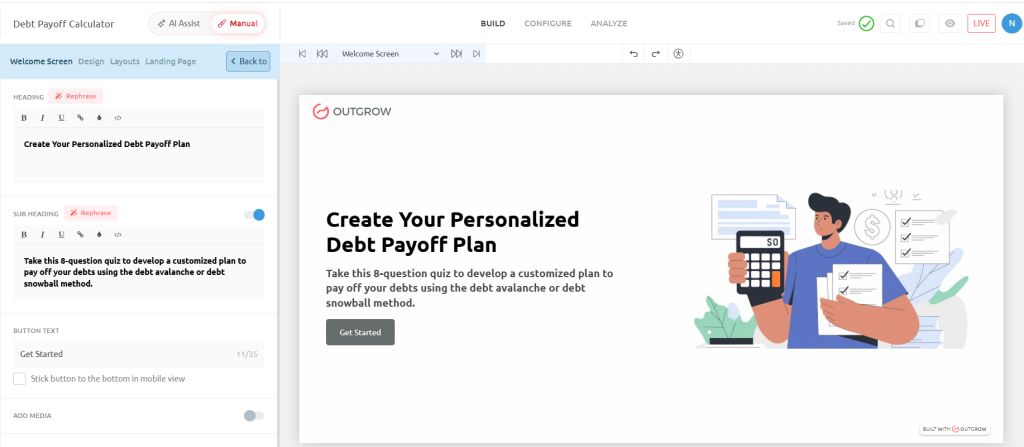
Set up an engaging entry point:
- Headline: “Calculate Your Debt-Free Date in Minutes”
- Description: “Enter your debts and discover the fastest payoff strategy.”
- CTA: “Start Calculator”
- Suggested image: A clean, finance-themed visual (piggy bank, upward graph, or calendar icon)
Step 3: Add Questions
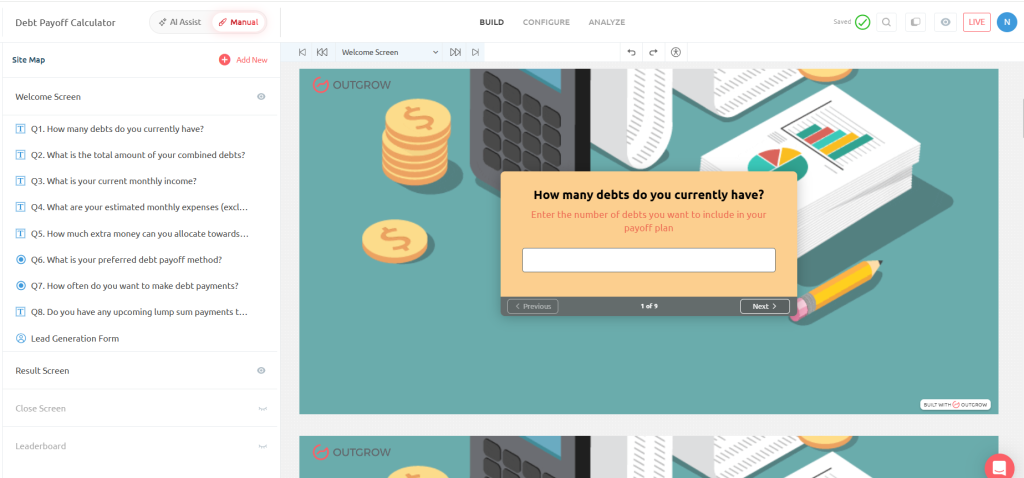
Build your question flow:
- Current Debt Balance (Number)
- Interest Rate (Number)
- Minimum Monthly Payment
- Extra Monthly Payment
- Choose Strategy (Snowball or Avalanche)
- Monthly Budget
- Number of Debts
- Expected Monthly Income (optional)
Step 4: Configure Calculator Formula
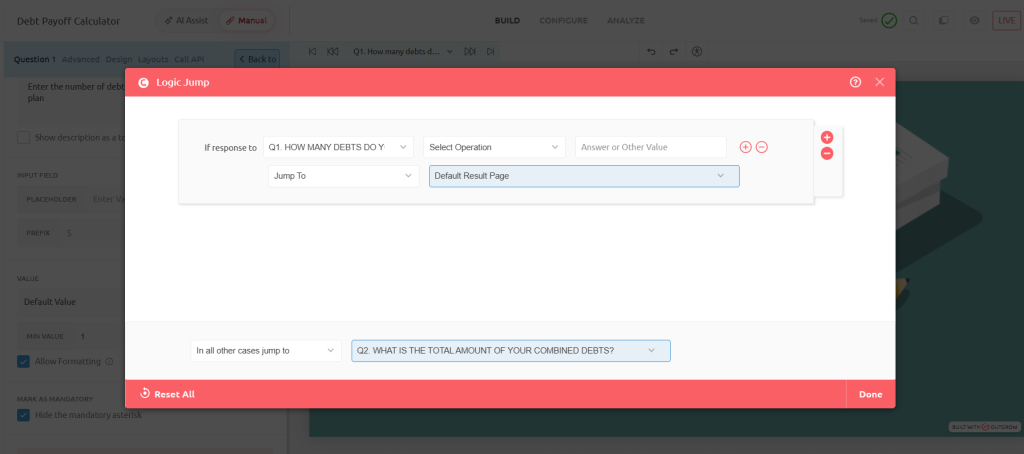
Set up your logic in Outgrow’s formula builder, using the amortization formula from Section 6:
- Inputs: Debt balance, APR, minimum payment, extra payment
- Formula: Amortization logic that recalculates balance monthly based on payments and interest
- Variables: Strategy type (snowball/avalanche) to determine payment order across multiple debts
- Outputs: Payoff date, total interest, monthly schedule
- Logic: Conditional rules to prioritize debts by balance (snowball) or APR (avalanche)
Step 5: Build the Outcome Page
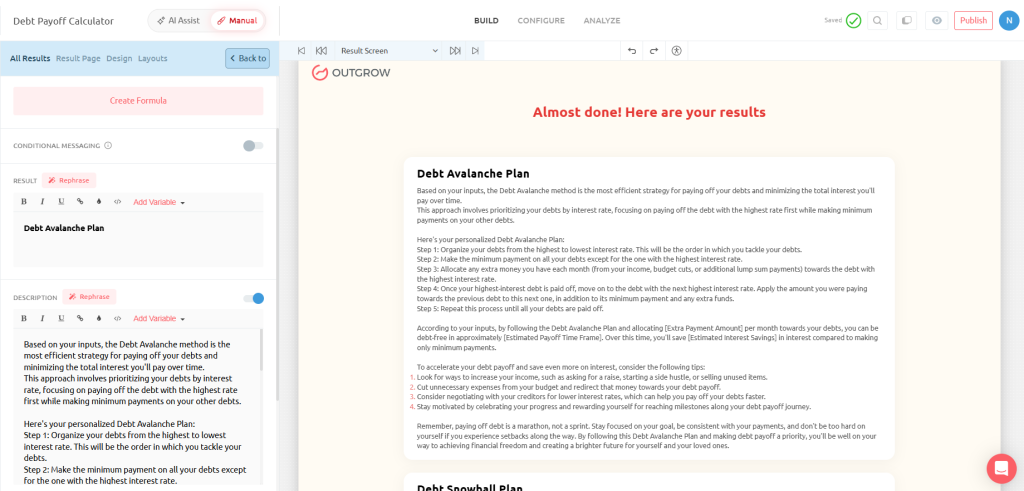
Display personalized results:
- ✔ Debt-Free Date
- ✔ Total Interest Paid
- ✔ Interest Saved
- ✔ Months Saved
- ✔ Personalized Recommendation
Add CTAs like “Book a Financial Consultation,” “Download PDF,” or “Share Results” to drive engagement.
Step 6: Customize Branding
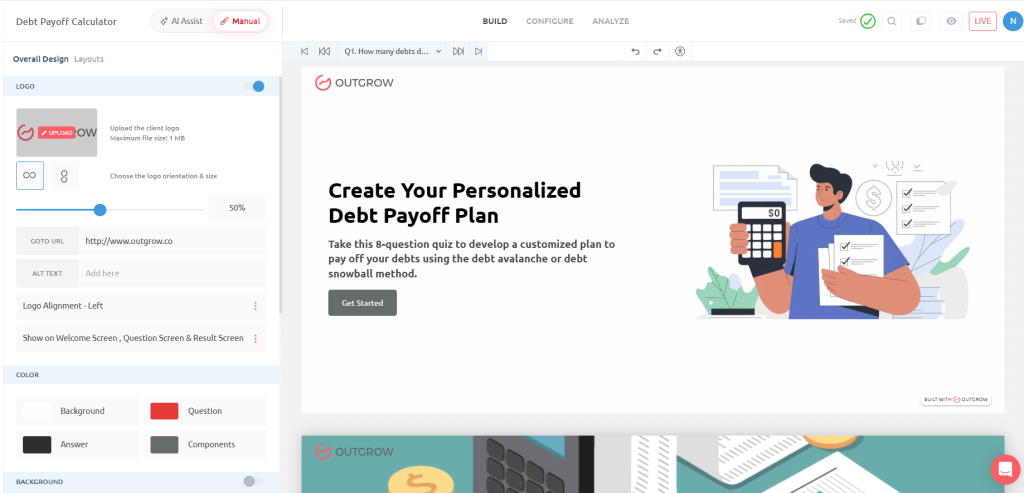
Match your brand identity with custom colors, fonts, logo placement, a progress bar, and icons throughout the calculator flow.
Step 7: Publish & Embed Anywhere
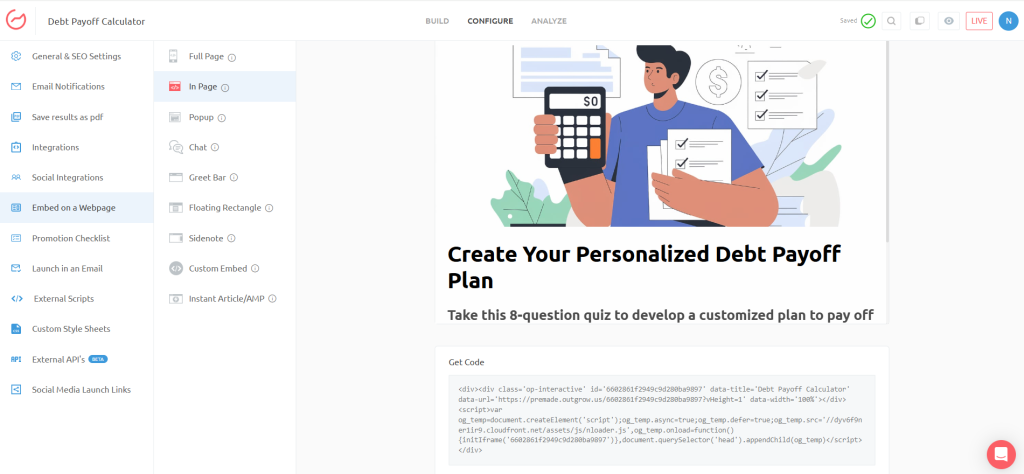
Once built, embed your calculator on your website, a dedicated landing page, or directly into WordPress, HubSpot, Shopify, or Webflow.
Step 8: Capture Leads
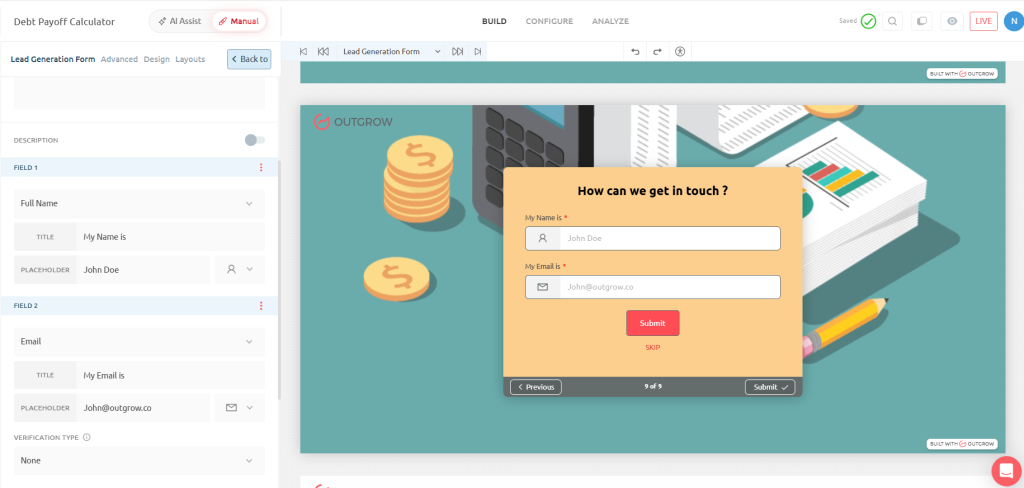
Before revealing results, ask for Name, Email, Phone, or Company. This works because people are emotionally invested after entering their financial details. They want their personalized results, which makes them far more likely to complete the form and convert into a lead.
Best Practices for Creating High-Converting Financial Calculators
- Keep questions under 8 to avoid drop-off
- Design mobile-first, since most users complete forms on their phones
- Show instant results, with no “we’ll email you” delays
- Add visual charts to make data easy to understand
- Use personalized recommendations based on user inputs
- Offer downloadable reports for users to save or share
- Add lead forms strategically, right before the results reveal
Why Businesses Should Use Debt Payoff Calculators
This type of calculator is ideal for:
- Banks
- Credit unions
- Mortgage companies
- Financial advisors
- Fintech startups
- Loan providers
- Personal finance blogs
With about 49% of cardholders carrying a revolving balance month to month, there’s a massive, motivated audience actively searching for payoff help. For these businesses, a debt payoff calculator isn’t just a helpful tool, it’s a lead generation engine. It attracts organic search traffic from people actively looking for financial solutions, engages them with genuine value, and captures qualified leads who are already primed for financial products or advisory services.
Related Calculators
A debt payoff calculator works even better as part of a broader financial planning toolkit. Consider building and linking to:
- Budget Calculator
- Car Loan Calculator
- Debt-to-Income Calculator
- EMI Calculator
- Personal Loan Calculator
- Credit Card Payoff Calculator
- Savings Calculator
- Retirement Calculator
Linking between these signals topical authority to Google and keeps visitors on-site longer, both of which support rankings across the whole cluster, not just this one page.
Final Thoughts
Debt payoff calculators outperform spreadsheets by delivering instant, error-free, visually engaging results, and with the average American carrying nearly $6,600 in credit card debt at over 21% APR, that clarity matters more than ever. Whether you choose the snowball method for research-backed motivation or the avalanche method to minimize interest, the takeaway is the same: extra payments, even small ones, can dramatically shorten your path to becoming debt-free.
If you’re a business looking to attract and convert financially motivated leads, building your own interactive debt payoff calculator with Outgrow is one of the most effective ways to turn valuable content into real conversions.
Start building yours today and give your audience the clarity they’ve been searching for.
Frequently Asked Questions
A tool that estimates how long it takes to pay off debt based on balance, interest rate, and payments.
Highly accurate for standard debts, assuming consistent payments and no new charges added.
Neither is universally better. Snowball builds motivation; avalanche saves more on interest.
Yes, most calculators let you enter and prioritize multiple debts simultaneously.
Even small extra payments can save hundreds to thousands of dollars in interest.
Depends on your balance, rate, and payment amount. The calculator estimates this instantly.
Yes, it works for credit cards, personal loans, and most fixed-rate debts.
Most online debt payoff calculators, including Outgrow’s, are free to use.
Total debt, interest rate, minimum payment, and any extra monthly payment amount.
Yes, though mortgages may need extra inputs like loan terms and taxes.

Ankit Upadhyay is a Digital Marketing and SEO Specialist at Outgrow. With a passion for driving growth through strategic content and technical SEO expertise, Ankit Upadhyay helps brands enhance their online visibility and connect with the right audience. When not optimizing websites or crafting marketing strategies, Ankit Upadhyay loves visiting new places and exploring nature.