Outgrow vs Formidable Forms: Which Tool is Best for Your Business?
Table of Contents
The Data Collection Dilemma: Why Your Form Strategy Matters
Let’s be honest for a second here. Most people dislike being asked to fill out forms. They can be boring, annoying, and just generally exciting as watching paint dry.
Yet, here we are, building forms for our websites, hoping that users actually fill them out.
I’ve been in marketing for a few years now, and during this time, I tested more form builders and data collection tools than I care to count. There are two platforms that keep popping up: Outgrow and Formidable Forms. Full disclosure upfront: I work at Outgrow, but have spent ample time using Formidable Forms to understand where this tool fits.
From what I’ve gathered, these tools enable you to gather information, but they’re both taking a totally different approach. One is a plugin for WordPress forms, and the other is an interactive content platform that reimagines how to best interact with your audience.
The following comparison will walk you through the features, pricing, and pros and cons of using either of them. After going through this, you know which software is better for your business.
Let’s get into it.
Understanding What Each Platform Actually Does
There are several things about these two platforms that you should know before I proceed with their comparisons in terms of their features as well as their respective prices.
What Problem Does Each Tool Solve?
Outgrow helps to solve the following problem: “How do I engage my audience, qualify leads automatically, and add value all while asking a bunch of questions?” It’s not about forms, to be honest. It’s about creating calculators, quizzes, assessments, or chatbots that people want to use, since they are getting something in return.
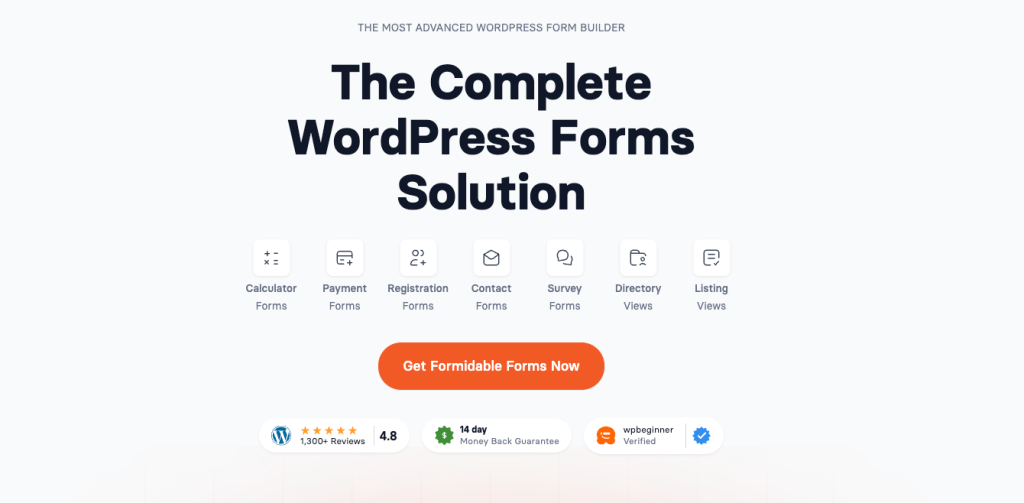
Formidable Forms such a need might include the following: “I want a robust and multi-functional forms management plugin for my WordPress site, to handle everything from very simple contact forms to a multi-stage application process.” This includes job applications, registrations, directory submissions, customer surveys, and even payment forms. It’s basically the Swiss Army Knife of WordPress form plugins.
A Real-World Example: Digital Marketing Agency
Let’s consider one example to understand their contrasting roles. Suppose you own a digital marketing agency.
With Formidable Forms, you could build a professional “Get a Quote” form to capture information such as names, emails, company size, current marketing investments, and services needed. Simple, nice-looking, and functional. Prospects use it; you get the information, and you follow up as needed.
With Outgrow, you would create a template called ‘Marketing Budget Calculator’ that basically asks similar questions, but from a place that helps the prospect figure out their optimal marketing spending. Depending on their answers, they will receive a personalized report with recommendations on their marketing budgets. The same questions that are being asked are still being used, but this time, you have showcased your expertise, created value, and qualified a lead based on their budgets and needs.
How Each Platform Works
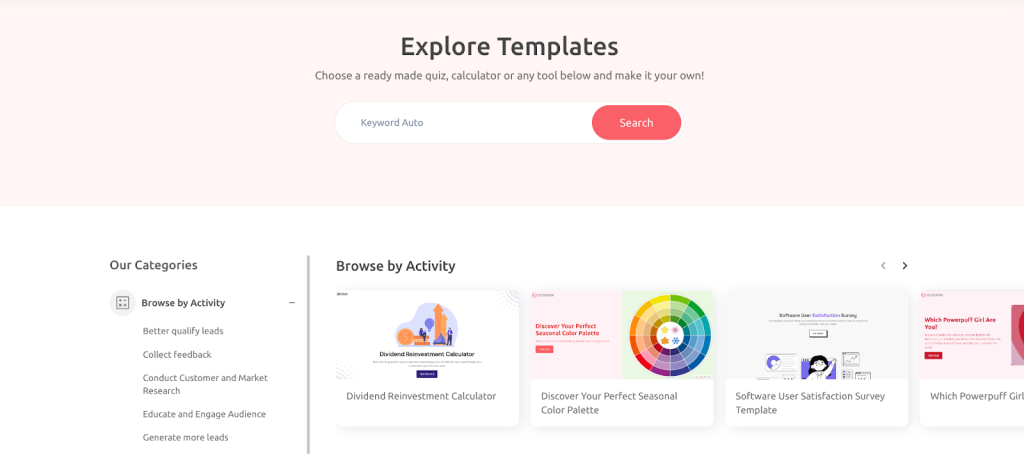
Outgrow doesn’t really offer traditional templates. Instead, you get templates for creating interactive content types, such as ROI calculators, product recommendation quizzes, assessment tools, polls, and conversational chatbots. The builder is a nice, visual interface for designing and creating your interactive content. There is a learning curve here, since creating experiences is a different process than collecting simple form fields. But once you get the hang of it, the possibilities can be quite extensive.
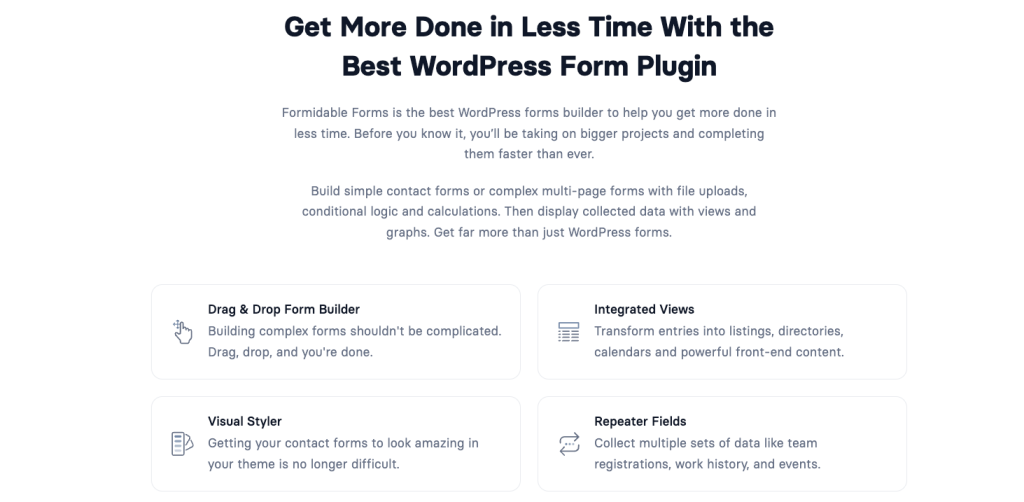
Formidable Forms was built specifically for WordPress and provides a drag-and-drop form creator with more than 45 different field types. Do you need checkboxes, file uploads, signatures, and/or cascading lookup fields? They have those. Their library has all kinds of templates, from simple contact forms to multifaceted multi-page applications. If you are familiar with Gravity Forms and/or WP Forms, then you will immediately recognize this interface. It’s easy to use, and no code is required.
Winner: Tie. For traditional WordPress forms with advanced field types, Formidable Forms wins on functionality and flexibility. For interactive content that engages users, Outgrow plays a completely different game.
Creating Engaging User Experiences
This is where the platforms dramatically diverge.
Outgrow is centered entirely on engagement and personalization. Every piece of content utilizes conditional logic, immediate calculations, and customized results. A mortgage calculator is not just used for inputting income and down payments. It calculates and displays immediate results for estimated payments and creates a customized report that can be printed out. A skincare quiz is not simply used to get preferences. It provides precise product recommendations.
I’ve helped a B2B software firm create a “Cloud Migration Cost Calculator” using Outgrow. Once they input their infrastructure details, they understand their cost savings, migration time frames, and returns on investment. This helped them capture 73% more qualified leads because people were getting value without talking to sales.
Formidable Forms also has conditional logic (to show or hide fields based on previous answers) and can create multi-page forms with a progress bar. You can actually create quite complex forms by doing calculations, like creating order forms or application forms, etc. While the features are robust, the overall interaction is not really different from the traditional forms experience.
Winner: Outgrow, if creating engaging, personalized experiences matters to your strategy. Formidable Forms handles basic interactivity well, but isn’t designed for the kind of deep personalization that drives engagement.
Automatic Lead Scoring and Qualification
Outgrow offers native lead qualification and lead scoring within all pieces of content. You assign specific points to answers and automatically segment leads based on categories and specific follow-up flows based on lead score results. A financial services company could automatically differentiate “ready to invest” leads (high income and immediate time sensitivity) from “just researching” leads (lower budget and 6+ month time sensitivity) without anyone sorting through any given results.
Formidable Forms collects form data and allows routing to different email addresses according to form results. You can also implement webhooks or Zapier to push information into a CRM system, and scoring happens on the outside. There are no scoring or qualifying capabilities within this platform.
Winner: Outgrow for an automated qualification process that is integrated into the platform. This is not possible with Formidable Forms.
Advanced WordPress Form Capabilities
Where Outgrow doesn’t necessarily compete, Formidable Forms excels: offering front-end editing (users edit their submissions), user registration and profile management, directory and listing creation, payment integration via Stripe and PayPal, file management with upload, and repeater fields for complex entry. You can create your membership directory, job board, real estate listings, or event calendar entirely with Formidable Forms.
None of these enhanced functionalities is possible with the advanced forms in Outgrow. It is not designed for creating directories or even accepting recurring submissions. Instead, it creates single-instance interactive experiences that are optimized for both engagement and conversion.
Winner: Formidable Forms for advanced form applications, such as directories, listings, or user-generated content management.
Connecting to Your Marketing Stack
Outgrow has integrations with over 1,000 marketing tools, which implies that it supports a wide array of integrations that are native, including HubSpot, Salesforce, Marketo, Mailchimp, ActiveCampaign, Klaviyo, Google Analytics, Facebook Pixel, among others.
It’s not the number that makes Outgrow’s integrations powerful; it’s what that number means. Instead of passing just names and emails, its integrations pass actual engagement metrics, qualification scores, quiz results, calculator results, and personal recommendations.
Formidable Forms is well-integrated into the WordPress environment and integrates well with popular email marketing services (Mailchimp, Constant Contact, AWeber), CRM systems (Salesforce, Hubspot through add-ons), and payment gateways (Stripe, PayPal, Authorize.net), plus thousands of other services through Zapier. The integrations are excellent, but again, it’s basic form field data.
Winner: Outgrow for marketing teams that need rich data flowing into their automation stack. Formidable Forms for WordPress-centric workflows and payment processing needs.
Data and Performance Insights
Outgrow provides detailed analytics that allow users to analyze their level of engagement, where users are dropping out, which path users are taking through your content, average time taken to complete content, lead quality distribution, and conversion metrics by traffic source. With Outgrow, users can run A/B tests and easily determine what works best and apply that. The analytics are tailored towards conversion, not recording.
Formidable Forms provides some basic reporting, allowing you to see submissions made, entry management, and export to CSV. It also gives you an opportunity to see analytics on forms, allowing you to see how many were completed, among other things. There is also an opportunity to create charts and graphs on forms using a visual plugin, providing some insight into what was actually submitted in the reports.
Winner: Outgrow for actionable engagement insights. Formidable Forms for basic submission tracking and data visualization.
Platform Compatibility and WordPress Integration
Outgrow is platform-neutral, and users can embed interactive content on platforms like WordPress, Shopify, Wix, Squarespace, or others by using embed codes or pop-ups. Outgrow can function on WordPress, but does not utilize WordPress’s capabilities.
Formidable Forms was designed specifically for WordPress and integrates nicely with themes, plugins, and workflows. You can embed forms anywhere on your website and display them as posts, customize views to display form information on your website, and even use form data throughout your WordPress workflow. If all of your Internet presence is WordPress-based, this is certainly useful to have.
Winner: Formidable Forms for WordPress-centric websites. Outgrow if you use multiple platforms or might migrate away from WordPress.
Mobile Experience and Responsiveness
Outgrow creates mobile-optimized interactive experiences automatically. Every calculator, quiz, and chatbot is adapted to mobile screens. The conversational interface actually works better on mobile versus traditional forms because users answer one question at a time rather than face a long form on the small screen.
Formidable Forms builds responsive forms that work on mobile devices. Forms adapt to screen size, though long forms with many fields can still feel tedious on mobile.
Winner: Tie, with a slight edge to Outgrow for mobile engagement.
Team Collaboration Features
Outgrow offers team collaboration tools such as team member role-based access control for the content before publication, teams can collaborate on interactive content creation, etc. Different permission levels for team editors, creators, and administrator users are available.
Formidable Forms supports multiple users with role-based permissions. Team members can manage forms, view submissions, and access different features based on their role. The Business plan includes user management capabilities.
Winner: Tie. Both handle team collaboration adequately for their respective use cases.
Investment Analysis: Pricing and Value
Outgrow Pricing
Outgrow positions itself as an interactive content and lead generation platform, which is reflected in the pricing:
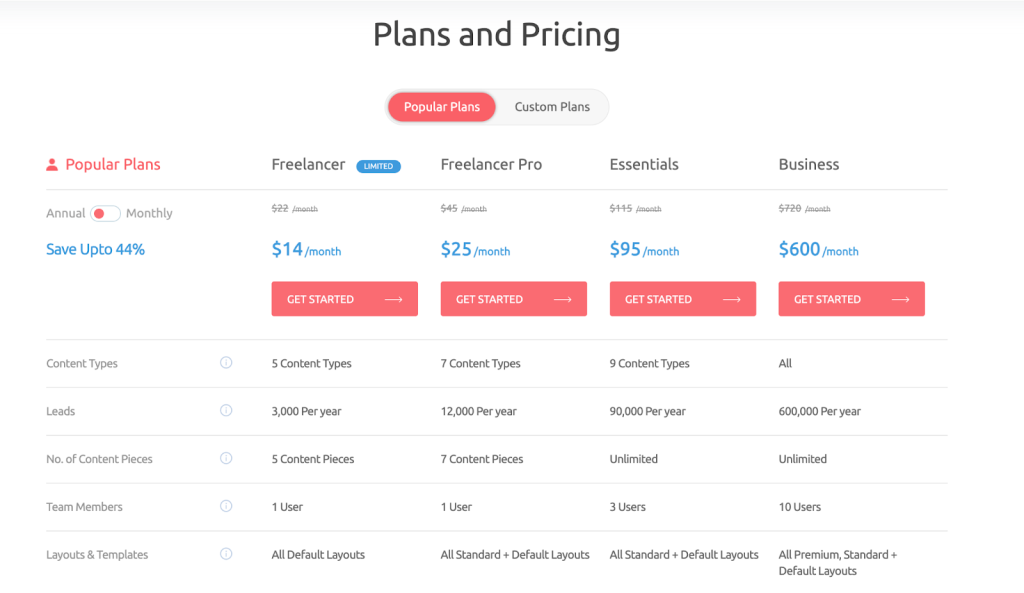
Popular Plans (Annual billing, saves 44%):
- Freelancer Limited: $14/month annual ($22 monthly) – 5 content types, 250 leads/month, 5 active pieces
- Freelancer Pro: $25/month annual ($45 monthly) – 7 content types, 1,000 leads/month, 7 active pieces
- Essentials: $95/month annual ($115 monthly) – 9 content types, 7,500 leads/month, unlimited pieces, 3 users
- Business: $600/month annual ($720 monthly) – All content types, 50,000 leads/month, unlimited pieces, 10 users
Custom Plans:
- Startup Special: $55/month annual ($85 monthly) – For qualifying startups, 1,000 leads/month
- Enterprise: Custom pricing with unlimited everything, priority support, and a dedicated success manager
Formidable Forms Pricing
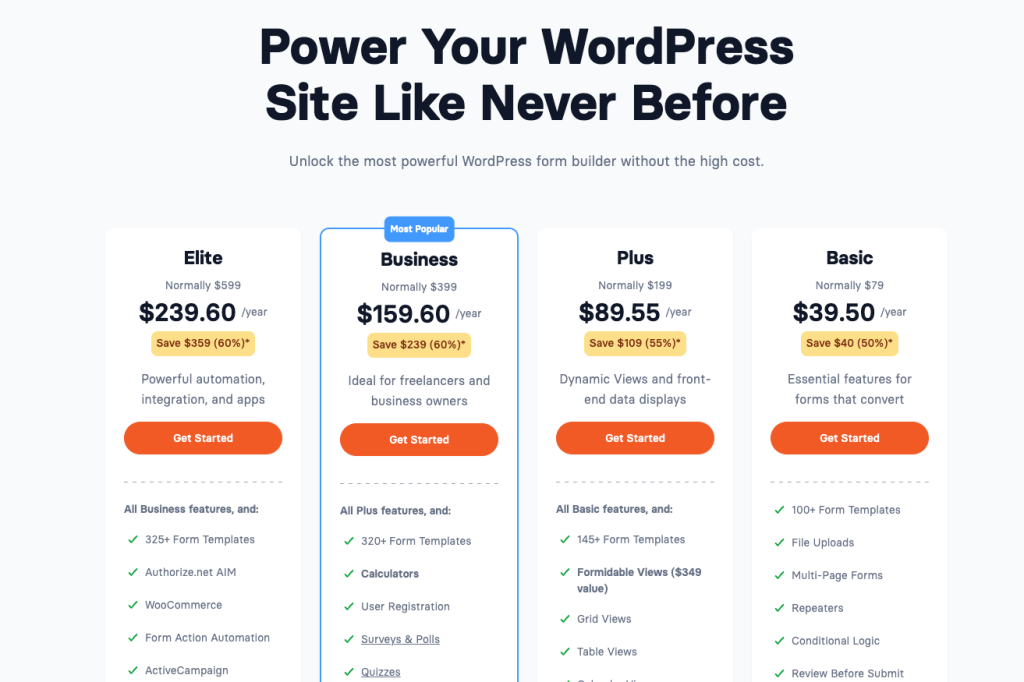
Formidable Forms offers straightforward WordPress plugin pricing:
Annual Plans:
- Basic: $39.50/year – Essential features, basic form building, email notifications
- Plus: $99.50/year – Calculations, file uploads, conditional logic, premium templates
- Business: $199.50/year – Front-end editing, user registration, views, visual styling
- Elite: $399.50/year – Repeater fields, Stripe payments, advanced integrations
All plans include updates and support for one year. You’ll need to renew annually to continue receiving updates.
Which Offers Better Value?
Formidable Forms is a capable WordPress form plugin at a reasonable price. Outgrow if you can justify the investment through improved lead quality, conversion rates, and automated qualification.
Real-World Applications: When to Choose Each Tool
When Outgrow Makes the Most Sense
- Interactive lead generation: Calculators and assessments that engage prospects while collecting data
- Lead qualification at scale: Automatically scoring and routing leads based on their responses and engagement
- Product recommendations: E-commerce quizzes that suggest products based on preferences, needs, or goals
- Educational content: Assessments that deliver personalized reports or learning recommendations
- Content marketing differentiation: Creating shareable, engaging content that stands out from competitor offerings
Real examples:
One SaaS business created a “Team Productivity ROI Calculator” in which they asked questions about the size of the team, current tools, and pain points. They saw an 89% boost in their demo request rate compared to their former approach of using a contact form.
The insurance broker devised a ‘Life Insurance Needs Assessment’ tool that asked for information on dependents, debts, income, and financial objectives, and then proceeded with a final calculation of the amount of insurance coverage recommended. By doing this exercise, they managed to decrease unqualified requests by 58%. At the same time, they increased the number of quotes from prospects who were familiar with their actual needs.
The consulting firm uses an assessment tool for qualifying enterprise-level leads. The tool is called “Digital Transformation Maturity Score.” A personalized benchmark report acts as a means for them to position themselves as experts, whereas for their sales team, the tool apparently helps them attain qualified leads with detailed scoring for investor readiness.
When Formidable Forms Is the Better Fit
- WordPress-based workflows: Forms that need to integrate deeply with WordPress themes and plugins
- Advanced form applications: Job boards, directories, listings, or member databases
- Payment collection: Registration forms, order forms, donation forms with Stripe or PayPal
- User-generated content: Front-end post submission, user profiles, review systems
- Complex data entry: Applications requiring repeater fields, file uploads, or multi-page submissions
- Budget-conscious projects: Simple contact forms and data collection on a tight budget
Real-Life Example: A photography studio can use Formidable Forms to manage its clients’ information, book photo shoots, execute contracts (through signature fields), and process payments. The process occurs entirely with custom forms on their site, which happens to integrate with their email marketing tools and automatically runs workflows and keeps all the data neatly organized. For this particular purpose, Formidable Forms will take care of everything without making things too complicated.
The Unfiltered Truth: Strengths and Limitations
Outgrow
Strengths:
- Creates genuinely engaging interactive experiences that people want to complete
- Built-in lead qualification and scoring saves hours of manual work
- Personalized outcomes significantly improve conversion rates
- Comprehensive analytics enable ongoing optimization
- Robust integrations with major marketing platforms
- Positions your brand as innovative and helpful rather than just data-hungry
- A/B testing is built into the platform
- Platform-agnostic (works anywhere, not just WordPress)
Limitations:
- Steeper learning curve for creating advanced branching logic
- Complete overkill if you only need basic contact forms
- Lower-tier plans limit the number of active content pieces
- Requires strategic thinking to maximize value
- Not designed for traditional form use cases like applications or registrations
Formidable Forms
Strengths:
- Extremely affordable for the functionality provided
- Powerful form-building capabilities with 45+ field types
- Deep WordPress integration leverages your existing infrastructure
- Front-end editing and user management features
- Payment processing built in
- Excellent for creating directories, listings, and user-generated content
- One-time annual payment rather than a monthly subscription
- Large community and extensive documentation
Limitations:
- Limited to WordPress (if you ever migrate platforms, you’ll need a new solution)
- Basic interactivity compared to modern interactive content platforms
- No built-in lead scoring or qualification
- Analytics are basic and don’t drive optimization insights
- Still feels like a form to users (not particularly engaging)
- Requires annual renewal for continued updates and support
Getting Help: Support and Learning Resources
Outgrow offers email and chat support, extensive video tutorials, template libraries, and a very detailed knowledge base. Higher-tier plans provide priority support, along with a dedicated success manager. I particularly appreciate the fact that their support team goes beyond technical troubleshooting into more strategically oriented questions. They’ll even advise on the structuring of your calculator or quiz for better results.
Formidable Forms provides ticket-based support, extensive documentation, video tutorials, and active community forums. The general quality of the support is good; the response times vary based on the plan level you’re on. The knowledge base is huge and covers most of the common scenarios. Community forums can be helpful to find solutions from other users.
Both platforms have enough support. Outgrow takes the lead in case you appreciate strategic guidance on how to create high-converting content.
Making the Right Choice: Forms vs Interactive Engagement
Above is what I have learned after working extensively on both platforms.
Therefore, need a powerful WordPress plugin to manage complex form applications, user management, billing, and directories? Well, Formidable Forms is a fantastic and affordable choice. This plugin is what it says it is; no more, no less.
If your focus is on lead generation, lead qualification, and delivering exciting experiences that actually engage your prospect, then Outgrow is serving an entirely different space. If you want to see success from these companies, then they aren’t using it as a form replacement. They’re using it as a lead gen and qualification tool that just happens to collect data.
The question is not really “Outgrow or Formidable Forms?” but rather “What am I trying to accomplish with my data collection?”
Final Verdict: Choosing Based on Your Goals
Let me cut to the chase. For WordPress forms, registrations, applications, and directory functionality, the sensible choice is Formidable Forms. It’s affordable, capable, and gets the job done.
But if you are serious about lead generation, automatic qualification, and creating interactive experiences that differentiate your brand, Outgrow changes what’s possible entirely. The companies getting the best results view it as a marketing investment, not a form expense.
The best of both worlds? Most marketing teams use both. Formidable Forms handles standard WordPress form needs like contact forms, registrations, and applications. Meanwhile, Outgrow empowers high-value marketing initiatives where engagement, qualification, and conversion actually make a difference in revenue.
Ready to see what interactive content can do for your lead generation? Create your first calculator, quiz, or assessment with a free Outgrow trial. You will know within a week if the improvement in engagement and conversion justifies the investment.
But the right tool isn’t the one with the most features or the lowest price. It’s the one that aligns with your actual business goals and delivers measurable results. Choose accordingly.
Frequently Asked Questions
For sure. While many businesses will use Formidable Forms to power standard WordPress forms and internal business workflows, they will use Outgrow to power marketing-focused interactive content.
The learning curve for building initial forms is less steep with Formidable Forms. Outgrow requires more strategic thought in terms of branching logic and personalization; however, the visual interface is easy to use once you grasp the concept of interactive content.
No coding required for either platform. Formidable Forms offers more customization options if you know CSS or PHP, but both work perfectly fine without any technical skills.
Outgrow, on one hand, provides more integrations with marketing automation tools and CRM systems that receive detailed information such as qualification scores and engagement metrics. Formidable Forms, meanwhile, has good email marketing integrations and operates smoothly with WordPress.
The level of results will depend on your industry and conversion rates; however, our clients generally report a 30-100 percent+ improvement over traditional forms. The most important effect may actually be the elimination of manual lead qualification for your sales teams. This can save huge amounts of time for them.

Deeksha Malik is a Marketing Professional at Outgrow, working at the crossroads of people, brand, and growth. She helps scale teams, strengthen employer branding, and drive B2B marketing campaigns that actually move the needle. Known for balancing strategy with execution, Deeksha enjoys building meaningful campaigns and smarter growth stories. When she’s not working, you’ll likely find her with a good cup of coffee, staying curious about marketing trends, people dynamics, and what makes a brand memorable.