Stop Losing Leads at the Pricing Page, Build a Price Quote Calculator Instead!
Table of Contents
Last year, a friend of mine who runs a mid-sized landscaping company told me something that stuck with me. He said, “I know people are coming to my site. Google Analytics shows me that. But my phone barely rings.”
So I looked at his site. Great photos. Decent copy. A services page. And right where the pricing should be, a little button that said: “Call us for a free estimate.”
That was the entire problem.
People don’t want to call. They don’t want to wait for a callback on Tuesday. They want to know right now, at 9 pm on a Sunday, whether they can afford you, before they get emotionally attached to the idea of working with you. The second they hit that wall, they go back to Google and click the next result.
He added a price quote calculator to his site. Lead form submissions went up by over 30% that month. Not because his traffic changed. Because he stopped making people work for basic information.
So What Actually Is a Price Quote Calculator?
Honestly, it’s less complicated than the name sounds.
A price quote calculator is just an interactive tool sitting on your website where someone types in their details, square footage, number of employees, project timeline, whatever applies to your business, and gets back an actual number. Or a range. Something real, not “pricing varies.”
You’ve used one before, even if you didn’t call it that. The car insurance estimator you filled out at midnight. The moving cost tool you used before your last apartment switch. That “how much will solar panels cost for my house” widget. All price quote calculators are just with different inputs and different industries behind them.
For your business, the concept is identical. Someone lands on your site, puts in their specs, and you give them a number. No forms to wait on. No discovery calls just to find out if they’re even in the ballpark. They get what they came for, and you get a lead who already knows what they want to spend.
Here’s Why Your Current Pricing Page Is Bleeding Money
Think about who actually visits your pricing page.
That person is not casually browsing. They’ve already looked at your homepage, probably read a few testimonials, and decided they’re interested enough to see what it costs. That is a warm lead. That is someone three clicks away from becoming a customer.
And what do most pricing pages do with that warm lead? Show them three generic tiers: Starter, Pro, and Enterprise, none of which quite maps to their actual situation. Or worse, hit them with “Contact us for pricing” and a form that promises someone will “get back to them within 1-2 business days.”
That warm lead goes cold fast.
The reason a price quote calculator changes this isn’t magic. It’s just that it answers the question the person actually has, which is: “What will this cost ME, specifically, given my situation?“ Not what it costs for the average customer. Not what it costs for the case study on your homepage. For them.
A plumber with three employees and a 12-house subdivision contract has totally different needs than a solo contractor doing one bathroom remodel a week. When you make both of them stare at the same pricing table, one of them will leave. Usually both.
The Part Nobody Talks About: Lead Quality
Getting more leads is great. Getting better leads is the actual goal.
Here’s the quiet power of a price quote calculator that most marketing content glosses over: by the time someone reaches your results screen, they’ve already told you everything your sales team needs to know.
They told you the size of their project. Their rough budget. Which services they need. Whether they’re looking for monthly recurring work or a one-time job. All of that comes through in the inputs before they ever see the quote.
When you put a lead capture form at the end, “Enter your email to get your full quote breakdown”, the person filling it out isn’t a cold contact. They’re someone who spent three minutes building a personalized estimate and now genuinely wants to see it. That conversion intent is completely different from someone who downloaded a generic PDF lead magnet.
Outgrow customers consistently report that leads coming through their calculators close at higher rates than leads from other channels. The math makes sense: you’re catching people at peak decision-making mode, when the problem is fresh, and they’re actively evaluating options.
A Real Example: Office Cleaning
Let me put this in concrete terms with a specific example, because “interactive tool” can feel abstract until you see it play out.
Say you run a commercial office cleaning business. Your pricing depends on the size of the office, how often they need cleaning, what add-on services they want, and where they’re located. Right now, your website probably has a “request a quote” button that goes to a contact form. Leads come in cold; your team has to email back and forth three times just to figure out the scope, and half the time, the prospect has gone with someone else by the time you get to a number.
Now picture this instead. Someone lands on a page with a tool called:
“Office Cleaning Quote: Get an Instant, Accurate Quote for Professional Office Cleaning Services“

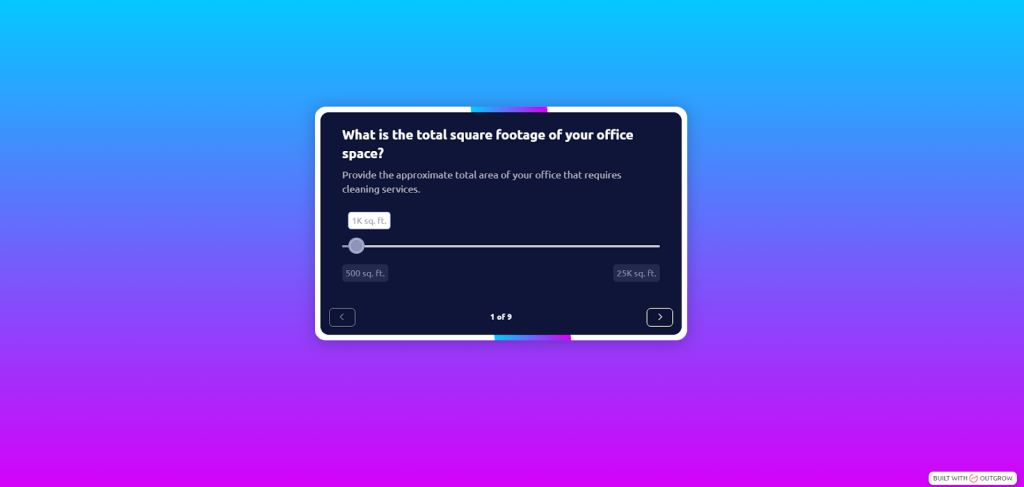
Outgrow lets you build exactly this, a branded, embeddable price quote calculator with your logo, your color scheme, and your pricing logic baked in. No developer needed. You set the questions, write the formula, and it lives on your site as a native-feeling widget. Here’s what that looks like in practice for the cleaning example:
Seven questions, clean interface, takes 45 seconds:
- What is the total square footage of your office space?
- How many floors does your office have?
- How many private offices are there?
- How many bathrooms are there?
- What type of cleaning service do you prefer?
- What city are you in?
- When would you like to schedule the cleaning service?
The screen flips. They see: “Your estimated monthly cleaning cost: $640 – $790. Want us to lock this in? Drop your email, and we’ll send the full breakdown.”
They type their email. Done.
Your CRM now has a lead that says: 4,200 sq ft office, weekly cleaning, carpet add-on, 2 floors, Austin, TX, estimated $690/month. Your sales rep calls that person, and they already know what ballpark they’re working in. The conversation is completely different; it’s about closing, not about figuring out what the customer even needs.
Outgrow’s calculator templates are built so you can swap in your own service categories, adjust the formula to match your real rates, and customize the results page to reflect your brand. The cleaning example above could be live on your site in an afternoon.
That’s what a price quote calculator actually does in practice. The “Office Cleaning Quote” example is just one version of it. The same logic works for web design agencies, HVAC companies, SaaS tools, freight brokers, tutoring services, basically any business where “it depends” is currently the honest answer to a pricing question.
Who Should Actually Build One?
Short answer: If your pricing has more than one variable, you should have a price quote calculator.
Commercial cleaning and facilities: Obvious fit. Size, frequency, and services are easy inputs, and they map directly to a real estimate.
Agencies: Clients hate not knowing what a website or campaign will cost. A scoping-based price quote calculator that asks about deliverables, timeline, and revision rounds makes your quoting process feel organized and professional before the first call.
Construction and renovation: People buying a kitchen remodel have no idea if they’re looking at $15k or $80k. A calculator that asks about square footage, fixture quality, and existing condition narrows that gap and gets you calls from people who are already budget-aligned.
SaaS companies: Seat count plus feature tier plus billing cadence. A price quote calculator handles this better than a pricing comparison table and reduces “how much will this actually cost us” support tickets.
Logistics and freight: Weight, distance, freight class, timeline, all perfect calculator inputs.
Insurance brokers, financial services: Showing someone a rough premium before they talk to an agent reduces anxiety and makes the first conversation much less adversarial.
If you’re in any of those categories and you’re still running “contact us for pricing,” you’re leaving both leads and money on the table every single week. If you’ve never built one before, here’s a step-by-step guide on how to create and embed a calculator on your website.
Building One on Outgrow- What It Actually Looks Like
Outgrow has a no-code calculator builder, which means you don’t need a developer or an afternoon fighting with JavaScript. Here’s the honest breakdown of how it works:
Write out the three to six inputs that actually determine your price. Resist the urge to ask for twelve things. If your sales team can give a ballpark with four data points, your calculator only needs four questions.
Build the formula like a spreadsheet. Outgrow’s formula editor lets you reference your input fields by name and write out the math. If you can write a basic Excel formula, you can build this. Outgrow formats the output as currency automatically.
Design your results page like it’s a landing page. Most people rush the results screen, and that’s a mistake. This is where your lead is most engaged; they just got a number that means something to them. Use that moment. Show the estimate clearly. Add a short line of context (“This estimate covers standard weekly cleaning for your space”). Put the email capture here, not before the results. And include one trust signal: a recognizable client logo, a review excerpt, a certification badge.
Embed it and put it somewhere people actually go. Outgrow gives you a snippet you can paste into any page. Drop it on your pricing page for sure. Also, add it to any blog posts or landing pages where people are in “how much does this cost” mode. If you run ads to a landing page, consider making the calculator the centerpiece of that page rather than a contact form.
Hook it up to your CRM. HubSpot, Salesforce, Marketo, Mailchimp, ActiveCampaign- Outgrow connects to all of them. The calculator inputs become lead properties. Your sales rep opens a fresh lead and already knows the project scope before dialing.
What Goes Wrong When People Build These
A few patterns keep showing up when a price quote calculator underperforms:
Asking for email before showing the estimate. This is the single biggest mistake. The visitor hasn’t seen anything valuable yet, so there’s no reason to hand over their contact info. Show the estimate first. Then ask if they want to save or share it. Conversion on the second ask is much higher because they’ve already gotten something from you.
Making the calculator too long. If you can’t get to a useful estimate with fewer inputs, your pricing model might be too complex for a self-serve tool, and you might need a “get a custom quote” flow instead of a calculator.
Forgetting to update the formula when pricing changes. Set a quarterly calendar reminder to test your own calculator and verify the outputs still reflect your actual rates. One client found their calculator had been quoting 2021 prices for 14 months before anyone noticed.
Not connecting it to anything. If the lead data is just sitting in Outgrow and nobody is pulling it into their sales workflow, the calculator is doing half the job. Connect it to your CRM or, at a minimum, set up email notifications so someone on your team sees new submissions the same day.
The Real Numbers
Outgrow customers who put a price quote calculator on their pricing page typically see session duration go up, bounce rate go down, and lead form fill rate climb. The exact numbers vary by industry and traffic quality, but the direction is consistent across the board.
One pattern that repeats: companies often find their calculator page outperforms dedicated paid landing pages within a few months of launch. Not because paid traffic is bad, but because a calculator gives the visitor something to do rather than just something to read. Engagement creates commitment. Commitment drives conversions.
Wrapping Up
If your website is currently asking people to “contact you for pricing” and then wait, a price quote calculator is probably the highest-ROI change you can make this quarter. Not a redesign. Not a new ad campaign. A tool that takes your existing pricing logic and makes it self-serve for anyone who lands on your site.
Outgrow makes this something you can actually ship in a day. The calculator logic, the branding, the lead capture, the CRM sync, it’s all there. You just need to know how your own pricing works, which obviously you already do.
So go build it. Your leads are already on your website. Stop making them wait.
Ready to create your Price Quote Calculator? Start your 7-day free trial on Outgrow today!
Frequently Asked Questions
A pricing page shows you fixed options someone designed for a theoretical average customer. A price quote calculator takes the visitor’s actual numbers, their square footage, their team size, their project scope, and does math specific to them.
Outgrow’s builder lets you set up questions, write formulas using a spreadsheet-style editor, customize the design, and generate an embed code, all without touching code.
Project size, budget range, service preferences, it’s all in the inputs. When you ask for their email at that point to send the full breakdown, they’re opting in as someone who’s already evaluated your pricing and decided it works for them. That’s a fundamentally different kind of lead than someone who filled out a contact form just to get a ballpark.
Any business where pricing naturally varies based on the situation often finds that “it depends” is the honest answer to a pricing question. For example, commercial cleaning, construction, marketing agencies, SaaS, freight, insurance, home services, and event planning all have variable pricing that maps well to a calculator format.

Sakshi is a digital marketing enthusiast passionate about connecting brands with audiences. With a background in content strategy and social media, she loves turning trends into actionable strategies. Outside of work, you’ll find her reading a book or hunting for the perfect cup of coffee.