Salary Calculator: Stop Guessing What You Actually Take Home
You Probably Don’t Know Your Real Hourly Rate
Table of Contents
Ask ten coworkers what they earn per hour. At least seven will either guess or give you a number they haven’t actually verified.
It’s not that people don’t care about money. It’s that nobody sits down and runs the real math. They know their paycheck. They know their annual figure. But the actual hourly rate? That stays fuzzy, and that fuzziness shows up at the worst times.

When you walk into a salary negotiation with a vague sense of your rate instead of a real number, you’re already at a disadvantage, or a freelance client asks what you charge, and you’re doing rough math in your head, you often land lower than you should, and in cases, where two job offers hit your inbox, and you can’t quickly compare them, you stall or guess.
A salary calculator fixes this. You put in your pay details, your actual hours, and your vacation situation, and you get back one number you can work with. No back-of-envelope math. No assumptions about a 40-hour work week that doesn’t match your life.
Most people use the “divide by 2,080” trick. That assumes a perfect year, 40 hours every single week, zero days off. For most workers, that’s not real. Someone earning $65,000, working 45 hours a week, with four weeks of unpaid vacation? Their real hourly rate is $30.09, not the $31.25 that shortcut spits out. Over a year of decisions, that gap matters.
What the Outgrow Salary Calculator Does
Before building anything, it’s worth seeing a salary calculator that actually works well in practice.
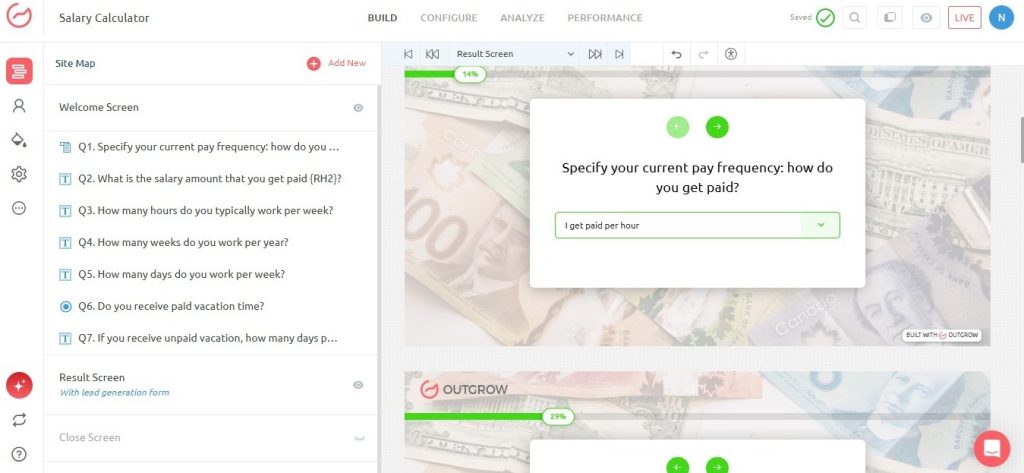
The Outgrow Salary Calculator asks eight questions and gives you results right away. Here’s the flow:

- Pay Frequency: Hourly, daily, weekly, biweekly, semimonthly, monthly, quarterly, or annual. Pick whichever matches how you actually get paid.
- Pay Amount: The gross figure tied to that frequency, before anything gets taken out.
- Hours Per Week: Your real weekly average. Not what your contract says if you consistently work more.
- Weeks Per Year: Actual weeks worked after vacation and public holidays come out of the picture.
- Days Per Week: How many days do you put in weekly? Relevant for shift workers and anyone on a non-standard schedule.
- Paid Vacation: Whether your employer pays you during time off. This changes the math more than most people expect.
- Unpaid Vacation Days: If vacation is unpaid, those days factor directly into your effective hourly rate.
- Results Screen: Your hourly wage, annual equivalent, and the breakdown of exactly which inputs produced the number.
That last part is what separates a good salary calculator from a basic one. When someone can see the math behind the result, not just the result itself, they trust it. This level of transparency is similar to reviewing detailed paystubs, where earnings, deductions, and net pay are clearly displayed. Tools people trust get shared and used again. Tools people trust get shared and used again.
Why a Spreadsheet Won’t Cut It Here
Plenty of people have tried building their own salary calculator in Excel. Some of them have a formula that works. Most of them stopped updating it after a month.
A spreadsheet is fine for personal use if you’re comfortable with formulas and only ever open it on a laptop. The moment you want something your audience can actually use, the limitations become obvious fast.
An interactive salary calculator built through a platform like Outgrow handles this differently:
- Everything recalculates live. Change your weekly hours from 40 to 46, and the result updates on the spot. No formula maintenance, no risk of something breaking.
- It works on any screen. Someone reviewing job offers on their phone at lunch isn’t opening Excel. A mobile-friendly salary calculator gives accurate results from wherever they are.
- All pay frequencies in one place. Most spreadsheets are rigged for one pay type. A real salary calculator moves between hourly, annual, biweekly, and everything else without requiring a separate version for each.
- It asks the right questions. Real hours, paid vs. unpaid vacation, actual days per week. These are the inputs that separate a number you can use from one that gets you into trouble.
- It shows the calculation. When the results screen shows exactly how the number was reached, users leave with confidence rather than doubt.
Building Your Own Salary Calculator Without a Developer
If you run a job board, an HR platform, a career blog, or any site where people think about pay, a salary calculator fits naturally. People bookmark these tools, send them to colleagues, and come back when their situation changes.
Here’s how to build one with Outgrow’s calculator maker:
- Start from a template: Outgrow has compensation-specific templates already built out. Starting from one cut setup time significantly.
- Set up your questions: You need pay frequency, gross pay, hours per week, weeks per year, days per week, and vacation details. Use dropdowns for frequency and number fields for amounts.
- Write the formula: Outgrow’s formula builder connects directly to each question response. The conditional formula behind the Outgrow salary calculator works like this:
((Q1==1)?Q2*(Q3*Q4):(Q1==2)?Q2*(Q5*Q4):(Q1==3)?Q2*52:(Q1==4)?Q2*26:(Q1==5)?Q2*24:(Q1==6)?Q2*12:(Q1==7)?Q2*4:Q2)/(Q3*Q4)
One formula, every pay frequency, handled through conditional logic. No need to build separate salary calculators for different pay types.
- Build the results screen. Show hourly and annual equivalents, the inputs behind them, and benchmarks if your audience finds that useful.
- Add an email capture. A simple email field on the results screen turns a useful tool into a lead source. People completing a salary calculator are already thinking about compensation. That’s a warm audience for HR platforms, recruiting software for small business operations, and financial products.
- Embed it anywhere. Outgrow generates a code snippet that drops into any platform, WordPress, Webflow, HubSpot, or custom builds. Updates made in Outgrow are reflected everywhere automatically.
What Engagement Data Actually Shows
Interactive tools consistently pull better numbers than static content, and salary calculators are no exception.

According to Outgrow’s data, interactive calculators generate roughly twice the conversions of passive content. Completion rates for calculators average above 80 percent. Most standard forms sit below 40 percent. Salary tools lean heavily toward mobile, too, with over 60 percent of completions coming from phones.
The underlying reason is intent. Someone searching for a salary calculator right now is not browsing. They are in a specific moment: comparing offers, prepping for a negotiation, deciding whether a contract makes financial sense. Capturing that visitor at that moment, with a tool that actually helps them, is where interactive content earns its keep.
Who Actually Uses a Salary Calculator
The real audience here is broader than people assume.
- Job seekers weighing multiple offers. Two offers, two pay structures, different working hours. A salary calculator puts both into the same format so you can actually compare them.
- Freelancers setting rates. People leaving salaried roles to go independent almost always underprice themselves early on. They set a day rate without accounting for unpaid gaps, admin time, and the benefits they’re now personally covering. A salary calculator adjusted for freelancers surfaces a rate that actually makes sense financially. Outgrow’s builder makes that customization accessible without any code.
- HR teams are fielding the same questions every cycle. “What does this hourly rate come out to annually?” “How does our vacation policy affect effective pay?” Embedding a salary calculator in an onboarding portal handles these before they reach a human inbox.
- Employers are checking their own competitiveness. A business paying $54,000 annually to someone working 45-hour weeks is effectively paying $23.08 an hour. If the market rate for that role is $28, the salary calculator shows that gap before it turns into a resignation letter.
- Financial advisors are working through client situations. Knowing a client’s real hourly rate makes spending conversations grounded. Abstract percentages land differently once someone understands what an hour of their working life actually costs.
Five Industries Using Salary Calculators Right Now
Tech and SaaS Hiring
Tech companies drop salary calculators into offer acceptance pages so candidates can immediately check what an annual figure works out to hourly. It shortens the back-and-forth during the offer stage and speeds up acceptance. Candidates who can run the math themselves ask fewer clarifying questions and move faster.
Staffing and Recruiting Agencies
Agencies place workers across hourly contracts and salaried roles constantly. A salary calculator on the agency website lets candidates convert quoted hourly rates into annual figures before they apply. Fewer candidates disappear because they couldn’t figure out whether the numbers worked for them.
Travel Nursing and Healthcare Platforms
Travel nurses compare per-diem rates, staff positions, and contract packages on a regular basis. Each comes with a different structure and a different benefit situation. A salary calculator that handles hours, weeks, and benefit costs gives nurses a real comparison instead of a confusing set of numbers that don’t line up.
Retail Employee Portals
Hourly retail workers often need an annualized income figure for a loan application or apartment lease. An associate earning $17.50 an hour needs that number fast and accurately. Some retailers now have salary calculators built into employee self-service portals so workers can pull them up without contacting HR.
Personal Finance Apps
Instead of asking new users to type in their income cold, budgeting apps walk people through a salary calculator flow at signup. The annual figure that comes out feeds the budget model with real accuracy rather than a self-reported guess that may be off by several thousand dollars.
Where People Go Wrong With Pay Calculations
Even with a good salary calculator in front of them, these mistakes keep showing up.
- Mixing up gross and net pay. A salary calculator runs on gross pay before taxes. Actual take-home runs are 20 to 35 percent lower, depending on your tax situation. Use gross for comparing offers and negotiating. Use the net for figuring out your monthly budget.
- Forgetting the unpaid vacation. Ten unpaid days are two fewer working weeks. That moves your effective hourly rate in ways that matter. A salary calculator that asks whether vacation is paid or unpaid catches this. One that skips the question gives a slightly inflated number.
- Typing contracted hours instead of real ones. If you’re salaried and regularly work 48-hour weeks, your effective hourly rate is lower than the standard formula shows. Your real average goes into the salary calculator, not the number your offer letter mentions.
- Comparing a contract to a salary without adjusting for benefits. A contract hourly rate looks better than a salaried offer until health insurance, paid time off, and retirement contributions enter the picture. Add around 20 to 25 percent to the salaried role before making the comparison in the salary calculator.
- Leaving old numbers in place. Pay changed. Hours changed. Running a salary calculator on figures from two years ago produces two-year-old conclusions. Update the inputs before making any real decision.
Making the Results Actually Work For You
Getting a number from the salary calculator is the easy part. Here’s what to do with it.
- Going into a raise conversation. A salary calculator showing you at $24.15 an hour when the market median sits at $29 gives you a specific number to name. A concrete figure is harder to dismiss than a general sense of being undervalued.
- Evaluating freelance work. Your salary calculator result is your baseline rate. Any project paying less needs a compelling reason to say yes. Know the floor before the conversation, not after.
- Comparing vacation policies. Two identical salaries with different vacation setups aren’t the same job. Run both through the salary calculator with different weeks worked figures. A two-week versus four-week vacation gap often works out to two or three dollars an hour in effective rate. Worth knowing before signing anything.
- Deciding on overtime. Once you know your real hourly rate from the salary calculator, you can quickly figure out what five extra hours per week add to your annual income. Seeing the actual dollar figure changes how you think about staying late.
How Outgrow Turns a Salary Calculator Into a Lead Source
A salary calculator serves the person filling it out. When it’s built through Outgrow, it also works hard for the business behind it.
You build the salary calculator and embed it in a relevant spot, a post about negotiating pay, a job listing page, or a financial planning guide. A visitor fills out their pay details and gets their result. On the results screen, a simple email field offers to save or send their output.
The people who enter their email are not random visitors. They are actively thinking about compensation and engaged enough to complete an eight-question tool. For HR software, recruiting services, financial products, or career coaching, that contact arrives already qualified by what they just told you.
Outgrow’s free quiz maker and survey tools extend this further. A salary calculator can roll into a short survey about compensation satisfaction. That survey segments the contact and feeds a relevant follow-up. The lead doesn’t just come in; it comes in with context.
This is what makes interactive content worth building. It helps your audience do something they actually need to do, and in exchange, it brings you contacts who already trust you a little. That combination is harder to manufacture with static content and easier to build with the right tools.
Wrapping Up
A salary calculator does one thing that nothing else does quite as cleanly. It takes your pay situation and turns it into a number you can actually make decisions with.
Not a rough estimate. Not a shortcut that assumes a work year that doesn’t match yours. A real figure based on your real hours, your real schedule, your actual vacation situation.
Whether you’re comparing offers, setting a freelance rate, walking into a raise conversation, or just trying to understand what you earn per hour, running your numbers through a salary calculator takes two minutes and saves you from decisions made on guesswork.

The Outgrow salary calculator covers eight inputs, handles every pay frequency, and shows the math behind every result. It works on any device. For businesses that embed it, it captures warm, qualified leads from visitors who are already thinking about pay. Try the live salary calculator and build your own with a free trial on Outgrow: https://app.outgrow.co/signup.
Frequently Asked Questions
It converts your pay from whatever frequency you receive it into other formats you can compare and use. Enter an annual salary and see your hourly rate. Enter an hourly wage and see what it works out to annually.
Always enter gross pay. That’s the pre-tax figure before deductions come out. Salary calculators use gross because net pay varies too much between individuals based on tax brackets and benefit elections. Gross is also the standard when comparing offers or negotiating.
More than most people expect. Ten unpaid days off equals roughly two fewer working weeks per year. A salary calculator that captures whether vacation is paid or unpaid and asks for the number of days gets noticeably closer to your real effective hourly rate than one that skips those questions entirely.
Yes, and it is one of the most practical things a salary calculator helps with. Convert the annual salaried figure to hourly, then put it next to the contract rate. One thing to adjust manually: salaried roles include health insurance, retirement matching, and paid time off that contract roles typically don’t.
Outgrow’s calculator maker handles the whole thing through a visual builder. Set up your input questions, write the conversion formula using Outgrow’s formula editor, design the results screen, and publish. The build takes around 25 to 35 minutes.

Muskan is a Marketing Analyst at Outgrow. She is working on multiple areas of marketing. On her days off though, she loves exploring new cafes, drinking coffee, and catching up with friends.