Outgrow vs Microsoft Forms: Which Tool is Right for Your Business?
Table of Contents
Executive Summary
Choosing between tools isn’t about picking the “better” option. It’s about matching the right solution to your specific business needs.
Outgrow is built for marketers and sales teams who need interactive lead generation tools. If you’re looking to create quizzes, calculators, and assessments that qualify leads, deliver personalized recommendations, or boost engagement numbers, Outgrow is worth the investment.
Microsoft Forms is ideal for straightforward surveys and data collection, especially if you operate within the Microsoft 365 environment. It’s a simple form builder that gets you from A to B without fuss.
Here’s what we’ll cover in this Outgrow vs Microsoft Forms comparison: core feature differences, pricing breakdowns, integration capabilities, and real-world use cases to help you decide which tool fits your workflow.
Outgrow vs Microsoft Forms: Interactive Content vs Traditional Forms
Before diving into features, let’s address the fundamental distinction between these tools.
Outgrow takes a different approach to data collection. Yes, it can create forms, but it’s designed to build interactive content experiences: calculators, quizzes, assessments, polls, and chatbots that engage users and qualify them based on their responses. Think of it as the difference between a survey and a BuzzFeed-style quiz that happens to generate qualified leads for your sales team.
Microsoft Forms creates… well, forms. You ask questions, people answer them, you collect responses in a spreadsheet. It does this efficiently and reliably, especially if you’re already living in the Microsoft universe.
This distinction matters because it determines everything else about how you’ll use these tools.
Outgrow vs Microsoft Forms: Feature Comparison
Interactive Content Creation: Question Types and Logic
Outgrow includes all standard question types plus:
- Conditional logic that creates dynamic, personalized paths
- Custom variables and calculations for complex scoring
- Image-based multiple choice and interactive elements
- Lead qualification scoring that runs in the background
- Outcome-based content (users get personalized results based on their answers)
The learning curve is steeper, but the payoff is content that feels less like a form and more like an interactive tool. One of our clients built a “Marketing Budget Calculator” that asks questions about company size, goals, and current spend, then delivers a customized budget breakdown. That’s not something you can replicate in a traditional form builder.

Microsoft Forms offers the essentials:
- Multiple choice, text, rating, date, ranking, file upload
- Basic branching logic (skip to questions based on answers)
- Sections to organize longer forms
- Theme customization with your brand colors
The interface is clean and intuitive. If you’ve used any Microsoft product in the last decade, you’ll feel right at home. I’ve watched non-technical team members build their first form in under ten minutes.

Design & Customization
Outgrow: Full design control with custom CSS, multiple layouts (conversational, card-based, full-screen), animated transitions, and the ability to match your brand guidelines precisely. You can create experiences that look like they were custom-coded for your website.
Microsoft Forms: You get basic theming. Choose colors, add your logo, upload a header image. The result looks clean but unmistakably like a Microsoft form. It’s consistent and professional, but there’s limited ability to create something that feels distinctly branded.
Outgrow vs Microsoft Forms: Which Tool is Right for Your Business?
Executive Summary
Choosing between these tools isn’t about picking the “better” option. It’s about matching the right solution to your specific business needs.
Outgrow is built for marketers and sales teams who need interactive lead generation tools. If you’re looking to create quizzes, calculators, and assessments that qualify leads, deliver personalized recommendations, or boost engagement numbers, Outgrow is worth the investment.
Microsoft Forms is ideal for straightforward surveys and data collection, especially if you operate within the Microsoft 365 environment. It’s a simple form builder that gets you from A to B without fuss.
Here’s what we’ll cover in this Outgrow vs Microsoft Forms comparison: core feature differences, pricing breakdowns, integration capabilities, and real-world use cases to help you decide which tool fits your workflow.
Outgrow vs Microsoft Forms: Interactive Content vs Traditional Forms
Before diving into features, let’s address the fundamental distinction between these tools.
Outgrow takes a different approach to data collection. Yes, it can create forms, but it’s designed to build interactive content experiences: calculators, quizzes, assessments, polls, and chatbots that engage users and qualify them based on their responses. Think of it as the difference between a survey and a BuzzFeed-style quiz that happens to generate qualified leads for your sales team.
Microsoft Forms creates… well, forms. You ask questions, people answer them, you collect responses in a spreadsheet. It does this efficiently and reliably, especially if you’re already living in the Microsoft universe.
This distinction matters because it determines everything else about how you’ll use these tools.
Outgrow vs Microsoft Forms: Feature Comparison
Interactive Content Creation: Question Types and Logic
Outgrow includes all standard question types plus:
- Conditional logic that creates dynamic, personalized paths
- Custom variables and calculations for complex scoring
- Image-based multiple choice and interactive elements
- Lead qualification scoring that runs in the background
- Outcome-based content (users get personalized results based on their answers)
The learning curve is steeper, but the payoff is content that feels less like a form and more like an interactive tool. One of our clients built a “Marketing Budget Calculator” that asks questions about company size, goals, and current spend, then delivers a customized budget breakdown. That’s not something you can replicate in a traditional form builder.
Microsoft Forms offers the essentials:
- Multiple choice, text, rating, date, ranking, file upload
- Basic branching logic (skip to questions based on answers)
- Sections to organize longer forms
- Theme customization with your brand colors
The interface is clean and intuitive. If you’ve used any Microsoft product in the last decade, you’ll feel right at home. I’ve watched non-technical team members build their first form in under ten minutes.
Design & Customization
Outgrow: Full design control with custom CSS, multiple layouts (conversational, card-based, full-screen), animated transitions, and the ability to match your brand guidelines precisely. You can create experiences that look like they were custom-coded for your website.
Microsoft Forms: You get basic theming. Choose colors, add your logo, upload a header image. The result looks clean but unmistakably like a Microsoft form. It’s consistent and professional, but there’s limited ability to create something that feels distinctly branded.
While Microsoft Forms offers quick setup, Outgrow delivers significantly more value. The additional time investment pays off through higher completion rates, better brand perception, and professional-looking content that prospects actually want to engage with. Plus, Outgrow’s template library means you can start with pre-built designs and customize them, reducing setup time while maintaining that premium look.
Integrations & Data Flow
- Direct integrations with major marketing platforms (HubSpot, Salesforce, Marketo, Mailchimp, ActiveCampaign, and 1,000+ others via Zapier)
- Webhook support for custom integrations
- Lead scoring data passes directly to your CRM
- Analytics integration with Google Analytics and Facebook Pixel
For marketing teams using best-of-breed tools, Outgrow’s integration flexibility is essential. When a prospect completes a calculator, their information and qualification score can flow directly into your CRM with the appropriate lead source and tags already applied.
- Native integration with Microsoft 365 (Excel, Teams, SharePoint, Power Automate)
- Responses automatically populate in Excel Online
- Power Automate connections enable workflows (send email when form submitted, add to SharePoint list, etc.)
- Limited direct CRM integrations outside the Microsoft world
If you’re all-in on Microsoft, this integration is genuinely convenient. Responses flow directly into Excel where your team already works.
Analytics & Reporting
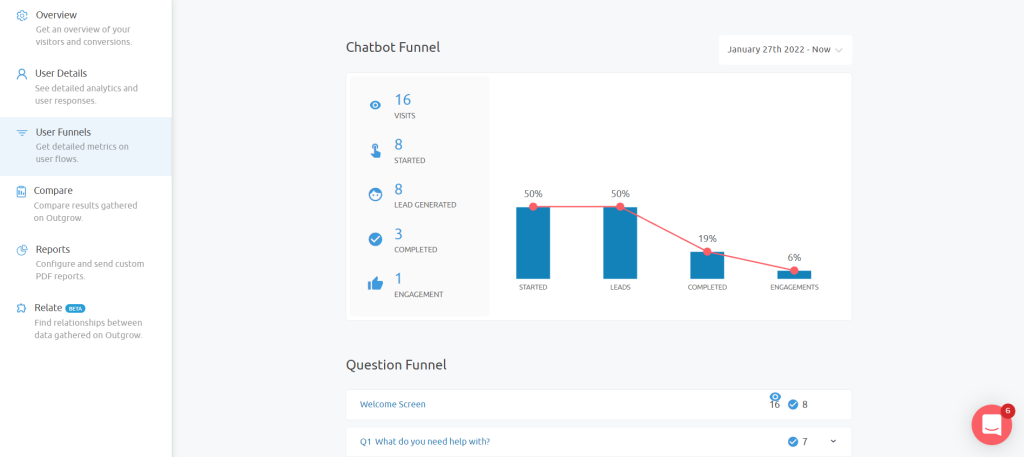
Outgrow offers comprehensive analytics:
- Completion rates, drop-off points, time-per-question
- A/B testing for optimization
- Lead quality metrics and conversion tracking
- Integration with Google Analytics for attribution
I once helped a client discover their 15-question quiz had a 73% drop-off rate at question 8 (which asked for company revenue, too invasive too early). We moved it to question 12 and completion rates jumped to 64%. That kind of insight drives real improvement.
Microsoft Forms provides basic metrics:
- Response counts and completion times
- Question-by-question breakdown
- Export to Excel for deeper analysis
It tells you what happened but doesn’t help you understand why or what to do next.

Collaboration & Team Features
Outgrow:
- Team workspaces with role-based permissions
- Content templates that teams can clone and customize
- Approval workflows for larger organizations
- White-label options for agencies managing multiple clients
Microsoft Forms:
- Easy sharing and real-time collaboration (multiple people can edit)
- Group forms that multiple team members can access
- Works seamlessly with Teams for internal surveys
Outgrow vs Microsoft Forms: Pricing Comparison 2025
Outgrow
Freelancer ($22/month):
- Unlimited content pieces
- Up to 1,000 interactions/month
- Basic integrations and analytics
Essentials ($45/month):
- 10,000 interactions/month
- Remove Outgrow branding
- Advanced integrations and A/B testing
Business ($115/month):
- 100,000 interactions/month
- Custom domains and advanced analytics
- Priority support and white labeling
Enterprise ($720/month):
- Custom interaction limits
- Dedicated account management
- Advanced white labeling and custom features
Yes, Outgrow is significantly more expensive. But here’s the math that matters: if interactive content generates 10-20 qualified leads per month that your sales team actually wants to talk to, what’s that worth to your business? For most B2B companies with deals worth thousands of dollars, the calculation makes sense.
Microsoft Forms
Free tier: Included with free Microsoft accounts
- 200 responses per form
- Basic question types and branching
- Individual use
Microsoft 365 Business (from $6/user/month):
- Unlimited responses
- 50,000 responses per form
- Support and advanced controls
The value proposition is simple: if you’re already paying for Microsoft 365, Forms is essentially free. For small teams collecting straightforward data, it’s hard to beat that price point.
Best Use Cases: When to Use Outgrow vs Microsoft Forms
Why Choose Outgrow for Lead Generation
Lead generation and qualification: A SaaS company built a “Software ROI Calculator” that asks about current tools, team size, and pain points. The calculator delivers value (cost savings estimate) while scoring leads based on budget indicators and timeline questions. Their sales team reports 40% higher show rates for demos booked through the calculator versus traditional contact forms.
Interactive product recommendations: An insurance broker created a “Policy Needs Assessment” that asks lifestyle and coverage questions, then recommends specific policy types. Completion rate: 68% (compared to 23% on their previous contact form). The personalized recommendations build trust before the first sales conversation.
Content marketing that generates engagement: A marketing agency built a “Marketing Maturity Assessment” that grades companies on various marketing capabilities and delivers a custom report. They’ve generated over 3,000 email subscribers in six months, with the assessment acting as a lead magnet that actually provides value.
E-commerce experiences: Product finders, bundle builders, or size recommendation quizzes that reduce returns while collecting valuable customer data.
Why Choose Microsoft Forms for Simple Surveys
Internal surveys and feedback collection: Gathering employee feedback, running team retrospectives, and collecting event registrations. One marketing team I know uses Forms for their weekly content planning meetings. Quick, collaborative, and everyone already has access.
Simple customer surveys: Basic satisfaction surveys, post-webinar feedback, or support ticket follow-ups where you need straightforward yes/no answers.
Academic or research projects: Collecting structured data where advanced interactivity isn’t required.
Budget constraints: Especially for non-profits, small teams, or individual use, where Microsoft 365 is already in the budget.
Outgrow vs Microsoft Forms: Performance Data and Results
A B2B software company I worked with replaced their standard “Request Demo” form with an interactive needs assessment built in Outgrow. Here’s what changed:
- Form-to-completion rate: 23% to 47%
- Demo show-up rate: 52% to 71%
- Sales qualification: 100% of leads now arrive with context about their needs and challenges
The difference? Instead of asking “What’s your biggest challenge?” in an open text field, the assessment presented five common challenges as cards, asked follow-up questions based on selections, and delivered a customized recommendation. Prospects felt heard, sales reps had actual talking points, and everyone saved time.
Microsoft Forms would have collected the same contact information, but without the context, engagement, or qualification.
Outgrow vs Microsoft Forms: Pros and Cons
Outgrow
Pros:
- Creates genuinely engaging interactive experiences
- Built-in lead qualification and scoring
- Extensive integration with marketing and sales tools
- Comprehensive analytics and optimization features
- Professional, branded appearance
Cons:
- Significant price jump from free/cheap alternatives
- Steeper learning curve for non-technical users
- Probably overkill if you just need basic data collection
- Requires strategy to get the best return
Microsoft Forms
Pros:
- Zero learning curve for Office 365 users
- Included in existing Microsoft subscriptions
- Perfect for internal collaboration and simple surveys
- Reliable, fast, and always accessible
- Real-time collaboration on form building
Cons:
- Limited design customization
- Basic analytics without much useful insight
- No built-in lead qualification or scoring
- Feels utilitarian, not engaging
- Integration challenges outside Microsoft products
Final Verdict: Outgrow vs Microsoft Forms
Here’s my honest take after working with both platforms extensively:
Invest in Outgrow if you’re a marketer or sales professional who needs to generate and qualify leads through interactive calculators, quizzes, and assessments. The pricing makes sense when you calculate the value of better-qualified leads and higher conversion rates.
Go with Microsoft Forms if you’re collecting internal feedback, running simple surveys, or working with tight budget constraints. For basic data collection needs, it’s sufficient and probably already included in your Microsoft 365 subscription.
The key question? “Do I need a basic form for data collection, or do I need interactive content that engages and qualifies prospects?” If it’s the latter, Outgrow is the better choice for your business.
Conclusion: Choose the Right Tool for Your Business Goals
If you’re a marketing professional focused on lead generation, interactive content, and sales qualification, Outgrow is the clear winner despite the higher price point. The lead qualification features and engagement tools pay for themselves when you consider the time saved on unqualified prospects.
For basic surveys, internal feedback collection, and straightforward data gathering (especially within Microsoft 365 environments), Microsoft Forms handles the job efficiently and affordably.
Ready to create interactive content that actually converts? Start your free trial of Outgrow and build your first calculator, quiz, or assessment. See for yourself how interactive content changes the conversation with your prospects.
And if you decide Microsoft Forms is still the right fit? That’s totally fine. The best tool is always the one that solves your specific problem, and sometimes, simple is exactly what you need.
Frequently Asked Questions: Outgrow vs Microsoft Forms
Outgrow is significantly better for lead generation. It offers built-in lead scoring, conditional logic for qualification, and personalized outcomes that engage prospects. Microsoft Forms only collects basic information without qualification features.
Not directly, but rebuilding forms in Outgrow usually presents an opportunity to rethink the user experience. Most of our clients report that the rebuilt interactive version performs significantly better than the original static form.
No, though having someone with basic HTML/CSS knowledge helps with advanced customization. Most users create fully functional content without writing any code.
Most B2B companies see positive ROI with Outgrow within 2-3 months when actively driving traffic to interactive content and integrating it with their sales process. Microsoft Forms has minimal cost but also limited impact on lead quality and conversion rates.
Tools like Typeform and JotForm sit somewhere between these two. More engaging than Microsoft Forms but less focused on lead qualification than Outgrow. They’re worth considering if the budget is tight but engagement matters.

Deeksha Malik is a Marketing Professional at Outgrow, working at the crossroads of people, brand, and growth. She helps scale teams, strengthen employer branding, and drive B2B marketing campaigns that actually move the needle. Known for balancing strategy with execution, Deeksha enjoys building meaningful campaigns and smarter growth stories. When she’s not working, you’ll likely find her with a good cup of coffee, staying curious about marketing trends, people dynamics, and what makes a brand memorable.