AI Forms: Build Smarter Lead-Gen Experiences Without Writing a Single Line of Code
The Numbers That Should Make You Rethink Your Contact Form
Your contact form has a serious conversion problem. The average static form converts at 2 to 3%. Outgrow’s 2025 Benchmark Report, covering 50,000+ forms across 1,200 companies, puts interactive AI forms at 47.3%. That gap isn’t a rounding error. It’s a completely different category of performance.
If you’ve ever stared at a Google Form wondering why barely anyone fills it out, you already know the issue. Static forms are built to collect data. AI forms are built to hold a conversation. One takes; the other gives something back – a personalized result, a product match, a score. That’s the exchange driving the difference.
This guide walks through what an AI forms builder actually is, why the traditional form is losing ground fast, how Outgrow’s platform works from first click to live embed, and which industries are already pulling serious results. By the end, you’ll know whether an AI forms builder belongs in your stack – and exactly how to build your first one.
| Metric | Figure |
| AI Form Conversion Rate | 47.30% |
| Traditional Form Average | 2.80% |
| Avg. Page Engagement | 2.8 minutes |
| Higher Info Retention | 84% |
Sources: Outgrow 2025 Interactive Content Benchmark Report; Outgrow User Engagement Benchmarks 2026
What Are AI Forms and Why Do They Convert Better?
Table of Contents
An AI forms experience works nothing like a standard web form. Rather than dropping a fixed list of fields in front of someone, an AI forms builder creates an actual back-and-forth: questions shift based on what the user just said, the tone matches your brand, and at the end, the user gets something worth their time – a recommendation, a result, a score they actually care about.
Picture the last “Contact Us” form you filled in. Name. Email. Phone. Company. Message. Submit. You handed over your details and got a generic “We’ll be in touch.” That’s the entire problem with static forms. Modern buyers have been trained to expect more, and AI forms deliver it.
Research from the Journal of Interactive Marketing (2024) found that interactive experiences hold information at an 84% higher rate than passive content. When someone is three questions into a skincare quiz or working through a business assessment, they’re committed to finding out their result. That commitment is exactly what drives completion rates that static forms will never touch.
The gap between a standard form and an AI form builder output is the difference between a paper application and a smart conversation with a consultant. One collects on the company’s behalf. The other genuinely helps the person filling it in. That shift in who benefits is what creates the 16.9x conversion difference.
Static Form vs. AI Form
| Feature | Static Form | AI Forms Builder Output |
|---|---|---|
| Question Logic | Fixed sequence | Adaptive branching based on answers |
| User Value | Collects data, gives nothing back | Personalized result, recommendation, or score |
| Avg. Conversion | 2 to 3% | 47.3% (Outgrow 2025) |
| Data Quality | Name and email | Rich intent signals and qualifications |
| Engagement Time | Around 30 seconds | 2.8 min average |
| Setup Speed | Minutes | Seconds with AI generation |
Outgrow’s AI Forms Builder: How It Actually Works
Outgrow sits at the crossroads of a free-form builder, an interactive quiz platform, and a full marketing automation hub. The AI forms builder takes you from “I need a lead gen quiz for real estate buyers” to a live, branded, converting experience in minutes – no developer, no designer needed.
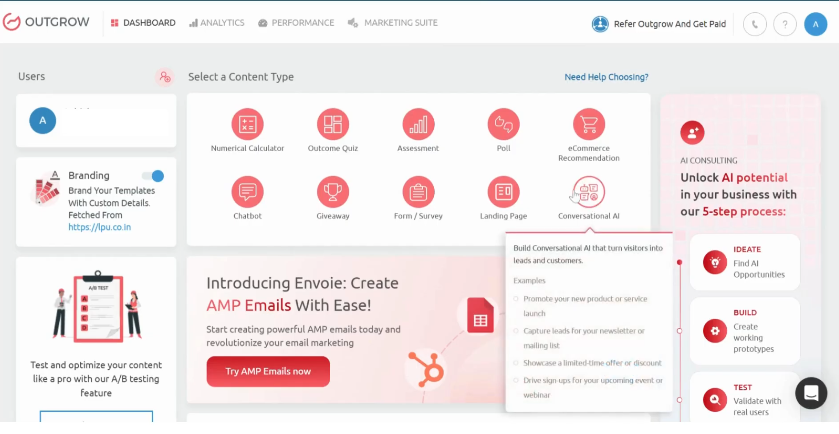
Two Ways to Start
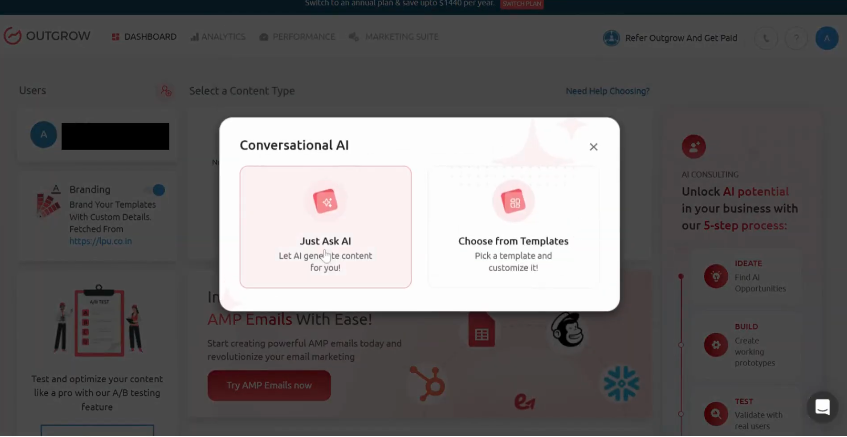
When you open the Conversational AI section of your Outgrow dashboard, you get two paths:
Option 1 – Just Ask AI Type your goal in plain language. “Build a product recommendation quiz for skincare.” Set your tone, add company context, and click Generate. The AI forms builder returns a complete question-by-question experience in seconds.
Option 2 – Choose from Templates Browse pre-built templates by use case: lead generation, personalized quizzes, sales qualification, product feedback, giveaways, smart job applications. Pick one, click Generate, and your AI forms scaffold is ready to customize.
Question Management and AI Journey
Once your AI forms builder output lands, the Overview panel is where you shape it. You can:
- Adjust the goal, tone, and company details without regenerating from scratch
- Edit question text, switch question types, or mark specific ones as mandatory
- Enable the AI Journey for fully adaptive branching based on user responses
- Add new questions or rework existing ones in the same view
- Reorder questions with drag-and-drop to control the flow
The AI Journey feature is where AI forms genuinely pull away from anything a basic free-form builder can do. Two users starting the same quiz can travel completely different paths based on their answers – one gets routed to enterprise pricing, another to a starter plan, and neither one feels like they hit a wall.
Thank You Screen
Most platforms treat the post-submission screen as a throwaway. Outgrow’s AI forms treat it as prime conversion space. On this screen, you can write a personalized message in your brand voice, upload a relevant image or video, add a CTA button to your site or a Calendly booking page, include a retake option, and drop in social sharing links so your AI forms experience spreads organically.
Design Customization
The design panel in the AI forms builder handles everything you’d want from a proper brand tool. Upload your logo, set colors and fonts, adjust button styles, pick a layout, and preview across desktop and mobile. When you’re embedding AI forms directly on your site, brand consistency isn’t optional – a form that looks out of place breaks trust before a single question gets answered.
Configure: The Marketing Control Center
The Configure section is what separates Outgrow’s AI forms builder from a standard free-form builder online. This is where your AI forms plug into everything else:
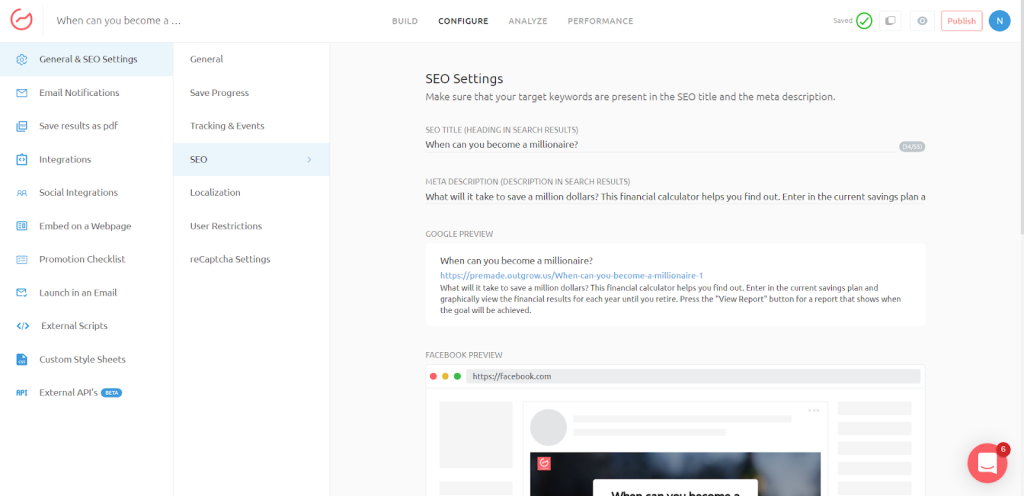
- General and SEO Settings – page titles, meta descriptions, and URL slugs per experience
- Email Notifications – instant confirmation emails to users on completion
- Native Integrations, Zapier, and Webhooks – connect to your CRM and full marketing stack
- Embed Settings – inline on a page, pop-up, or full-page takeover
- Email Launch – start a conversational form directly inside an email campaign
- Custom Stylesheets – CSS-level control for teams that need it
- Promotion Checklist – a step-by-step distribution guide built into the platform
- Social Media Launch Links – one-click share links with tracking intact
Analytics
The Analytics dashboard in Outgrow’s AI forms builder shows you what’s working in real time: total visitors, unique visits, starts, conversions, conversion rate, and question-level drop-off. That last metric is the one most free online survey tools skip entirely. If users are abandoning your AI forms at question four, you know exactly which question to fix. You can export full response data by date range for offline analysis or CRM mapping.
Outgrow as a Calculator Maker and Interactive Content Hub
Outgrow is bigger than just an AI form builder. It’s the widest interactive content platform on the market, and getting your head around that scope changes what you think is possible.
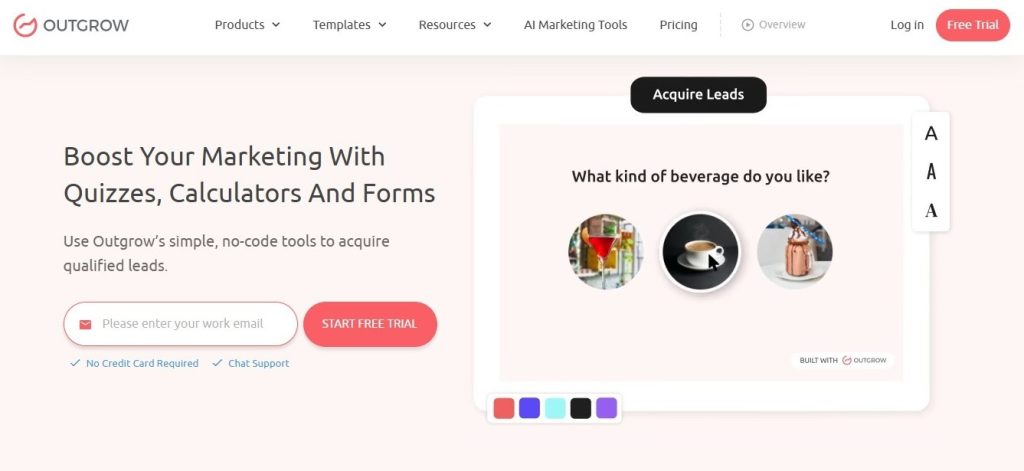
The calculator maker is one of the most underused features in the platform. A good calculator does something a quiz can’t always do: it solves a specific, high-intent problem. “What’s my estimated ROI if I switch to your platform?” or “How much could I save per year?” Users who complete a calculator come back already knowing the math. They’re not browsing – they’re deciding. Outgrow’s 2025 Interactive Content Examples report shows calculator-driven leads are significantly more likely to book a demo or request pricing than leads who came through a standard form.
The full range of content types the AI forms builder infrastructure supports:
- Quizzes and assessments – lead qualification, product matching, brand personality, knowledge scoring. The most recognized format in interactive marketing.
- Calculators – ROI tools, pricing estimators, loan calculators, savings projectors. Particularly strong for SaaS and financial services.
- Surveys and polls – market research, NPS, customer satisfaction. Works like a free survey maker with the conversion data of an AI-driven experience.
- Chatbots – conversational flows for lead qualification and always-on support.
- Recommendations – product finders, service matchers, and content recommendations built like a personal shopper.
- Contests and giveaways – viral campaigns with sharing mechanics baked in.
Having all of this inside one platform is a genuine operational advantage. Every AI form of experience, every calculator, and every interactive quiz feeds into the same analytics and CRM layer. You’re not stitching together five separate tools. You’re running one coherent interactive strategy from a single dashboard.
For teams managing a SaaS marketing funnel, this matters a lot. Your top of funnel might be a quiz (“What’s your marketing maturity score?”), Your middle is a calculator (“See your ROI with our platform”), your bottom is a smart sales qualification form. All three were built in the same place. All three tracked together.
AI Forms Builder Templates: Skip the Blank Page
Outgrow’s template library for AI forms is one of the fastest routes from idea to live experience. Templates are organized by use case, so you’re not picking a format – you’re picking a goal.
Available categories in the AI forms builder:
- Lead Generation – built to maximize top-of-funnel captures
- Personalized Quiz – product recommendation, personality matching, knowledge testing
- Sales Qualification – score and sort prospects before they hit your sales team
- Product Feedback – post-purchase reviews and feature request collection
- Giveaway and Contests – list-growth campaigns with built-in sharing
- Smart Job Application – screen candidates interactively before they reach your ATS with the help of AI recruiting software
Pick a template, click Generate, get a complete experience with questions, logic, Thank You screen, and design framework – all ready to brand and publish. Most teams get to a live URL in under 20 minutes.
One thing worth knowing: the question logic inside these templates isn’t guesswork. It’s built on conversion data from thousands of real campaigns. Use the templates as a smart starting point, then customize for your brand voice and A/B test from there.
AI Forms Builder vs. Free Form Builder: Where the Gap Actually Is
Plenty of tools let you build online forms for free. Google Forms, Typeform, Jotform, Microsoft Forms. So what makes an AI form builder worth the switch?
The gap isn’t at the feature level of the form itself. It shows up in three places: how the experience feels to the user, what data you walk away with, and what you can do with that data downstream.
| Capability | Free Form Builder | AI Forms Builder (Outgrow) |
| AI-generated question logic | No | Yes – describe your goal, get a full form |
| Adaptive branching | Limited | Full AI Journey mode |
| Personalized results pages | No | Yes – tailored per user response |
| CRM integrations | Basic | Native, Zapier, and Webhooks |
| Conversion analytics | Submission counts | Full funnel with question-level drop-off |
| Calculator maker | No | Built into formula logic |
| Embed options | Iframe only | Inline, pop-up, full-page, email launch |
| Avg. conversion rate | 2 to 3% | 47.3% benchmark |
Free forms online and free survey tools absolutely have a place. Newsletter signups, event RSVPs, internal HR forms – a basic free form builder handles those fine. But when the form’s job is to generate leads, qualify prospects, or drive product engagement, the AI forms builder is operating at a completely different conversion level.
Integrations: Connecting AI Forms to Your Stack
An AI forms builder experience that doesn’t connect to your CRM is a missed opportunity. Every answer, score, and recommendation your AI forms collect should flow automatically to the tools your team already uses.
Outgrow’s integration layer covers:
- Salesforce, HubSpot, and Pipedrive – AI forms leads land in your pipeline automatically
- Mailchimp, ActiveCampaign, and Klaviyo – segment and tag contacts based on quiz responses
- Zapier – 5,000+ app connections without custom development
- Webhooks – push AI forms data to any endpoint in real time
- Calendly – let users book directly from the Thank You screen
- Incoming data pre-fill – populate AI forms with data you already have on a contact
- Social integrations – share directly to LinkedIn, Facebook, and Twitter
When your AI forms scores a lead as “high intent,” and that data automatically creates a CRM task and triggers a personalized follow-up email, you’ve built an automated qualification system without writing a single line of code. That’s the kind of output that makes an AI form builder a core part of a SaaS funnel rather than a side tool.
5 Real-World AI Forms Use Cases Across Industries
Use Case 1: SaaS – Lead Qualification and Demo Booking
A B2B SaaS company swapped its “Request a Demo” form for an AI forms builder experience that asked prospects about team size, current tools, and top pain points. The result page showed a personalized platform overview and a direct Calendly link.
Demo bookings went up 41% in the first 30 days. Show-up rates improved by 28% because prospects arrived on the call already educated. This is exactly the SaaS marketing funnel optimization that Outgrow’s 2026 SaaS Funnel Report covers in depth.
Use Case 2: E-commerce – Product Recommendation Quiz
A skincare brand built a product recommendation AI form experience around five questions covering skin type, top concerns, and budget. The result page returned a personalized three-product bundle with a direct add-to-cart button.
Completion rates ran between 35 and 50%. Average order value for quiz-guided purchases was 23% higher than standard browse-and-buy sessions, because users trusted they were buying the right thing.
Use Case 3: Healthcare – Patient Intake
A telehealth provider replaced a 12-field paper intake form with a conversational AI forms builder experience. Patients answered questions about symptoms, medical history, and insurance in a guided flow that adapted based on their responses. For practices that need human support alongside intake automation, Virtual Medical Assistant Services can help manage patient follow-ups, data coordination, and administrative workflows.
Incomplete intake submissions dropped by 60%. Care coordination teams received structured, complete data instead of half-filled PDFs, and time-to-first-appointment improved noticeably.
Use Case 4: Real Estate – Buyer Qualification
A real estate agency launched an AI forms builder quiz asking buyers about budget, preferred neighborhoods, must-have features, and timeline. The result page showed matched listings and routed high-intent leads directly to an agent’s calendar.
Agents reported spending 40% less time on initial qualification calls because prospects arrived pre-matched and pre-informed – not browsing cold.
Use Case 5: EdTech – Learning Path Assessment
An online learning platform used Outgrow’s AI forms builder to create a skills assessment that mapped learners to the right course track. Instead of browsing a 200-course catalog, users answered questions about current skill level, goals, and time availability – and received a personalized learning path.
Enrollment in recommended courses ran at 3x the rate of organic browse-and-enroll sessions, consistent with Outgrow’s interactive content statistics showing that personalization at the decision point dramatically lifts conversion.
SEO and Distribution: Getting Your AI Forms in Front of the Right People
Building a strong AI form experience is one half of the job. Getting it in front of the right audience is the other. Outgrow’s Configure section includes a full distribution toolkit:
- SEO Settings – Each AI form’s experience gets its own title, meta description, and canonical URL
- Embed on a Webpage – Drop your AI forms inline on a blog post or landing page with a single snippet
- Launch in an Email – Start a conversational form directly inside an email, cutting the extra click to a landing page
- Social Media Launch Links – Share with tracking parameters intact across LinkedIn, Facebook, and Twitter
- Promotion Checklist – A built-in distribution sequence for each AI form’s campaign
The embedded play is worth calling out specifically. Dropping an AI forms quiz or calculator inside high-traffic existing content catches users at peak intent. A skincare brand embedding their product finder inside a “How to Build a Skincare Routine” post is reaching readers already in research mode. Outgrow’s 2025 interactive marketing trends report flags zero-party data from interactive experiences as increasingly the most valuable first-party asset brands can build – and embedded AI forms are one of the cleanest ways to collect it.
How to Build Your First AI Form in Outgrow
1 – Go to Conversational AI. Open your Outgrow dashboard and click the Conversational AI section. Choose “Just Ask AI” or “Choose from Templates.”
2 – Describe Your Goal: Type your goal in plain language. Set tone and company context, then click Generate. For templates, browse by use case and click Generate.
3 – Edit Your Questions: Check question types, edit wording, mark mandatory questions, and enable AI Journey for adaptive branching.
4 – Set Up the Thank You Screen: Add your message, upload media, set the CTA destination, and configure social sharing.
5 – Customize Design: Upload your logo, set colors and fonts, preview on desktop and mobile.
6 – Configure Integrations: Connect your CRM or Zapier, set up email notifications, and fill in SEO settings.
7 – Go Live: Hit Go Live, distribute via the Promotion Checklist, embed on your site, or launch in email. Track everything in Analytics.
Here’s a quick walkthrough video on how to set up the AI Forms.
What to Watch in Your AI Forms Analytics
Going live is the start, not the finish. Here’s what to track:
- Start rate – A low start rate means the intro copy, or CTA, isn’t doing its job
- Question drop-off – Where users leave, tells you which question needs rewriting
- Conversion rate – 47.3% is the benchmark; below 20% means the flow needs work
- Lead quality signals – Match quiz scores to close rates in your CRM
- Result page clicks – Low CTA clicks mean the offer or copy on the Thank You screen needs testing
Pages with interactive content average 2.8 minutes of engagement, which is 3.1x the all-website average of 54 seconds according to Outgrow’s 2026 benchmarks. That time-on-page advantage is an SEO signal, which means AI forms builder pages tend to outrank equivalent static pages over time.
The Bottom Line on AI Forms
The data is settled. AI forms builder outputs convert at 16.9x the rate of traditional forms. Users who go through AI forms experience retention rates that are 84% higher. Pages with AI forms embedded generate 3.1x more engagement than standard pages.
Outgrow’s AI forms builder asks nothing of your technical team. You describe your goal, the platform builds the experience, and you’re live in under an hour. Whether you’re replacing a dead contact form, building a SaaS funnel qualification flow, launching a product recommendation quiz, or adding a calculator maker to your pricing page, it all runs from the same dashboard.
The question isn’t whether AI forms outperform static forms. It’s how long you want to leave that 16.9x conversion gap sitting there.
Start Building Free – Launch Your First AI Form in 5 Minutes at outgrow.co.
Frequently Asked Questions
A standard form tool gives you fixed fields in a fixed order. An AI forms builder generates adaptive experiences where questions change based on what each user answers, and users walk away with a personalized result rather than just a “thanks for submitting” message.
Not at all. You describe your goal in plain text, set your tone and brand context, and the AI forms builder generates a complete experience in seconds. Customizing the design, editing questions, and connecting integrations are all handled through a visual interface.
The platform covers lead generation quizzes, product recommendation quizzes, sales qualification forms, customer feedback surveys, ROI calculators, skills assessments, chatbot flows, giveaway forms, and smart job applications.
Outgrow’s AI forms builder includes native integrations with Salesforce, HubSpot, Pipedrive, Mailchimp, ActiveCampaign, and Klaviyo, plus Zapier for 5,000+ additional connections and webhooks for custom endpoints.
Yes, and in more detail than most free online survey tools offer. Outgrow’s analytics shows visits, starts, conversions, overall conversion rate, and question-level drop-off so you can see exactly where users are leaving your AI forms experience.

Muskan is a Marketing Analyst at Outgrow. She is working on multiple areas of marketing. On her days off though, she loves exploring new cafes, drinking coffee, and catching up with friends.