
Income Tax Calculator: Your Complete Guide to Accurate Tax Calculation and Planning
Table of Contents
Introduction
Navigating the complexities of income tax calculation can be overwhelming, especially when tax laws change frequently and financial situations vary from person to person. An income tax calculator is an essential tool that helps individuals and businesses estimate their tax liability accurately, plan their finances better, and maximize potential deductions. Whether you’re a salaried employee, self-employed professional, or business owner, using a reliable online income tax calculator can save you time, reduce errors, and provide clarity on your tax obligations.
In this comprehensive guide, we’ll explore how an income tax estimator works, the benefits of using a tax calculator tool, and how to leverage these calculators for effective tax planning. With the right income tax calculation tool, you can take control of your financial future and ensure compliance with tax regulations while optimizing your tax-saving strategies.
What Is an Income Tax Calculator?
An income tax calculator is a digital tool designed to help taxpayers estimate their annual tax liability based on their income, deductions, exemptions, and applicable tax rates. These calculators use current tax slabs, rules, and regulations to provide accurate estimates of how much tax you owe or what refund you might expect.
Key Features of a Modern Income Tax Calculator
A comprehensive tax calculation tool typically includes:
- Multiple income source integration: Salary, business income, capital gains, and other income types
- Deduction calculators: Standard deductions, itemized deductions, and tax credits
- Tax slab visualization: Clear breakdown of applicable tax brackets
- Refund estimator: Projected tax refund or amount owed
- Year-over-year comparison: Compare tax liability across different financial years
- Save and share functionality: Store calculations and share with tax advisors
How Does an Income Tax Calculator Work?
Understanding how an online income tax calculator functions helps you use it more effectively. Here’s the step-by-step process:
Step 1: Income Input
Enter all sources of income including salary, bonuses, rental income, capital gains, interest income, and business profits. A sophisticated income tax estimator will have separate fields for each income category to ensure accurate calculation.
Step 2: Deduction Selection
Select applicable deductions such as:
- Standard deduction or itemized deductions
- Retirement account contributions (401(k), IRA)
- Health savings account (HSA) contributions
- Student loan interest
- Mortgage interest
- Charitable donations
- Medical expenses
Step 3: Tax Credit Application
The tax calculator applies eligible tax credits including child tax credits, earned income tax credit, education credits, and energy-efficient home improvement credits.
Step 4: Tax Computation
Based on current tax brackets and rates, the calculator computes your total tax liability, applying the progressive tax system where different portions of income are taxed at different rates.
Step 5: Results Display
The income tax calculation tool displays your estimated tax liability, effective tax rate, marginal tax rate, and potential refund or amount owed.
Benefits of Using an Income Tax Calculator
1. Accurate Tax Estimation
An income tax calculator eliminates manual calculation errors and provides precise estimates based on current tax laws, helping you avoid surprises during tax season.
2. Better Financial Planning
By knowing your estimated tax liability throughout the year, you can adjust your withholdings, make quarterly estimated tax payments, or increase retirement contributions to optimize your tax situation.
3. Time-Saving Efficiency
Rather than spending hours with spreadsheets or waiting for an appointment with a tax professional, an online income tax calculator provides instant results in minutes.
4. Scenario Planning
Test different financial scenarios using an income tax estimator to see how life changes like marriage, having children, buying a home, or changing jobs might affect your taxes.
5. Maximize Deductions and Credits
A comprehensive tax calculator tool highlights deductions and credits you might be eligible for, ensuring you don’t leave money on the table.
6. Tax Withholding Optimization
Use the calculator to determine if you’re having too much or too little tax withheld from your paycheck, allowing you to adjust your W-4 form accordingly.
Types of Income Tax Calculators
Federal Income Tax Calculator
Calculates your federal tax liability based on IRS tax brackets, standard or itemized deductions, and federal tax credits. This is the most commonly used income tax calculation tool for U.S. taxpayers.
State Income Tax Calculator
Many states have their own income tax systems with different rates and rules. A state-specific tax calculator helps estimate your state tax obligations alongside federal taxes.
Self-Employment Tax Calculator
Designed for freelancers, contractors, and business owners, this income tax estimator calculates both income tax and self-employment tax (Social Security and Medicare).
Capital Gains Tax Calculator
Specializes in calculating taxes on investment income, including short-term and long-term capital gains from stocks, bonds, real estate, and other assets.
Paycheck Calculator
Estimates your take-home pay after federal, state, and local taxes, as well as other withholdings like retirement contributions and health insurance premiums.
How to Use an Income Tax Calculator Effectively
Gather Necessary Documents
Before using an online income tax calculator, collect:
- W-2 forms from employers
- 1099 forms for contract work, interest, and dividends
- Records of deductible expenses
- Previous year’s tax return for reference
- Documentation of tax credits you’re claiming
Choose the Right Calculator
Select an income tax calculator that matches your tax situation. Self-employed individuals need different features than salaried employees, and investors need capital gains calculation capabilities.
Enter Information Accurately
Double-check all numbers entered into the tax calculation tool. Small errors in income or deduction amounts can significantly affect your estimated tax liability.
Update Regularly
Tax laws change, and so do your financial circumstances. Use your income tax estimator multiple times throughout the year, especially after major life events or income changes.
Consult a Professional
While an income tax calculator is incredibly useful, complex tax situations may require professional advice. Use the calculator as a starting point for discussions with your tax advisor.
Common Tax Deductions to Include in Your Calculation
Standard vs. Itemized Deductions
Your tax calculator will help determine whether taking the standard deduction or itemizing is more beneficial. For 2024, the standard deduction is $14,600 for single filers and $29,200 for married couples filing jointly.
Above-the-Line Deductions
These deductions reduce your adjusted gross income (AGI) and include:
- Educator expenses
- Student loan interest (up to $2,500)
- IRA contributions
- Self-employment tax deduction
- Health savings account contributions
Itemized Deductions
If your itemized deductions exceed the standard deduction, your income tax calculation tool will use these instead:
- Mortgage interest
- State and local taxes (SALT) up to $10,000
- Charitable contributions
- Medical expenses exceeding 7.5% of AGI
- Casualty and theft losses (in federally declared disaster areas)
Tax Credits vs. Tax Deductions

Understanding the difference is crucial when using an income tax calculator:
Tax deductions reduce your taxable income. If you’re in the 22% tax bracket, a $1,000 deduction saves you $220 in taxes.
Tax credits reduce your tax bill dollar-for-dollar. A $1,000 tax credit saves you $1,000 in taxes, making credits more valuable.
Common Tax Credits
- Child Tax Credit: Up to $2,000 per qualifying child
- Child and Dependent Care Credit: Percentage of care expenses
- Earned Income Tax Credit: For low to moderate-income workers
- American Opportunity Credit: Up to $2,500 for education expenses
- Lifetime Learning Credit: Up to $2,000 for education expenses
- Saver’s Credit: For retirement contributions
Income Tax Calculator for Different Filing Statuses
Your filing status significantly impacts your tax calculation. An effective income tax estimator accounts for:
Single
Taxpayers who are unmarried, divorced, or legally separated use single filing status with specific tax brackets and a lower standard deduction.
Married Filing Jointly
When couples combine their income under this filing status, they often benefit from lower tax rates and a higher standard deduction in their tax calculator.
Married Filing Separately
Sometimes advantageous when spouses have significantly different incomes or large itemized deductions. Your online income tax calculator can compare both scenarios.
Head of Household
Available to unmarried taxpayers supporting a qualifying dependent, offering more favorable tax brackets than single filing status.
Qualifying Widow(er)
Available for two years after a spouse’s death if you have a dependent child, providing the same tax rates as married filing jointly.
Tax Planning Strategies Using an Income Tax Calculator
1. Retirement Contribution Optimization
Use your income tax calculation tool to see how increasing 401(k) or IRA contributions reduces your current tax liability while building retirement savings.
2. Tax-Loss Harvesting
For investors, calculate the tax impact of selling losing investments to offset capital gains, reducing your overall tax burden.
3. Charitable Giving Planning
Your tax calculator can show how bunching charitable contributions into alternating years might maximize tax benefits.
4. Timing Income and Expenses
If you’re self-employed, use the income tax estimator to determine whether deferring income or accelerating expenses into the current year reduces taxes.
5. Roth Conversion Analysis
Calculate the tax impact of converting traditional IRA funds to a Roth IRA, especially in years with lower income.
Mobile Income Tax Calculator Apps
Modern tax calculation tools are available as mobile apps, offering:
- On-the-go tax estimation
- Receipt scanning and expense tracking
- Real-time tax impact of financial decisions
- Integration with banking and investment accounts
- Push notifications for tax deadlines
- Cloud syncing across devices
Popular mobile income tax calculator apps often include additional features like mileage tracking for business use, quarterly estimated tax payment reminders, and year-round tax planning tips.
Income Tax Calculator Accuracy and Limitations
Factors Affecting Accuracy
While an online income tax calculator is highly reliable, accuracy depends on:
- Using current tax year rules and rates
- Entering complete and correct information
- Understanding which deductions and credits you qualify for
- Properly categorizing income types
- Accounting for state and local taxes
When to Seek Professional Help
An income tax estimator may not capture:
- Complex investment scenarios
- Multi-state tax situations
- Foreign income and tax credits
- Advanced tax strategies
- Audit risk assessment
- Estate and trust taxation
For these situations, combine calculator results with professional tax advice.
Try Outgrow’s Ready-to-Use Income Tax Calculator
Before building your own, test the premade income tax calculator. Live right now – use your real numbers.

Quick Tax Estimation in Under a Minute
The calculator walks you through essential tax information with intuitive input fields:
Nine key questions that determine your tax liability:
- Gross Salary (Wages, Salaries) – Enter your annual income in dollars
- Filing Status – Choose from Single, Married Joint, Married Separate, or Head of Household
- Tax State – Select your state from the dropdown menu
- Number of Dependents – Slide from 0 to 10 dependents
- Other Taxable Monthly Deductions – Adjust from 0% to 100% using the slider
- Retirement account contributions (401k, IRA, etc.) – Select your contribution range: No, Yes (less than $10,000), Yes ($10,000-$20,000), or Yes (more than $20,000)
- Capital gains or investment income – Indicate if you have investment income
- Health insurance premium percentage – Enter the percentage of income spent on health premiums
- Self-employment status – Select Yes or No
Takes 30 seconds to complete. Enter your information, and results appear instantly on the right panel showing your complete tax breakdown.
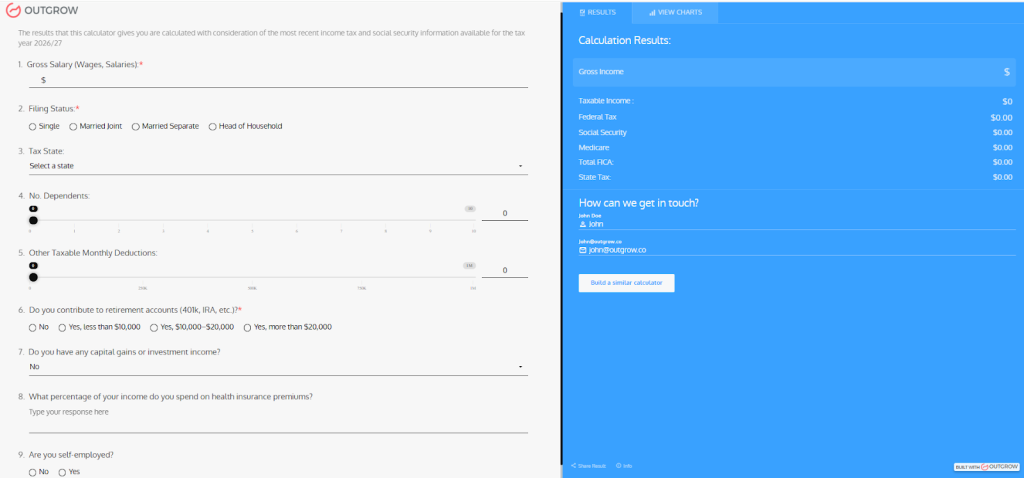
Real-Time Calculation Results
The online income tax calculator displays comprehensive results instantly:
- Gross Income – Your total annual income
- Taxable Income – Income after deductions
- Federal Tax – Your federal tax liability
- Social Security – Social Security tax amount
- Medicare – Medicare tax contribution
- Total FICA – Combined Social Security and Medicare
- State Tax – Your state tax obligation
Real example from the tool: Earn $85,000 annually? Single filer in California? Two dependents? Contributing $15,000 to retirement? The calculator shows your exact federal tax ($9,200), state tax ($2,890), and total FICA ($6,503) in real-time.
Interactive Tax Planning Made Simple
Can’t afford the estimated tax liability? Adjust your retirement contributions slider and watch your federal tax decrease immediately. Or change your filing status to see how marriage affects your tax situation. Testing different scenarios takes seconds.
Why this income tax calculation tool works – Progressive tax brackets are built into every calculation. Your income isn’t taxed at one flat rate. Different portions are taxed at different brackets. At $85,000, you’re not paying the same rate on your first $11,600 as you are on income above $47,150.
Professional Applications
Tax professionals use this tax calculator in client consultations. Accounting firms embed it on their websites. Financial advisors link from tax planning blog posts. HR departments share it with employees during benefits enrollment. Works because it’s fast, accurate, and gives actionable insights.
Lead functionality is included, too. Users can enter their contact information to save results or request professional consultation. For tax businesses, that’s qualified leads actively planning their tax strategy.
Build Your Own Customized Calculator
After testing the ready-made version, you can create a branded income tax estimator tailored to your specific needs using Outgrow’s platform. Customize questions, add your company logo, integrate with your CRM, and start generating tax-planning leads immediately.
Integration with Outgrow: Interactive Tax Calculators
Outgrow’s platform enables businesses and tax professionals to create custom, branded income tax calculators that engage users and generate leads. These interactive tools offer:
Personalized User Experience
Create an income tax calculation tool that adapts questions based on user responses, providing a tailored experience for different tax situations.
Lead Generation
Capture user information in exchange for detailed tax estimates, building your client base while providing value.
Educational Content
Embed explanations and tax-saving tips throughout the calculator journey, positioning your brand as a trusted tax resource.
Seamless Integration
Connect your tax calculator with CRM systems, email marketing platforms, and analytics tools to nurture leads and track ROI.
Mobile-Responsive Design
Ensure your online income tax calculator works flawlessly on all devices, reaching users wherever they prefer to research their taxes.
Customizable Branding
Create a calculator that matches your brand identity, from colors and fonts to messaging and tone.
Future of Income Tax Calculators
AI-Powered Tax Optimization
Next-generation income tax calculators will use artificial intelligence to:
- Automatically identify overlooked deductions and credits
- Provide personalized tax-saving recommendations
- Predict future tax liability based on income trends
- Offer real-time tax planning throughout the year
Blockchain and Tax Verification
Emerging technology may enable tax calculation tools to verify information directly from blockchain-based financial records, increasing accuracy and reducing fraud.
Integration with Financial Ecosystems
Future income tax estimators will seamlessly connect with banking, payroll, investment, and accounting platforms to auto-populate data and provide comprehensive financial planning.
Conclusion
An income tax calculator is an indispensable tool for modern tax planning and financial management. Whether you’re using a basic online income tax calculator for quick estimates or a sophisticated tax calculation tool for comprehensive tax planning, these resources empower you to understand your tax obligations, optimize your financial decisions, and maximize your tax savings.
By regularly using an income tax estimator, you take control of your financial future, reduce tax-season stress, and make informed decisions throughout the year. Combined with professional tax advice when needed, a quality tax calculator helps you navigate the complex tax landscape with confidence.
For businesses and tax professionals, creating interactive, branded income tax calculators using platforms like Outgrow offers a powerful way to engage clients, demonstrate value, and build trust while generating qualified leads. The future of tax calculation is interactive, personalized, and integrated into our broader financial lives, making tax planning accessible to everyone.
Start using an income tax calculator today and discover how this simple tool can transform your approach to taxes and financial planning. With Outgrow’s 7-day free trial, you can build your own customized income tax calculator without any commitment, making it easier than ever to create a professional tool tailored to your specific needs.
Frequently Asked Questions (FAQs)
An online income tax calculator is highly accurate when using current tax laws and correct information, though complex situations may need professional review.
Yes, many income tax calculators include state tax features. Choose a tax calculator that supports your specific state’s tax laws.
Most basic online income tax calculators are free. Premium versions may charge for advanced features like detailed reports or unlimited calculations.
Use an income tax estimator at year start, after major life events, before financial decisions, and when adjusting withholdings or quarterly payments.
An income tax calculator identifies missed deductions and credits. However, optimal tax planning minimizes both refunds and amounts owed throughout the year.
You need W-2s, 1099s, deductible expenses, retirement contributions, and tax credit information for an online income tax calculator to provide accurate estimates.
A self-employment income tax calculator includes business income, expenses, self-employment tax (15.3%), and specialized deductions like home office and vehicle expenses.
Yes, an income tax calculator lets you compare scenarios like retirement contributions, filing status changes, and investment timing for optimal tax planning.
Many comprehensive online income tax calculators include AMT calculations. Look for tax calculators that specifically mention AMT functionality for high-income situations.

Ankit Upadhyay is a Digital Marketing and SEO Specialist at Outgrow. With a passion for driving growth through strategic content and technical SEO expertise, Ankit Upadhyay helps brands enhance their online visibility and connect with the right audience. When not optimizing websites or crafting marketing strategies, Ankit Upadhyay loves visiting new places and exploring nature.