
Retirement Calculator: Plan Your Golden Years Without the Guesswork
Introduction
Table of Contents
Retirement planning keeps you up at night, doesn’t it? You’re saving money every month, but that nagging question lingers: Is it enough? Will you run out at 75 and spend your final years pinching pennies? Or worse, are you hoarding cash you could be enjoying right now?
Here’s where a retirement calculator actually helps. Plug in your savings, expected expenses, and timeline. See if your plan holds up or needs adjustments. No more wild guesses about whether $500,000 lasts 20 years or 10.
Most people mess this up badly. They either save way too much (and miss out on living today) or save way too little (and face a rough retirement). A solid retirement planning calculator shows the reality before it’s too late to fix things.
What Is a Retirement Calculator?
A retirement calculator is a tool that projects whether your savings will last through retirement. You enter your current age, retirement age, life expectancy, savings balance, monthly contributions, and expected spending. The calculator runs the numbers and tells you if you’re on track or heading for trouble.
What goes into the calculation:
- Your current retirement savings across all accounts like 401(k)s and IRAs
- Monthly or yearly contributions you’re making
- Expected rate of return on investments (typically 5-8%)
- Inflation rate eating into purchasing power
- Your anticipated retirement expenses
- Social Security or pension income
- Healthcare costs that spike as you age
- Withdrawal strategies (4% rule or customized)
The retirement planning calculator shows whether your money outlasts you or you outlast your money. In simple terms, it answers: Can I retire when I want to and live how I want to?
Why You Need a Retirement Planning Calculator

Retirement planning isn’t something you can eyeball. Too many variables, too much at stake. A retirement income calculator matters because:
The numbers are bigger than you think. Need $50,000 yearly for 25 years? That’s $1.25 million, and inflation hasn’t even entered the chat yet. At 3% inflation, you actually need closer to $1.8 million. Big difference.
Your timeline changes everything. Retire at 62 versus 67, and you need five extra years of funding plus smaller Social Security checks. That gap can cost you $200,000 or more. Run the scenarios and see what waiting actually buys you.
Healthcare costs wreck budgets. A 65-year-old couple needs roughly $300,000 just for healthcare in retirement. Most people budget maybe $50,000. Use a retirement withdrawal calculator that factors in medical expenses, or you’re setting yourself up for disaster.
Social Security doesn’t cover what you think it does. Average benefit is around $1,900 monthly. Can you live on $22,800 yearly? Probably not. The calculator shows the gap between government benefits and actual living expenses.
Investment returns aren’t guaranteed. Planning on 10% returns because that’s what the market averaged over decades? Cool, but a bad sequence of returns early in retirement can sink the whole plan. Conservative estimates protect you from market reality. Understanding different investment strategies for retirement can help you set realistic return expectations.
How Outgrow’s Interactive Tools Help Your Planning

Outgrow takes the basic retirement planning calculator and turns it into something people actually want to use instead of avoiding.
Regular calculators dump a form on you, demand 30 inputs, then spit out a number with zero context. Outgrow’s calculator maker creates a guided experience that explains what each question means and why it matters. You’re not drowning in financial jargon.
The platform uses conditional logic. Translation: it adapts based on your answers. Already retired? You skip questions about contribution rates. Still working? It asks about 401(k) matching. You only see questions relevant to your situation, making the whole thing faster.
Visual results beat spreadsheets every time. Charts showing your savings trajectory, color-coded warnings when you’re off track, and clear breakdowns of where money goes. Way better than staring at a wall of numbers trying to figure out what they mean.
Outgrow’s builder lets financial advisors, wealth managers, and fintech companies create custom tools without hiring a development team. You control the formulas, add your branding, and embed it on your site. The whole thing is drag, drop, and done.
The lead generation angle matters if you’re a business. Users get personalized results after entering their email. You’re capturing qualified leads actively planning a major life transition. These aren’t random clicks. These are people ready to talk about managing hundreds of thousands of dollars.
Try Outgrow’s Ready-to-Use Retirement Withdrawal Calculator
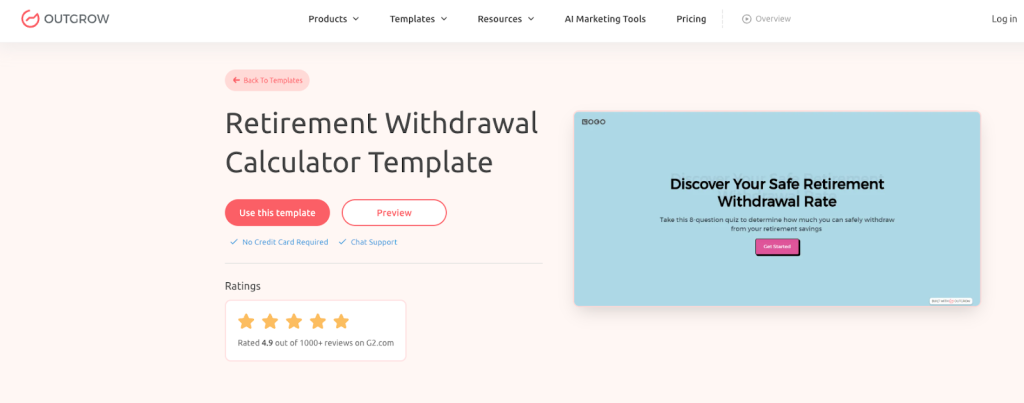
Before building your own, check out Outgrow’s premade retirement withdrawal calculator. It’s an 8-question quiz that figures out your safe withdrawal rate in about 90 seconds. No complicated forms or overwhelming spreadsheets.
Understanding Your Personalized Results
The calculator walks you through the essentials. First, it establishes your timeline by asking your current age, planned retirement age, and estimated life expectancy based on health and family history. This shows how many years your money needs to last.

Next, it gets into the financial details. You’ll enter your total retirement savings across all accounts (401(k), IRA, pension), your expected annual return rate on investments, and the yearly income you want in retirement. These numbers form the foundation of your withdrawal strategy.
The calculator also asks about additional income sources. Whether you’re counting on Social Security, rental income, or part-time work makes a huge difference in how much you need to pull from savings. Finally, it gauges your risk tolerance for running out of money, from conservative to comfortable with higher risk.
Once you complete the quiz, you get personalized recommendations based on your specific situation. The results break down whether a conservative, moderate, or aggressive withdrawal strategy works for you.
What Makes This Calculator Different
For a moderate withdrawal approach, the calculator provides actionable guidance:
- Build a detailed retirement budget covering both essential and discretionary expenses that align with your withdrawal rate
- Keep your investment portfolio diversified and rebalance regularly based on your risk level and timeline
- Stay flexible with withdrawals and adjust when markets shift or your needs change
- Consider additional income through part-time work, consulting, or other sources to ease pressure on your savings
The calculator explains the trade-offs clearly. A moderate withdrawal rate gives you more spending flexibility than ultra-conservative strategies but comes with higher risk than playing it super safe. You’re balancing income needs today with making money last 30+ years.
What makes this different from basic calculators? It considers your complete financial picture, not just one magic number. The famous 4% rule works for some people, but your situation might call for 3% or 5% depending on factors like additional income, risk tolerance, and life expectancy.
Run it with your real numbers first, then play with scenarios. What happens if you delay retirement three years? How would your plan change if investment returns hit 6% instead of 8%? Consider the impact of needing an extra $10,000 annually.These adjustments show which changes actually impact your retirement security.
Financial advisors put this calculator on their websites to attract serious prospects. Wealth managers use it in initial meetings to show clients where they stand. Insurance professionals demonstrate coverage gaps. The calculator captures leads through email opt-in, giving you contact info for people actively planning major financial decisions.
Building Your Own Calculator with Outgrow
Takes about 30-45 minutes to build a custom retirement calculator. Start with a template or use the blank canvas.
Questions you’ll include:
- Current age
- Target retirement age
- Current retirement savings balance
- Monthly contribution amount
- Employer match percentage
- Expected investment return
- Inflation assumption
- Retirement duration estimate
- Monthly spending goal
- Social Security estimate
- Pension or other income
- Healthcare cost buffer
Setup is straightforward. Outgrow’s formula builder works like Excel but simpler. Reference any answer and do math with it. Calculate compound growth, adjust for inflation, project withdrawals over time. The system formats currency and percentages automatically.
Pick your layout style. Multi-step guides users through one question per screen, which feels less overwhelming. Single-page shows everything at once for people who want to see the whole picture. Add tooltips and examples so users know what numbers to enter.
The results page is where the magic happens. Show projected account balance over time, success probability, monthly income available, and specific recommendations. Customize messages based on outcomes. “You’re on track” or “Consider increasing contributions by $200 monthly” hits different than generic advice.
Connect it to your existing systems. Link to your CRM, email platform, Google Sheets, whatever you use. When someone completes the calculator, their data flows where you need it. Trigger follow-up emails, assign leads to advisors, start nurture sequences automatically.
Industry Use Cases for Retirement Calculators
Financial Advisors put calculators on their websites to catch prospects early in the planning journey. Someone realizes they’re $300,000 short of their goal, and the advisor gets their contact info and current situation. Works as a lead magnet while providing genuine value.
Wealth Management Firms use calculators to qualify leads before spending time on consultations. If someone has $50,000 saved at age 60, they might not fit the firm’s client profile. The calculator helps identify ideal prospects with assets worth managing.
Employer HR Departments offer retirement calculators as part of benefits education. Helps employees understand their 401(k) options and whether they’re contributing enough. Increases participation rates and employee satisfaction with benefits packages.
Insurance Companies demonstrate the retirement income gap that annuities or life insurance products can fill. The calculator shows the shortfall, then the product presentation shows the solution. Much more effective than leading with a sales pitch.
Banks and Credit Unions provide calculators as a value-add service for members. Drives engagement, builds trust, and positions the institution as a partner in financial wellness. Also generates cross-sell opportunities for IRAs and investment products.
Getting Started: From Idea to Live Calculator
Pick a template or start blank in Outgrow’s interface. Name your project something descriptive for when you’re managing multiple calculators later.
Add questions using the calculator builder. Drag in number inputs for financial figures, dropdowns for preset choices, and sliders for ranges. Each input type changes how users interact and affects completion rates.
Write clear explanations for each question. Users shouldn’t have to Google “safe withdrawal rate” while taking your calculator. Add a tooltip explaining typical ranges (3-5% depending on risk tolerance). Good explanations reduce abandonment.
Set up your formulas carefully. Calculate future value of current savings using compound interest. Project contribution growth over time. Add Social Security income, subtract expenses, factor in inflation. Test the math thoroughly because wrong formulas destroy credibility.
Design a results page people can understand at a glance. Big numbers in large fonts catch attention. Charts showing account balance over time work better than paragraphs. Recommendations provide clear next steps, whether that’s “increase contributions” or “schedule a consultation.”
Test everything with realistic scenarios. Run the calculator as a 25-year-old just starting out, a 45-year-old mid-career, and a 60-year-old nearing retirement. Verify formulas work across all age ranges and savings levels. Fix bugs before anyone sees them.
Embed it on your website or share the direct link. Outgrow provides multiple embedding options: inline on a page, popup after certain actions, or standalone landing page. Pick what works for your site structure.
Common Mistakes to Avoid
Forgetting about inflation. Your $60,000 yearly expenses today cost $108,000 in 25 years at 3% inflation. Planning like costs stay flat? You’ll run out of money while you’re still alive.
Overly optimistic returns. Using 10% annual returns because someone told you that’s the stock market average? Sure, buying looks amazing in the calculator. Reality includes down years, sequence risk, and the fact that retirees typically use more conservative allocations. Use 6-7% to be realistic.
Ignoring healthcare costs. Thinking Medicare covers everything? It doesn’t. Long-term care isn’t covered. Dental and vision cost extra. A 65-year-old couple needs roughly $300,000 for healthcare alone. Factor this in or face a nasty surprise.
Static expense assumptions. Spending the exact same amount every year for 30 years? Unlikely. You’ll probably spend more in early retirement (travel, activities) and less later. Use a calculator that lets you adjust spending over time.
Underestimating life expectancy. Planning to 85 but living to 95? That’s 10 years with zero income. Use at least age 95 for planning, especially if you’re healthy and have family longevity. Better to have extra than run out.
Forgetting taxes. Your $1 million in a traditional IRA isn’t really $1 million. Uncle Sam gets his cut when you withdraw. That’s maybe $750,000 after taxes depending on your bracket. Roth IRAs and taxable accounts have different tax treatments. Account for this.
Ignoring Social Security strategy. Taking benefits at 62 versus 70 changes your monthly check by 76%. That’s the difference between $2,000 and $3,520 monthly for life. The calculator should factor in claiming age strategy.
Reading Your Results
Account balance projection shows your savings over time. It should grow during working years, peak at retirement, then decline as you withdraw. The key question: does it hit zero before you do?
Success probability tells you the likelihood your money lasts based on historical market returns. Above 80% is generally considered solid. Below 50% means serious adjustments needed.
Monthly income available shows what you can actually spend each month in retirement. Compare this to your expected expenses. The gap (positive or negative) determines your lifestyle.
Withdrawal rate displays what percentage of your savings you’re pulling annually. The traditional 4% rule suggests this as a safe rate. Higher rates increase the risk of running out early.
Shortfall or surplus sums up whether you’re on track. Short $200,000? You know what needs fixing. Surplus of $150,000? Maybe you can retire earlier or spend more.
Look at the complete picture. A small shortfall might be fixed by working one extra year or cutting expenses by $500 monthly. A massive gap requires bigger changes like dramatically increasing savings or rethinking retirement age entirely.
Wrapping Up
A retirement calculator turns anxiety about the future into concrete numbers you can actually work with. Build one with Outgrow’s tools or use existing templates, just run the projections before making irreversible decisions.
The calculator won’t make the decision for you. Career goals, health situations, and lifestyle preferences all matter. But it removes the financial guesswork. You’ll know if you’re on track, how much you can spend, and what changes improve outcomes.
For financial advisors, wealth managers, and insurance professionals, calculators do double duty. Help prospects while capturing qualified leads ready to take action. Outgrow’s platform makes building these accessible without technical skills or developers.
Enter your real numbers. Try different scenarios. Make retirement decisions based on projections instead of hoping everything works out. Sign up for a free 7-day trial today and start building your customized retirement calculator.
Frequently Asked Questions
It projects whether your savings will last through retirement by analyzing your current savings, contributions, expected returns, and planned expenses. The calculator shows if you’re on track or need adjustments.
Accuracy depends on realistic inputs like actual savings amounts, conservative return estimates, and honest expense projections. They provide directional guidance, not guarantees, since markets and life circumstances change.
Most experts suggest 10-12 times your annual income, though it varies based on lifestyle and other income sources. A $60,000 yearly lifestyle needs $600,000-$720,000 saved, plus Social Security.
It suggests withdrawing 4% of your retirement savings annually, adjusted for inflation, to make money last 30 years. A $1 million portfolio allows $40,000 yearly withdrawals under this strategy.
Yes, factor it in but don’t rely on it exclusively since benefits may change and it typically replaces only 40% of pre-retirement income. Use the Social Security website calculator for personalized estimates.
Start in your 20s or 30s when small adjustments make huge differences through compound growth. Even late starters in their 50s benefit from knowing exactly where they stand.
Yes, by showing how different retirement ages affect your financial security and monthly income. Running scenarios for retiring at 62, 65, and 67 reveals the trade-offs clearly.
Outgrow lets you build custom, branded calculators with conditional questions that adapt to user answers, visual results, lead capture, CRM integration, and full formula control without coding.

Deeksha Malik is a Marketing Professional at Outgrow, working at the crossroads of people, brand, and growth. She helps scale teams, strengthen employer branding, and drive B2B marketing campaigns that actually move the needle. Known for balancing strategy with execution, Deeksha enjoys building meaningful campaigns and smarter growth stories. When she’s not working, you’ll likely find her with a good cup of coffee, staying curious about marketing trends, people dynamics, and what makes a brand memorable.