Outgrow vs Google Forms: Which Tool Actually Deserves Your Marketing Budget?
Table of Contents
Overview
Google Forms and Outgrow represent two fundamentally different approaches to online data collection. Google Forms is a free form builder designed for simplicity, surveys, registrations, and feedback forms that anyone can create in minutes. Outgrow is an interactive content platform built specifically for marketers who need calculators, quizzes, and assessments that engage prospects while generating qualified leads.
One collects data efficiently; the other creates experiences that make people want to share their information. Understanding which approach matches your goals will determine which tool serves you best.
The Problem Both Tools Solve (Just Very Differently)
Before we compare feature lists, let’s talk about why either of these tools exists in the first place.
You need information from people. Maybe it’s their feedback, their contact details, or whether they prefer the blue logo or the red one. Whatever it is, you need a system that asks questions and stores answers.
Google Forms solves this with maximum efficiency. Drag some questions onto a page. Share the link. Boom, responses appear in a spreadsheet. For probably 70% of business scenarios, this is perfect.
But here’s where things get interesting. What if you’re trying to:
- Qualify prospects before your sales team wastes time on tire-kickers
- Demonstrate your product’s value before asking for a demo
- Create content that people actually want to engage with and share
- Personalize recommendations based on someone’s specific situation
That’s a different problem entirely. And that’s where the traditional form model starts showing cracks and Outgrow comes to the rescue.
I remember sitting in a marketing meeting where someone asked, “Why is our contact form conversion rate so terrible?” The answer was obvious once we looked at it from the user’s perspective: we were asking for their name, email, company, role, budget, timeline, and specific needs and giving them absolutely nothing in return. Just a promise that someone would “be in touch soon.”
Would YOU fill that out? I wouldn’t. Not unless I was already 90% convinced I needed the product.
This is why calculators, quizzes, and assessments work so well. They flip the equation. Instead of “give us information and maybe we’ll help you later,” it’s “answer these questions, and we’ll give you something valuable right now.” The lead capture becomes secondary to the value exchange.
Google Forms can’t really do this. It’s not built for it. Outgrow is.
Feature Breakdown: What Each Tool Actually Does
Content Types
Outgrow is more specialized:
- ROI and savings calculators with real-time math
- Outcome quizzes
- Assessment with scoring
- Conversational chatbots
- Interactive polls and survyes
- Contest and giveaway mechanics
- E-commerce recommendations
Google Forms gives you the basics:
- Multiple choice (pick one or several)
- Short answers and paragraphs
- Dropdowns and linear scales
- File uploads
- Basic section branching
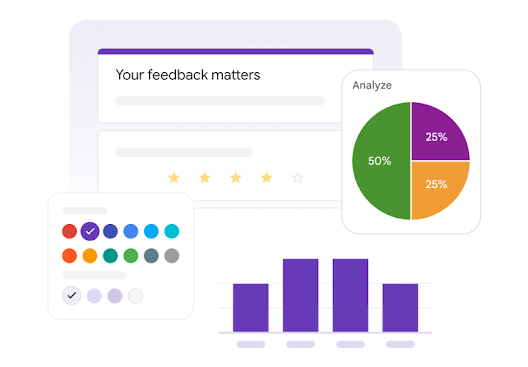
The difference isn’t subtle. With Google Forms, you’re asking questions linearly. With Outgrow, you’re building an experience.
Here’s a real example: We built a “Marketing Maturity Assessment” for a consulting firm. Users answer 25 questions across five categories. As they go, they see their score building in real-time. At the end, they get a detailed breakdown showing exactly where their marketing strategy has gaps, with specific recommendations for each area.
Try building that in Google Forms. You can collect the answers, sure. But you can’t calculate scores dynamically, you can’t show personalized results pages, and you definitely can’t make it feel like anything other than, well, a form.
Design & Customization
Outgrow is where design nerds get excited:
- Over 1,000 templates built by actual designers
- Complete white-labeling (strip out all Outgrow branding)
- Custom CSS if you want pixel-perfect control
- Built-in brand kit integration
- Actually responsive design that looks good on mobile
- Multiple embed options (popup, inline, chatbot widget)
Google Forms looks like Google Forms. You know what I mean, everyone recognizes that signature style immediately. You get:
- A handful of color themes
- The ability to add a header image
- Google’s standard fonts
- That’s about it
I’m not just talking aesthetics here, though that matters. Good design reduces friction. It makes people more likely to complete your quiz or calculator. We’ve A/B tested this extensively. A well-designed interactive experience can outperform a basic form by 40-50% on completion rates alone.
Logic & Branching
Outgrow’s logic engine is honestly pretty impressive. You can:
- Build calculators that do actual math (compound interest, ROI projections, cost savings)
- Create scoring systems with weighted variables
- Show different result pages based on score ranges or answer combinations
- Use progressive profiling (ask different questions to returning users)
- Display real-time feedback as users progress
Google Forms has basic conditional logic.
What it cannot do:
- Complex multi-variable logic
- Real-time calculations
- Score tracking across multiple dimensions
- Dynamic content based on previous answers
- Personalized result pages
Data Handling
Outgrow:
- Captures partial completions (someone gives you their email at question 3, then bounces, you still have their contact info)
- Lead scoring based on responses
- Progressive profiling
- GDPR consent management built in
- Custom thank-you pages with next-step CTAs
Google Forms:
- Everything dumps into Google Sheets automatically
- You can set up email notifications for new responses
- Basic validation (make sure emails look like emails, numbers are numbers)
- Can limit to one response per person
- Can close forms after X responses or on a specific date
The Sheets integration is legitimately great if you live in Google Workspace. Responses appear instantly. You can build pivot tables, create charts, and share with your team. It’s seamless.
The partial completion thing is huge. With Google Forms, if someone doesn’t hit “Submit,” you get nothing. With Outgrow, if you place an email capture at question 4 and they quit at question 7, you still captured that lead plus their answers to questions 1-6. That’s valuable data you’d otherwise lose.
Integrations
Outgrow connects to:
- Every major CRM (HubSpot, Salesforce, Marketo, Pardot, Zoho, Pipedrive)
- Email platforms (Mailchimp, ActiveCampaign, Klaviyo, Constant Contact)
- Analytics (Google Analytics, Facebook Pixel, Google Tag Manager for conversion tracking)
- Slack for instant lead notifications
- Webhooks for custom integrations
- Zapier for everything else
Google Forms integrates with:
- Google Sheets (native, instant, perfect)
- Google Drive for file uploads
- Pretty much anything via Zapier
- Various add-ons from Google’s marketplace
Analytics
Outgrow provides:
- Completion rate by traffic source
- Drop-off analysis (which question loses people?)
- Time spent per question
- A/B testing for different versions
- Lead quality metrics
- Conversion funnel visualization
- Result distribution (which outcomes are most common?)
- Traffic attribution
Google Forms shows you:
- How many responses you’ve received
- Summary charts of each question’s responses
- Individual response viewing
- Option to export to Sheets for deeper analysis
It’s functional. You can see what people answered. That’s usually enough for surveys and feedback forms.
When I’m trying to optimize a calculator, I need to know where people are dropping off. If 40% of users abandon at “What’s your annual revenue?”, that tells me that question is too invasive for that point in the experience. Maybe I can make it optional or rethink whether I need it at all.
Google Forms can’t tell me that. I just see final submission numbers. Outgrow shows me the entire funnel.
Pricing: The Money Conversation
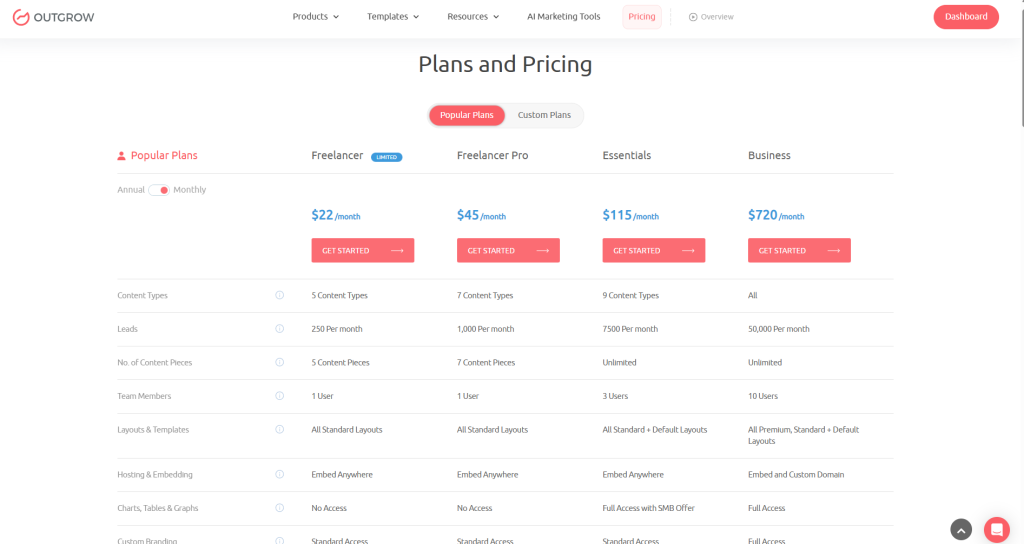
Outgrow
- Freelancer Limited ($22/month): 250 unique visitors/month, 5 pieces of content, 24/7 live chat support, and standard access to custom branding.
- Freelancer Pro ($45/month): 1000 unique visitors/month, 7 content pieces, 24/7 live chat support, and standard access to custom branding.
- Essentials ($115/month): 7500 unique visitors/month, unlimited content pieces, 24/7 live chat support, and all content types.
- Business ($720/month): 50,000 unique visitors/month, unlimited content pieces, 24/7 live chat support, and all the advanced features.
- Custom Plans for small businesses cater to small business owners.
- Enterprise: Custom pricing for high-volume needs. (gotta contact them)
Google Forms
Free.
That’s it. That’s the pricing section. You get unlimited forms, unlimited responses, all features, forever, for zero dollars.
There’s no catch. Google isn’t going to suddenly start charging you. They’re not limiting features or trying to upsell you. It’s genuinely free because it’s part of their ecosystem strategy.
Hard to argue with free.
I’m not saying money doesn’t matter; it absolutely does. But ROI matters more than absolute cost.
Use Cases: When to Use What
When Outgrow Makes Sense
Marketing campaigns:
- “Calculate Your Potential ROI” lead magnets
- “Find Your Perfect [Product]” recommendation quizzes
- “Are You Ready for [Solution]?” assessment tools
- Pricing calculators, Savings estimators
Sales enablement:
- Qualification quizzes that pre-score prospects
- Configuration tools for complex products
- Needs assessments that inform discovery calls
- Value calculators that demonstrate ROI before the first meeting
Content marketing:
- Viral quizzes designed for social sharing
- Interactive industry benchmarks
- Personality assessments tied to your methodology
- Calculators that demonstrate expertise
E-commerce:
- “Which skincare routine is right for you?”
- Gift recommendation engines
- Style quizzes for apparel brands
- Subscription box selectors
When Google Forms Makes Perfect Sense
Internal operations:
- Employee surveys and feedback
- PTO requests
- IT support tickets
- Internal event registration
- Meeting agenda submissions
- Equipment checkout logs
Educational settings:
- Student course evaluations
- Assignment submissions
- Research data collection
- Workshop registration
Simple customer needs:
- Post-purchase satisfaction surveys
- Event RSVPs
- Simple contact forms
- Volunteer sign-ups
When the budget is literally zero: If you’re a nonprofit running on fumes, a student organization, or a bootstrapped startup pre-revenue, Google Forms is a gift. Use it. There’s no shame in free tools that work.
Pros and Cons (The Unvarnished Truth)
Outgrow
What works really well:
- Purpose-built for marketing and lead generation
- Templates are genuinely well-designed
- Logic engine handles complex calculations and branching
- Analytics show exactly where people drop off
- Integrations go deep (not just surface-level data passing)
- Lead scoring and qualification are built in
- A/B testing actually works
- White-labeling makes it fully your brand
What’s less ideal:
- Steeper learning curve than Google Forms
- Takes more time to build than a basic form
- Some advanced features require higher-tier plans
- You need a strategy to maximize value
Google Forms
What’s legitimately great:
- Costs exactly zero dollars
- So simple your grandma could build a form
- Google Workspace integration is seamless
- Reliable, Google’s infrastructure never goes down
- Mobile responsive works perfectly
- Everyone knows how to fill out a Google Form
- Great for internal/non-commercial use
What’s limiting:
- Looks generic
- Can’t create engaging, interactive experiences
- No way to qualify leads or score responses automatically
- Analytics are surface-level only
- No A/B testing
- Can’t do calculations or dynamic content
- Not built for marketing campaigns
Real Stories from the Field
Case Study #1: Financial Advisor Lead Gen (When Outgrow Crushed It)
The financial planning firm wanted to attract high-net-worth clients without being salesy or aggressive. Built a “Retirement Readiness Calculator” that showed projected retirement income based on current savings, expected expenses, investment strategy, and timeline.
The numbers:
- 89% completion rate (insanely high for financial data)
- Average session time: 4 minutes 37 seconds (people were engaged)
- 412 qualified leads in 3 months
- 34 consultation meetings booked
- 8 new clients (average lifetime value: $45K each)
The calculator positioned the advisor as helpful and knowledgeable before any sales conversation happened. People were willing to share detailed financial information because they wanted the calculation. The lead capture was almost incidental.
Case Study #3: When Google Forms Was Perfect
The marketing team needed quarterly feedback from 150 employees across 6 departments. Needed it anonymously and simply. Needed it yesterday.
Google Forms was the right call:
- Built in 15 minutes
- Sent to the entire company
- Results populated a shared Sheet automatically
- Analysis done in an hour
- Cost: $0
- Problem solved
Not every situation needs fancy interactive content. Sometimes you just need to collect information efficiently. Google Forms excels at this.
The Decision Framework
Stop trying to find the “best” tool. Instead, ask yourself:
What’s the actual goal?
- Generating and qualifying leads → Outgrow
- Collecting feedback/data → Google Forms
Who’s filling this out?
- Prospects you’re trying to convert → Outgrow
- Internal team or existing customers → Google Forms
What’s your budget situation?
- Marketing budget with ROI expectations → Outgrow
- Literally zero dollars available → Google Forms
How complex is the experience?
- Calculations, scoring, personalized results → Outgrow
- Straightforward questions in sequence → Google Forms
How important is professional design?
- Brand image matters for this → Outgrow
- Function over form is fine → Google Forms
What happens with the data afterward?
- CRM integration with lead scoring → Outgrow
- Analysis in spreadsheets → Google Forms
The Outgrow vs Google Forms decision isn’t about features; it’s about what you’re trying to accomplish.
Integration Ecosystems
Outgrow has deeper marketing integrations:
- HubSpot with bi-directional sync
- Salesforce with custom field mapping
- Marketo with progressive profiling
- Facebook/Google Ads with conversion tracking
Email platforms with segment-based triggers
Google Forms plays nicely with:
- Google Sheets (obviously)
- Google Drive
- Google Calendar
- Anything via Zapier
Support & Learning Resources
Outgrow:
- Email support (all plans)
- Live chat (Business plan up)
- Dedicated customer success manager (Enterprise)
- Knowledge base (actually well-organized)
- Template library (learn by example)
Google Forms:
- Community forums (sometimes helpful, sometimes not)
- Documentation (comprehensive but dry)
- YouTube tutorials (endless)
- Dedicated support (doesn’t exist, it’s free)
When you’re launching a campaign with $10K in ad spend behind it, having someone to call when integrations aren’t working right is worth paying for.
Final Thoughts
Google Forms is the reliable Honda Civic of form builders. It gets you where you need to go, costs nothing, and never breaks down.
Outgrow is the specialized sports car you rent for the race. It’s built for performance in specific conditions, costs money, but wins when speed and style matter.
Choose based on the race you’re running.
Use Google Forms if: You need basic data collection, you’re working with internal stakeholders, or you have zero budget. It’s a phenomenal tool for what it does, and sometimes simple is exactly what you need.
Use Outgrow if: You’re serious about lead generation and want marketing assets that actually move the needle. If you’re paying for ads, if you’re building a content strategy, if you need to demonstrate ROI on your marketing efforts, Outgrow is purpose-built for these scenarios.
The Outgrow vs google-forms comparison isn’t really about which tool is “better.” It’s about which tool matches your objectives.
Ready to test it yourself? Outgrow offers a 7-day free trial, no credit card required. Build a calculator, quiz, or assessment for your business and compare the engagement metrics to your existing forms. The data will make the decision for you

Sakshi is a digital marketing enthusiast passionate about connecting brands with audiences. With a background in content strategy and social media, she loves turning trends into actionable strategies. Outside of work, you’ll find her reading a book or hunting for the perfect cup of coffee.