AI Form Builder: How Smarter Forms Are Changing the Way Businesses Actually Get Leads
Table of Contents
I’ll cut straight to it: the standard contact form is broken.
Not technically broken. It submits, stores data, and does the thing it’s supposed to do. But functionally? It’s failing most of the businesses using it, quietly, every single day.
Here’s what actually happens: someone finds your site. They’re interested enough to scroll down, find your contact page, and start filling in your form. Then field four asks for their phone number. Field six wants its annual budget. By field eight, they’ve decided this isn’t worth the effort, and they’re gone. You never knew they were there.
That drop-off isn’t a user problem. It’s a form problem.
The way forms work hasn’t really changed since 2005
Your CRM has AI. Email tool personalises at scale. Your ads platform optimises in real time. And your lead capture is a box that asks everyone the same ten questions in the same order, regardless of who they are or why they showed up.
It’s the one part of the funnel that got left behind.
The companies starting to figure this out are switching to what’s broadly called an AI form builder, tools that create forms that actually respond to the person filling them out. The form listens. It adjusts. It asks different questions depending on what someone just told it. And critically, it gives people something back instead of just taking their data.
That last part is what most people miss when they try to understand why these tools work so much better.
Why people abandon forms (it’s not what most teams think)
The usual assumption is that forms are too long, so the fix is to make them shorter. Cut it from twelve fields to six. Completion rates go up a bit. Problem solved, right?
Not really.
Length is a symptom. The actual problem is that traditional forms feel like a transaction where only one side benefits. You give up your details, your name, phone number, company size, job title, and so forth, and in return, what do you really get? A “thanks for your time, we’ll be in touch” type of message and the vague hope that somebody might actually phone you back sometime in the near future.
But people don’t want to do this anymore. Not because they are lazy, but because they’ve been burned one too many times and are skeptical about whether giving up their details is really worth the effort.
An AI form builder changes that dynamic. When a form ends with a personalised score, or a tailored product recommendation, or an instant estimate, suddenly the person filling it out has a reason to finish. They’re not just submitting their information into a void. They’re getting something specific and useful back in exchange.
That shift in psychology is why completion rates tend to jump significantly when companies make this switch. Not because the form got shorter, but because it got fair.
What Outgrow actually does (and why it’s worth your time)
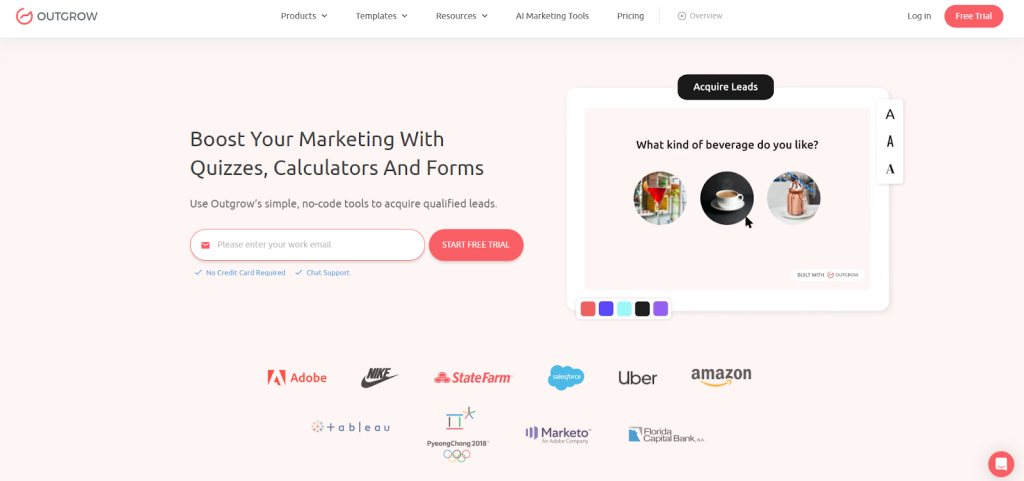
Outgrow is a platform built specifically around this idea. You can use it to build interactive forms, quizzes, calculators, assessments, and recommendation tools, the whole range of content that actually gets people to engage rather than bounce.
The builder is no-code, which matters more than it sounds. A lot of “no-code” tools still require you to think like a developer to get anything useful done. Outgrow genuinely doesn’t. The drag-and-drop interface is straightforward, and there are templates across most major industries, such as SaaS, retail, healthcare, finance, and recruiting. So you’re usually starting from something that’s at least 70% of the way there.
The part that separates it from a fancier version of Google Forms is the logic engine. You can set rules so that what someone sees on question four depends entirely on how they answered question two, and assign scores to different answers. You can send two different people who complete the same form to completely different result pages based on what they told you. None of this involves writing code or formulas, you configure it in the UI.
The results page is genuinely the secret weapon. After someone finishes, Outgrow shows them something personalised, their score, a specific recommendation, or a calculated estimate. This is why people push through to the end. They want to see the result. The content is almost secondary to the pull of finding out your answer.
Integrations cover the usual suspects. HubSpot, Salesforce, Mailchimp, ActiveCampaign, Slack, Google Sheets, and Zapier for anything else. Every response gets routed to wherever you need it without any manual exports or copy-pasting.
Real situations where this actually played out
A skincare brand tried something simple: a “find your skin type” quiz on their homepage. Five questions takes under two minutes. At the end you get a personalised routine with specific product suggestions. They collected email addresses as part of the flow. Two months in, their list had grown by thousands of new subscribers, and the people who came through the quiz were buying at roughly three times the rate of regular site visitors. The quiz didn’t just generate leads. It warmed them up before they even got to the product page.
A B2B software company was frustrated with the quality of demo requests coming through their contact form. Plenty of submissions, but too many were the wrong size, wrong industry, wrong stage. They replaced the form with a short qualification quiz, five questions about team size, current tools, and what they were trying to fix. Leads who scored above a certain threshold got fast-tracked to sales. Everyone else went into a nurture sequence. Demo-to-close rate went up considerably because reps were no longer wasting time on calls that were never going to convert.
A recruiting agency had a manual screening problem. Hundreds of applicants for each role, not enough time to review them properly. They built a role-fit form using Form Builder, ten questions, and an instant compatibility score at the end. Candidates got immediate feedback rather than silence, which improved the experience for them. Recruiters cut their weekly screening time significantly. Two problems solved with one tool.
How to Actually Build a Form on Outgrow
This is where most people expect it to get complicated. It doesn’t.
Step 1: Pick your content type
First, log in to your Outgrow account. If you don’t have an account, you can sign up for free. No credit card details will be required. Once done, navigate to the ‘Form/Survey’ section.
Step 2: Choose a template or start blank
Choose a layout that aligns with your brand, or start with a premade template. Outgrow offers a variety of visually appealing options that you can customize to match your brand’s aesthetics.
Step 3: Edit your questions
Click on any question to edit it. Change the text. Swap the question type- multiple choice, short answer, dropdown, slider, date picker, file upload. Add new questions by dragging them in from the left panel. Reorder them by dragging. Delete the ones that don’t apply. This part genuinely takes minutes if you know what you want to ask.
Step 4: Set up your logic
This is the part that makes Outgrow more than just a form tool. Click on any question and go to the Logic tab. From there, you can set rules like: “if someone answers X, skip to question 7” or “if someone selects option B, show them this follow-up question.”
Step 5: Build your results page
Every Outgrow form has a results page that shows after completion. This is where you configure what someone sees when they finish. You can display a personalised message based on how they answered, include a specific product recommendation, or embed a calendar link for booking a call. The results page is what makes people want to finish. Don’t skip this step; a generic “thanks for submitting” kills the engagement you just built up over the previous questions.
Step 6: Connect your tools
Head to the Integrations tab. Search for your CRM or email platform. Authenticate. Map your form fields to the corresponding fields in your CRM. If your tool isn’t in the native integrations list, connect via Zapier.
Step 7: Publish and embed
Hit Publish. Outgrow gives you a few options: a direct link you can share anywhere, an embed code to drop into your website, a pop-up embed that triggers after a delay or scroll, or a full-page embed. Most teams embed it on a dedicated landing page or as a pop-up on high-traffic pages. Copy the embed code, paste it into your site’s HTML or CMS, and it’s live.
So, that’s genuinely the whole process. In fact, building a new form from a template is something you can realistically knock out in under an hour.
One thing worth noting is the analytics piece. For example, the dashboard shows you exactly where in the form people are dropping off. So, if question three has a 40% abandonment rate, it likely means that question has a problem; it may be too personal, too confusing, or simply unnecessary. In that case, you can remove it and immediately see whether things improve. As a result, this kind of feedback loop becomes easy to act on, something traditional forms make nearly impossible.
The honest case for making the switch
If your current form completion rate is somewhere in the 20–30% range, that’s actually about average. Most companies are there. It doesn’t feel like a crisis because it’s the baseline everyone’s working from.
But here’s the thing: that baseline is beatable. Not by a small margin either. Teams that have moved from static forms to an AI form builder approach consistently report completion rates doubling or in some cases, tripling. The leads that come through tend to be better qualified too, because the form has already done some of that filtering work.
You’re not replacing your CRM or rebuilding your funnel. You’re changing one thing, the moment when a potential customer first decides whether to share their information with you. That moment matters more than most teams realise.
Conclusion
Static forms had their moment. They’re not going away entirely; there are still contexts where a simple field or two makes sense. But as a primary lead capture mechanism, they’re increasingly outmatched by what an AI form builder can do.
Today, the businesses getting the most out of their traffic are the ones that treat lead capture as the beginning of a conversation, rather than just a data collection exercise. Because of this, Outgrow becomes one of the most practical ways for teams to make that shift without a major technical lift or a large budget.
If you haven’t tried it, the 7-day free trial is a real way to test it, build something, get it live, and see how your audience responds. That’s genuinely enough time to know whether it’s going to work for you.
Frequently Asked Questions
First, pick a template. Then, swap in your questions and set up your logic. Next, configure the results page and connect your CRM. Finally, embed it on your site or simply share the link. In most cases, building a new form from a template can realistically be done in under an hour.
Yes, that’s the point. First, the builder is visual and template-driven. So, you don’t need to touch code, write formulas, or configure anything in a backend. In fact, if you can use a slide deck tool or a basic email builder, then you can easily use Outgrow.
Both, typically, but the quality improvement is often the more valuable one. Because the form asks qualifying questions, the leads that come through have already self-selected to some extent.
Every response gets stored in your Outgrow dashboard, where you can easily view, filter, and export it. Additionally, you control where the data flows. For example, you can push it to your CRM, your email platform, a Google Sheet, or even any tool connected via Zapier.

Sakshi is a digital marketing enthusiast passionate about connecting brands with audiences. With a background in content strategy and social media, she loves turning trends into actionable strategies. Outside of work, you’ll find her reading a book or hunting for the perfect cup of coffee.
![[Infographic] How to Create Kickass Interactive Content](https://outgrow.co/blog/wp-content/uploads/2023/05/Blogs-min-1536x768-1-1-1.png)