From Engagement to Execution: Using Outgrow with Outreach to Qualify and Convert Leads
Personalization drives replies in sales. Everyone gets that. The challenge? Doing it when you’ve got 200 prospects in your pipeline.
Outreach is an agentic AI platform for revenue teams – built for prospecting, deal management, forecasting, and account expansion. For this integration, it’s the execution layer: running the sequences and acting on the signals Outgrow surfaces. Outgrow builds the interactive experiences, quizzes, calculators, and assessments that actually reveal what buyers care about. The Outgrow Outreach integration connects these two, so your outreach stops feeling generic.
We’ll walk through who needs this, how it operates behind the scenes, and how to implement it without overhauling your current workflow.
Who Benefits from This Integration?
Table of Contents
Three groups get the most value:
- Outreach users are frustrated with single-digit reply rates
- Sales and RevOps teams are manually personalizing hundreds of emails
- Marketing teams are trying to pass sales something beyond “downloaded a PDF.”
Running Outreach sequences already? Want to know what your prospects actually struggle with before sending that first email? This slots right in.
The Challenge: Scaling Personalization
Most teams personalize with three fields:
- First name
- Company name
- Job title
Better than nothing. Doesn’t tell you what keeps them up at night. Result?
Emails that still read like templates. Messages that miss the buyer’s actual priorities. Reps who join calls blind.
Interactive content fixes this. Someone completes a quiz or uses a calculator from the best online quiz maker; they’re showing their hand. The Outgrow Outreach integration captures that signal and puts it to work.
How Outgrow Fits into Outreach Workflows
Outgrow creates:
- Calculators
- Quizzes
- Assessments
- Interactive forms
These pull in:
- Contact information
- Engagement patterns
- Actual responses showing intent
The Outgrow Outreach integration moves this data directly into Outreach. Your team acts immediately. No spreadsheets, no manual transfers. Context that makes outreach land.
How the Integration Functions
Four steps:
- Prospect interacts with an Outgrow experience (your site, email campaign, social post)
- Outgrow grabs their data: responses, outcomes, and behavior patterns
- Data flows into Outreach automatically through the native integration
- Outreach sequences are personalized based on what the prospect shared
Removes manual entry. Gives reps ammunition before they write word one.
What Data Syncs?
Your Outgrow plan determines this:
Freelancer and Essential plans: Name, email, phone, company.
Business and Enterprise plans: Everything. Individual question responses, outcomes, time spent, and custom fields.
A rep sees:
- Prospect scored 85% on the product-market fit assessment
- Budget range of $50K-$100K from the calculator
- “Improving conversion rates” was selected as the top priority in your quiz software experience
Setting Up the Outgrow Outreach Integration
Ten minutes, start to finish:
Step 1: Prepare Your Outgrow Content
You need to live Outgrow content. ROI calculator, marketing maturity assessment, free quiz maker, segmenting by use case, pick one.
Step 2: Access Integration Settings
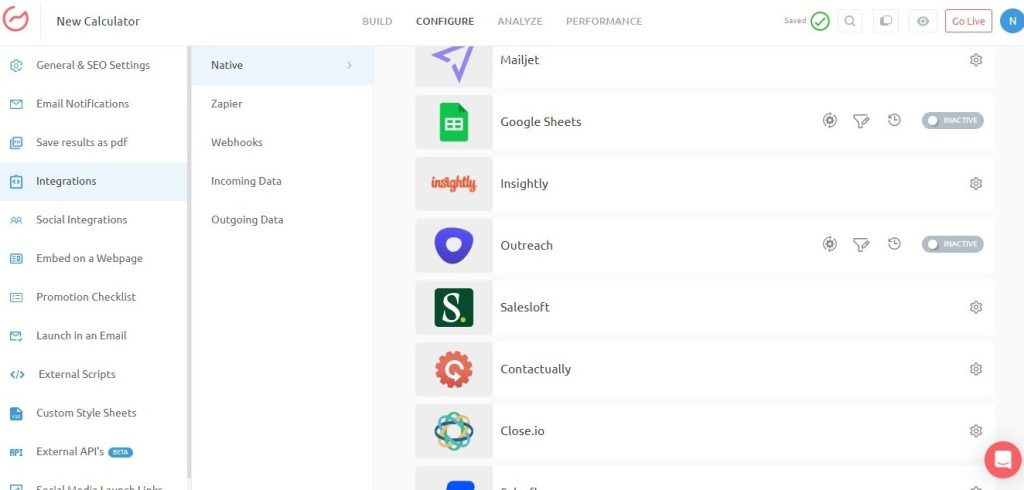
Log in to Outgrow. Open your content. Navigate to Configure > Integrations. Find Outreach under Native Integrations and click Configure.
Step 3: Authenticate
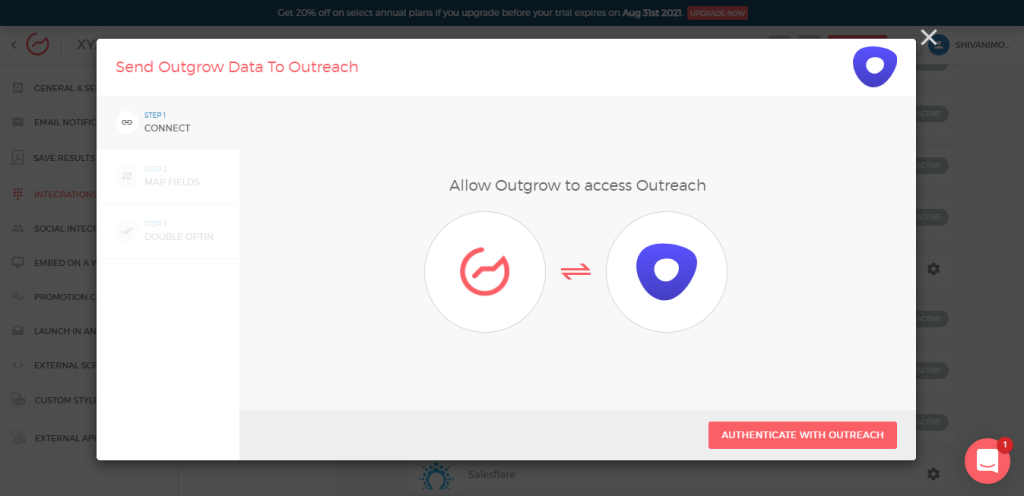
Click “Authenticate With Outreach” and sign in. This creates a secure connection.
Step 4: Choose Your Sync Method
Two paths:
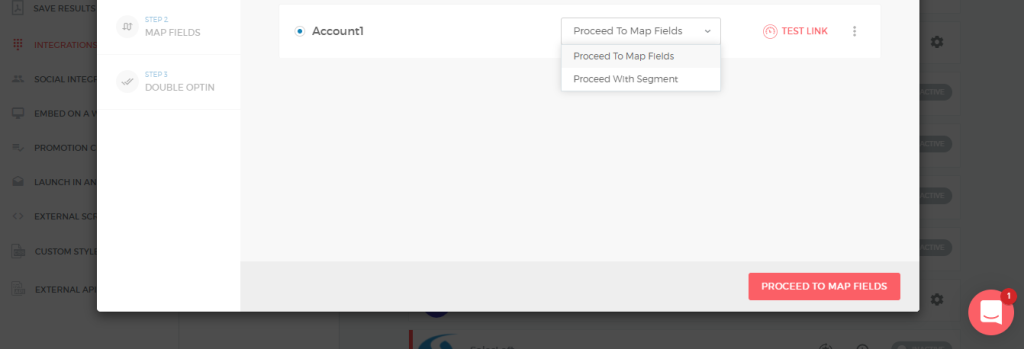
A: Proceed With List
- Select which Outreach list receives all leads
- Map Outgrow fields to Outreach fields
- Test the connection
- Enable double opt-in (optional)
- Save and activate
B: Proceed With Segment
- Map Outgrow segments (quiz results, answers, behavior) to different Outreach lists
- Configure routing for different lead types
- Map fields per segment
- Test, save, activate
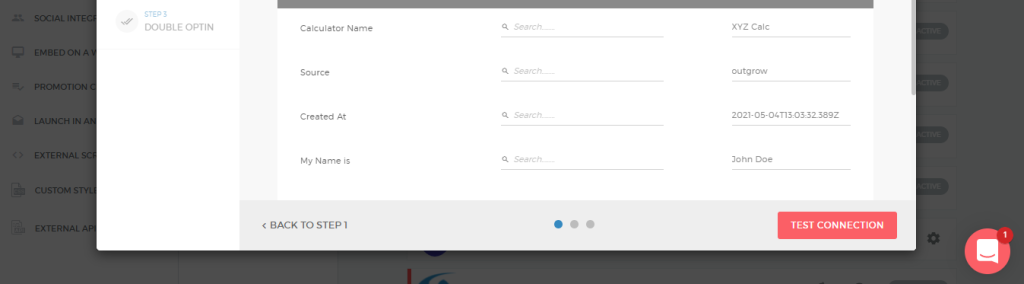
Option B gives you power. Different leads hit different sequences based on what they told you.
Step 5: Verify
Check your integration dashboard. Outreach should show as Active. Send a test lead through.
Documentation: https://support.outgrow.co/docs/outreach-and-outgrow-native-integration
Practical Applications
1. Smarter Lead Segmentation
Segment on what prospects tell you, not static demographics. When you use an online quiz maker to uncover needs, route people to sequences matching their actual situation.
Attribution model research? Different sequence. Lead scoring focus? Different approach. $10K budget versus $100K budget? Totally different treatment. The Outgrow Outreach integration handles routing automatically.
2. Contextual Outreach Messaging
Trigger sequences referencing specific interactions. The first email mentions their quiz outcome, calculated ROI, or stated challenge.
Cold outreach becomes warm. Instead of “I noticed you work in marketing,” you write “You mentioned improving conversion rates and calculated 500 potential additional leads monthly.”
3. Better Sales Conversations
Reps enter calls informed. Before the first conversation, they know:
- Prospect’s main objective
- Features that matter
- Buying process stage
- Budget and timeline constraints
From the quiz or assessment. Not LinkedIn stalking or guesswork.
4. Faster Follow-Ups
Engagement data syncs instantly. Reps follow up while interest peaks. Calculator completed at 2 PM? Rep reaches out at 2:15 PM referencing specific results.
Speed converts. A faster response to engagement means better conversion. The Outgrow Outreach integration eliminates the delay.
Best Practices for Adoption
Four guidelines for maximum impact:
- Start with one high-intent Outgrow experience. Assessment or calculator. Don’t build ten pieces immediately. Prove the model, then scale.
- Map only crucial data fields. Don’t sync everything available. Identify the 3-5 data points that actually change your message or sequence routing.
- Use engagement signals for sequence triggers. Configure segment routing. High scorers enter enterprise sequences. Lower scorers go to nurture.
- Train reps to reference responses directly. Show examples of strong emails mentioning quiz outcomes or calculator results. Confirm they understand data usage.
Start simple. See impact fast. Once you prove personalized outreach based on quiz software data outperforms generic messaging, expand to more content and sophisticated routing.
Mistakes to Avoid
Mistake 1: Using Surface-Level Content
Outgrow quiz asking only “What’s your name and email?” wastes the integration. Interactive content should uncover meaningful intent. Ask about challenges, priorities, budget, timeline, and specific needs.
Mistake 2: Generic Follow-Ups
Collecting rich data and then sending identical emails to everyone defeats the purpose. Sequences should mirror what someone shared. Reference specific responses.
Mistake 3: Over-Automating
Integration removes manual work. Messaging should still sound human. Avoid templates screaming “automated sequence.” Write like you’re addressing someone who shared specific information.
Mistake 4: Ignoring Segment Setup
Sending everyone to one list misses the point entirely. Configure segment routing. Different prospect types deserve different treatment. A free quiz maker segmenting by use case should route leads to matching sequences.
Mistake 5: No Sales Training
Reps who don’t understand the data or usage won’t adopt it. Walk through examples. Show before-and-after emails. Demonstrate value clearly.
Fitting Into Your Tech Stack
The Outgrow Outreach integration works alongside:
- Your CRM (Salesforce, HubSpot, others) for long-term management and reporting. Outgrow syncs to both CRM and Outreach simultaneously, with comprehensive tracking, plus immediate engagement.
- Marketing automation (Marketo, Pardot, etc.) for broader campaigns. Outgrow captures intent, Outreach handles direct sales engagement, and marketing automation runs long-term education.
- Analytics tools track which interactive experiences drive the pipeline. Most teams connect Outgrow to Google Analytics or Mixpanel for full-funnel visibility and content performance data.
- Form builders like a free form builder for static collection, Outgrow for interactive experiences, revealing intent. Static forms grab contacts. Interactive content reveals needs.
Measuring Success
Track these metrics:
1. Reply Rate
Compare reply rates on Outgrow-triggered sequences versus cold outreach. Most teams see 2-3x higher replies when referencing interactive content. Tag Outreach sequences using Outgrow data for tracking.
2. Meeting Booking Rate
Percentage of Outgrow engagers who book meetings. Shows whether you’re attracting the right audience and whether follow-up sequences convert.
3. Pipeline Generated
Tag opportunities starting with Outgrow interactions. Calculate ROI, justify investment. Showing the online quiz maker content generated $500K in the pipeline gets you a budget for more.
4. Time to Response
Real-time sync enables faster follow-up. Measure whether integration reduces response time. Faster follow-ups typically improve conversion.
5. Content Performance
Which Outgrow pieces generate the most qualified leads? Inform content strategy. Build more of what works.
Advanced Strategies
After mastering the basics:
1. Multi-Touch Campaigns
Deploy multiple Outgrow experiences throughout the buyer journey. Free survey maker for initial research, calculator for ROI justification, and assessment for implementation planning. Each feeds data into Outreach, triggering appropriate follow-ups.
2. Account-Based Personalization
Build custom calculators or assessments for target accounts, addressing specific challenges. Create industry-specific versions. A more personalized experience equals better data.
3. Progressive Profiling
Don’t ask everything upfront. Use quiz software to ask different questions at different stages. Early content addresses challenges and goals. Later content covers budget, timeline, and decision criteria.
4. Behavioral Scoring
Combine Outgrow engagement with other Outreach signals. Someone completing your assessment, visiting pricing, and attending a webinar scores higher than someone only submitting a contact form.
Troubleshooting Common Issues
1. Leads not syncing
Verify integration shows Active in the Outgrow dashboard. Check field mapping. Confirm required Outreach fields are populated. Review authentication validity.
2. Wrong sequence triggering
Review segment setup. Ensure conditions don’t overlap. Confirm the default “Else” case catches non-matching leads. Test with samples before launch.
3. Missing data
Confirm the Outgrow plan includes full field mapping. Freelancer and Essential sync only basic details. Business or Enterprise required for complete sync.
4. Duplicate leads
Outreach may create duplicates if the same email engages multiple times. Configure deduplication rules to merge or skip based on preference.
Technical support: https://support.outgrow.co/docs/outreach-and-outgrow-native-integration
Scaling Across Your Team
After proving effectiveness:
1. Create a Content Library
Build multiple Outgrow experiences for different segments, industries, and use cases. Create a survey for a free tool for customer feedback, a calculator for ROI, and quizzes for product fit. Give your team options.
2. Develop Sequence Templates
Create reusable Outreach sequences incorporating Outgrow data fields. Easy for reps to clone and customize. Include best practices and examples.
3. Train Across Sales and Marketing
Sales references interactive responses. Marketing identifies performing content. Regular training maintains alignment and understanding.
4. Share What Works
When reps close deals starting with Outgrow interactions, share the story. Builds momentum, encourages adoption. Create a Slack channel or a weekly email highlighting wins.
Bringing It All Together
The Outgrow Outreach integration delivers personalization without complexity. Combining interactive engagement with automated sales execution lets teams deliver timely, relevant, human outreach at scale.
Winning sales teams don’t send more emails. They send smarter emails based on what prospects care about. Someone completing a quiz or assessment gives you a roadmap. Use it.
Start with one piece. Build an assessment, calculator, or quiz revealing buyer intent. Connect to Outreach. Create sequences referencing what people shared. Train reps on data usage. Watch reply rates climb, meetings increase, and conversations strengthen.
Prospects appreciate relevant outreach. Teams close more without working harder. Tools exist. Integration works. Will you use them?
Sign up for a free 7-day trial today and start syncing your lead data today.
Frequently Asked Questions
The integration of Outreach and Outgrow allows linking these two tools. The connection between these tools facilitates the integration of Outreach’s agentic AI revenue platform and Outgrow’s interactive content system. Through synchronization, the sales force can tailor their approach to potential customers instead of simply using buyer demographics.
Yes. Outgrow segments allow leads to be routed to various Outreach lists based on quiz results or lead responses. High-scoring leads are routed to enterprise sales campaigns, while leads with lower scores are routed to nurture campaigns. Most powerful integration feature.
Yes. When a prospect finishes an Outgrow experience, the data is synced into Outreach immediately. The sales representatives follow up immediately while interest is high, potentially within minutes. This is much quicker than exporting data.
This depends on your Outgrow plan. Basic plans map standard fields, first name, last name, email, phone, and company, whereas business and enterprise plans allow for mapping custom fields, responses to questions, quiz results, scores, and the collected data.
Absolutely. Most teams sync Outgrow data to both CRM (long-term management and reporting) and Outreach (immediate sales engagement). Automated sales sequences based on intent data, plus comprehensive CRM tracking for pipeline analysis and forecasting.

Muskan is a Marketing Analyst at Outgrow. She is working on multiple areas of marketing. On her days off though, she loves exploring new cafes, drinking coffee, and catching up with friends.