Debt Snowball Calculator: How to Build a Payoff Tool With Outgrow
Introduction
Table of Contents
If you’ve got more than one debt sitting on your plate, you already know the hard part isn’t the math itself. It’s not knowing. You can scribble balances on a notepad all you want, but four numbers with four different interest rates won’t tell you the one thing you’re actually asking: when does this end?
That’s basically the whole point of a debt snowball calculator. Tools like the one on Undebt let you punch in what you owe, add whatever extra you can scrape together each month, and get an actual date back. Not a vague estimate, an actual date. Below, we’ll get into why a tool like this works, what it needs to have to be genuinely useful, and how you’d go about building your own with Outgrow.
Why a Debt Payoff Plan Matters
Debt rarely feels like one problem. It’s usually a handful of smaller, annoying ones stacked on top of each other, a store card here, a personal loan there, an auto loan quietly chugging along in the background. Two strategies tend to come up whenever this topic gets discussed:
- Snowball method – smallest balance first, for the quick psychological win
- Avalanche method – highest interest rate first, to save the most money long-term
Neither one wins in some objective sense. One’s about momentum, the other’s about the math working out best. A decent debt snowball calculator lets you test both against your actual numbers and see which one gets you there faster, instead of just trusting whatever advice a blog post throws at you.
What Is a Debt Snowball Calculator?
Put simply, a debt snowball calculator takes your real debts, balance, rate, minimum payment, plus whatever extra you’re able to throw at it each month, and turns that into an actual timeline. Instead of the tired “just pay more than the minimum” line, it spits out the exact order to attack things, how much interest you’ll end up paying, and the date you’re actually free of it.
It should run right there in the browser too. No account, nothing saved unless you decide to save it yourself. Numbers in, plan out. That’s really all it needs to be.
Understand Your Payoff Timeline: How the Calculator Works
The whole thing runs on a handful of fields you already know without needing to look anything up. Here’s the gist of the Free Debt Snowball Calculator.
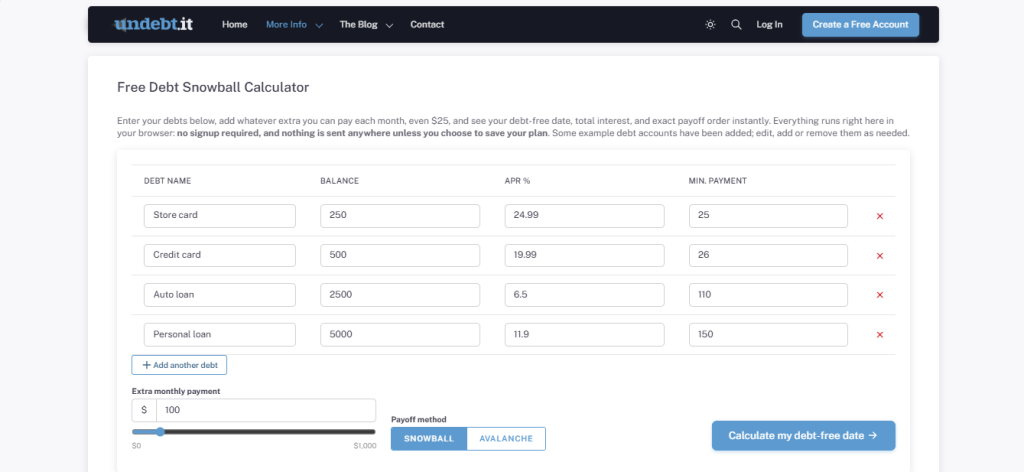
1. Enter Each Debt You’re Carrying
List out every debt: name, current balance, APR, minimum payment. Store card, credit card, auto loan, personal loan, whatever applies to you.
2. Add What You Can Realistically Pay Extra
Set an extra monthly amount on top of your minimums, usually through a slider that runs from $0 to $1,000. Even $25 extra moves things more than most people assume.
3. Choose Your Payoff Strategy
Snowball or avalanche, pick one and watch the date shift depending on which you choose.
4. Add or Remove Debts as Needed
You should be able to add another debt, or delete one, just as easily. Someone with one credit card and someone juggling ten accounts both need this to work.
5. Get Your Debt-Free Date Instantly
Once it’s all entered, one click gets you a payoff date, total interest, and the order to tackle everything, calculated right there, no signup, no waiting on anything.
Here’s what a fairly typical starting point might look like:
| Debt Name | Balance | APR % | Min. Payment |
| Store card | $247 | 24.49% | $25 |
| Credit card | $500 | 19.99% | $26 |
| Auto loan | $2,500 | 6.50% | $110 |
| Personal loan | $5,000 | 11.90% | $150 |
Throw in an extra $605 a month, and a debt snowball calculator recalculates on the spot, showing exactly when each balance disappears.
Who Actually Benefits From Using a Debt Snowball Calculator
People assume this kind of tool is only for someone drowning in debt, but that’s really not who ends up using it most.
Someone with just one or two manageable balances still finds it worth using, mostly to figure out if an extra $50 a month is even worth the sacrifice. Someone with five or six accounts uses it to finally see the whole picture at once instead of guessing at what matters most. And honestly, a good number of people use a debt snowball calculator less for the math and more for the reassurance, just to check they’re already headed the right direction.
Financial advisors and coaches use these tools too. Walking a client through their actual numbers, live, tends to land a lot better than handing over a worksheet and hoping it gets filled out.
Common Mistakes People Make Without a Debt Snowball Calculator
Most struggles with debt payoff come down to a few avoidable habits, and a debt snowball calculator tends to surface these fast once someone actually sits down with their real numbers.
- Paying only the minimums, across the board: Feels fine short-term, but it usually means years of extra interest that only becomes obvious once you see it laid out.
- Spreading extra money too thin: Tossing $20 at every single debt instead of focusing it on one at a time actually slows progress more often than not.
- Ignoring interest rates entirely: People fixate on whichever balance feels most “urgent” without realizing a smaller one at a brutal rate might be costing them more overall.
- Never touching the plan again: A payoff plan isn’t something you set once and forget. Balances change, extra income shows up, life happens, and a good debt snowball calculator makes it painless to update and see the new timeline instantly.
Why Interactive Tools Like the Debt Snowball Calculator Work So Well
1. It Turns Anxiety Into a Plan: Debt feels overwhelming mostly because it’s vague. A real date on the calendar replaces that vague worry with something you can actually work toward.
2. It Delivers Real Value, Not Just Entertainment: Unlike a lot of what passes for interactive content these days, this actually solves a problem instead of just killing time.
3. It Builds Trust Fast: Free, no signup, instant results- that combination tells someone a brand actually wants to help rather than just collect an email.
4. It Encourages Return Visits: Nobody uses a debt snowball calculator once and forgets it exists. People come back month after month to update numbers and check progress.
5. It Surfaces Useful Data for Brands: Average debt loads, which method people lean toward, typical extra payments- it all feeds into smarter decisions about content and product down the line.
How Popular Is a Debt Snowball Calculator? (Traffic Insights)
This isn’t a tool people stumble on once and forget about. It tends to earn steady, repeat traffic in the personal finance space. On average:
- On average, Undebt.it attracts roughly 129,000 monthly visits, per SimilarWeb.
- A solid chunk of visitors return more than once as they update balances and check progress
- Traffic tends to climb in January, around tax season, and whenever people are generally rethinking their finances (based on SimilarWeb traffic data for Undebt.it).
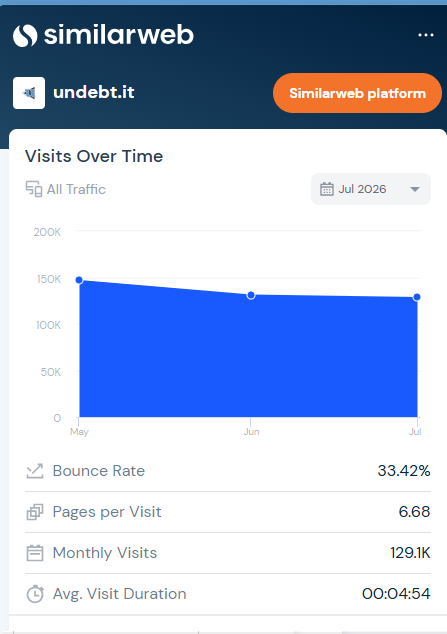
That pattern says something. A genuinely useful debt snowball calculator doesn’t just get clicked once. People bookmark it.
How to Build a Debt Snowball Calculator Using Outgrow
If this format’s got you thinking about building one, here’s how you’d actually do it with Outgrow Website Calculator.
1. Sign Up on Outgrow

Create a free account, then head into the calculator builder. Already on Outgrow? Just go straight to your dashboard.
2. Choose Your Format
Pick “Calculator” from your dashboard. There are ready-made financial templates, or you can build from a blank slate.

3. Customize the Look and Feel
Make it feel like yours:
- Add your logo
- Use your actual brand colors
- Pick a tone that fits: reassuring, practical, motivational- whatever suits your audience
- Add small visuals like progress bars or timeline graphics
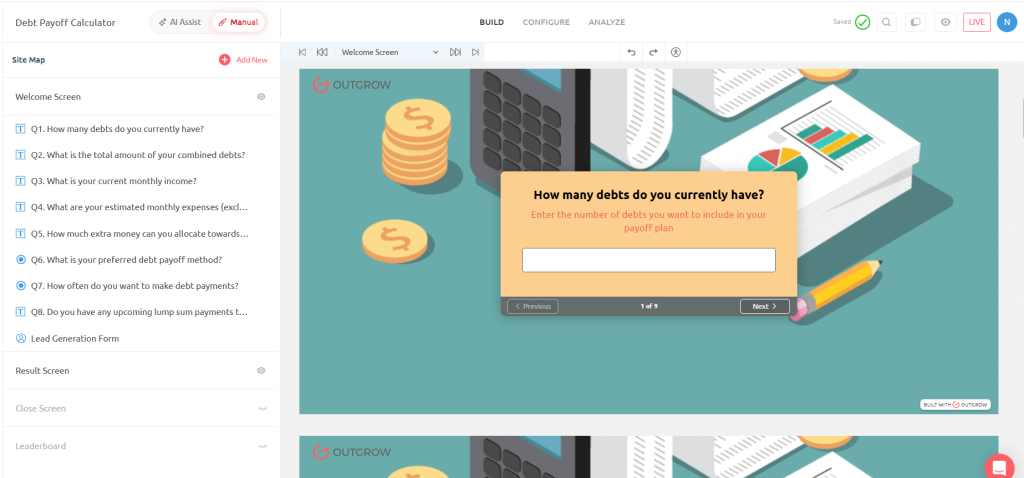
A clean layout builds more trust in the numbers, and that matters a lot with anything touching people’s finances.
4. Build Your Input Fields
Keep it simple and grounded in what a real debt snowball calculator actually needs:
- Debt name
- Current balance
- Interest rate (APR)
- Minimum payment
- Extra monthly payment (a 0–1,000 slider works well)
- Payoff method, snowball or avalanche
- The ability to add or remove debts freely
5. Set Up Your Formula Logic
This is where Outgrow’s formula builder does the actual work. Map it so your debt snowball calculator:
- Orders debts based on whichever method’s picked
- Applies extra payments to the priority debt each month
- Recalculates balances and interest until everything hits zero
- Spits out a debt-free date and total interest paid
No coding needed, just formula logic tied to your fields.
6. Embed and Share
Once it’s live, you’ve got options:
- Embed it on your site or blog
- Drop it into email newsletters
- Push it across social
- Run it in paid campaigns targeting people researching debt payoff
Tools like this also tend to pick up natural backlinks from finance sites, which doesn’t hurt your SEO either.
7. Analyze and Improve
Watch how it performs over time:
- Where people drop off while entering debts
- Which method gets chosen more
- How many debts people typically enter
- Return visits and repeat use
Use what you learn to keep sharpening it.
Final Thoughts
A debt snowball calculator works because it trades financial anxiety for an actual plan, and that’s the kind of thing that keeps people coming back well after their first visit. Build one with Outgrow, and you’re not just tacking on another interactive widget. You’re giving people a real reason to trust your brand with something as personal as their money.
Personal finance blog, fintech product, financial coach- whatever your niche is, this kind of tool can turn a one-time visitor into someone who checks in with your site every month.
Ready to build your own?
Start exploring Outgrow, no code required, and put together a debt snowball calculator people will actually come back to.
Frequently Asked Questions About the Debt Snowball Calculator
A free tool that takes your debts, balances, and extra payment amount, then hands you back an exact payoff order and debt-free date.
It’s a solid estimate built on standard amortization formulas, not an exact quote from a lender. The final rate and fees a lender offers can shift slightly based on credit and other factors, so use the number as a strong starting point going into negotiations.
Even something small, like $25, makes a real difference. Most calculators use a slider so you can test different amounts and see how the date shifts.
Only as accurate as what you put in, so keep your balances updated for the most realistic result.
No. It’s a planning tool, not a substitute for actual financial guidance, especially if your situation is more complicated.

Muskan is a Marketing Analyst at Outgrow. She is working on multiple areas of marketing. On her days off though, she loves exploring new cafes, drinking coffee, and catching up with friends.