Product Release: Introducing AI Powered Conversational Agents on Outgrow
We are excited to announce the official launch of AI Powered Conversational Agents, a new content type on Outgrow that lets businesses build, deploy, and optimize intelligent chatbot experiences without writing a single line of code.
This is not a minor feature update. AI Powered Conversational Agents represent a fundamentally new way to engage website visitors, qualify leads, handle support queries, and drive conversions. Everything happens inside one guided workflow on the Outgrow platform.
If you have been looking for a way to use AI in your marketing or support operations that actually produces measurable outcomes, this release is built for you.
Key Components
Table of Contents
Outgrow’s AI Powered Conversational Agents are built around five core capabilities that work together to deliver business outcomes, not just conversations:
- Advanced AI Model Support: Choose from OpenAI, Anthropic, Google Gemini, or DeepSeek and select the right model for your use case and budget.
- Structured, Goal Driven Agent Behavior: Every AI Powered Conversational Agent is configured around a specific business objective such as lead generation, demo booking, support resolution, or event registration.
- Multi Channel Deployment: Publish your AI Powered Conversational Agent across websites, standalone links, WhatsApp, Messenger, Telegram, and Instagram from a single setup.
- Built In Analytics and Optimization: Track resolution rates, sentiment, popular topics, lead capture, and full conversation history inside Outgrow.
- Design and Experience Customization: Fully customize the look, tone, and behavior of your AI Powered Conversational Agent to match your brand and audience.
This makes AI Powered Conversational Agents suitable for companies that want to use AI not just as a conversational layer but as an operational and revenue supporting tool.
What Is an AI Powered Conversational Agent?
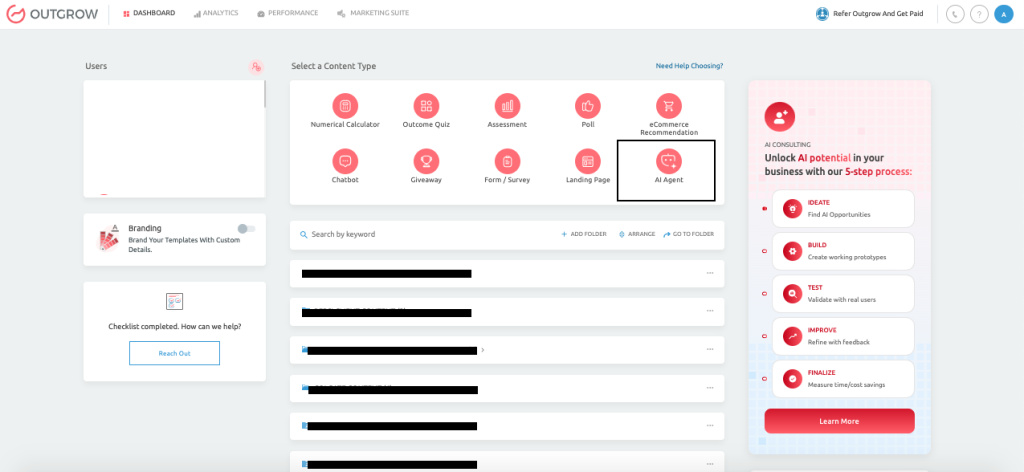
Using Outgrow’s AI Powered Conversational Agents, you can create, deploy, manage, and optimize intelligent chatbots across multiple channels. The feature is designed for businesses that want more than a basic FAQ bot. Instead of only answering questions, AI Powered Conversational Agents enable businesses to build chat experiences aligned with specific goals such as lead generation, appointment booking, support resolution, feedback collection, and customer engagement.
What AI Powered Conversational Agents Help Businesses Do
A business can use an AI Powered Conversational Agent to reduce repetitive support work, capture better leads, respond to customers faster, guide users through onboarding, automate appointment flows, and create a more personalized digital experience especially when connected through an MCP Gateway. Because it supports both AI intelligence and configuration logic, businesses can use it in both simple and complex scenarios.
What AI Powered Conversational Agents Are Not
An AI Powered Conversational Agent is not only a rule based chatbot, nor is it only a general AI chat interface. It sits between those two extremes. Traditional rule based builders are often too rigid, while pure AI chat systems can be too open ended and inconsistent. AI Powered Conversational Agents combine the flexibility of AI with structured goal based control.
Who Should Use AI Powered Conversational Agents
The AI Powered Conversational Agent content type is well suited for:
- SaaS businesses that want to book demos or guide users through onboarding
- E-commerce companies that want to recommend products and answer pre-sale questions
- Healthcare providers who want to schedule appointments or collect patient feedback
- HR and internal operations teams that want to answer policy questions or support employees
- Education and event businesses that want to manage registrations
Example Business Use Case
A SaaS company can place an AI Powered Conversational Agent on its pricing page. When a visitor asks about pricing, the agent can explain the plan structure, ask a few qualification questions, collect the visitor’s business email, and offer to book a demo. In the same flow, the business can track whether the conversation was successful, whether the user became a lead, and what objections were most common.
Benefits of AI Powered Conversational Agents
Enhanced Lead Generation
Traditional web forms capture a name and an email address. AI Powered Conversational Agents go further by qualifying leads through structured conversation, asking follow up questions based on user responses, and capturing high intent signals your sales team can act on immediately. The result is fewer cold leads and more pipeline ready contacts.
Streamlined Marketing Automation
Once a visitor completes a conversation, your AI Powered Conversational Agent can trigger downstream actions. It can send leads to your CRM, fire a webhook, or add contacts to an email sequence. Everything flows automatically without your team manually moving data between tools.
Reduced Support Load
AI Powered Conversational Agents handle repetitive tier one support queries around the clock. By training the agent on your existing documentation, FAQs, and product content, you give users accurate answers instantly and free your support team to focus on escalations that actually need a human.
Cost Efficiency
With multi model support, businesses can match the AI model to the task. High traffic FAQ bots run on lightweight and cost effective models. High stakes sales or support conversations use premium models. That flexibility keeps your cost per conversation in check at any volume.
Consistent Brand Experience Across Channels
One AI Powered Conversational Agent setup covers multiple channels. Whether a user reaches you on your website, Instagram, or WhatsApp, they get the same brand and goal aligned conversation experience managed from one place inside Outgrow.
Why AI Powered Conversational Agents Are Better Than Competitors
The AI Powered Conversational Agent content type stands out because it combines AI intelligence with business structure. Many competitors fall into one of two categories. Some rely heavily on rule based flows that require manual setup for every path. Others use AI broadly but give businesses very little control over the actual outcome of the conversation. AI Powered Conversational Agents are stronger because they combine guided setup, structured goals, AI flexibility, and measurable optimization.
Goal Driven AI Instead of Generic AI
Most chatbot platforms focus on conversation. AI Powered Conversational Agents focus on outcomes. Instead of only helping a user chat with AI, the platform lets the business define a goal such as:
- Generate leads
- Schedule appointments
- Collect feedback
- Promote a free trial
- Register users for a webinar
That goal then shapes the AI behavior through the prompt system. This gives the bot direction and makes the conversation more purposeful.
Prompt Generation Built Into the Workflow
One of the strongest differentiators is that users do not need to write sophisticated AI prompts from scratch. After they choose a goal and enter the necessary business details, they can click Generate Prompt and the platform automatically creates the AI instructions. If those instructions need improvement, they can click Enhance Prompt to refine behavior. This is a major advantage over tools that expect non-technical users to know prompt engineering.
Multi Model Support
The AI Powered Conversational Agent content type supports multiple AI providers rather than locking users into a single ecosystem. Supported providers include OpenAI, Anthropic, Google Gemini, and DeepSeek. Businesses can choose models based on quality, budget, traffic volume, or specific use case. For example:
- A premium support bot may use GPT-5 or Claude 4.6 Sonnet
- A high volume FAQ bot may use GPT-5 Mini or Claude 4.5 Haiku
- An analytical assistant may use Gemini 3 Pro Preview
Built In Analytics and Optimization
Many platforms treat analytics as an add on or give only basic chatbot usage numbers. AI Powered Conversational Agents include resolution tracking, sentiment data, visibility of popular topics, visitor tracking, lead capture visibility, and conversation review in the same platform. That makes it easier for businesses to improve the bot over time.
Multi Channel Deployment
A business can design and manage one chatbot experience and then deploy it across the website, standalone pages, WhatsApp, Messenger, Telegram, and Instagram. That gives teams a single place to manage AI behavior while still adjusting the channel experience as needed.
Example Comparison
A competitor may let a user build an FAQ flow or connect an LLM, but the user still has to handle prompting, optimization, channel design, and performance analysis separately. AI Powered Conversational Agents reduce that complexity by combining setup, AI control, deployment, and optimization into one guided workflow.
How Businesses Can Use AI Powered Conversational Agents
AI Powered Conversational Agents are flexible enough to support many industries, but the best results usually come when a business starts with one clear objective and one strong use case.
Public safety teams can take the same focused approach to operational workflows, where fire department scheduling software helps manage shifts, staffing coverage, crew availability, and readiness before emergency response is needed.
The content type is especially effective when the business knows what action it wants the user to take by the end of the conversation.
SaaS Businesses
SaaS companies can use AI Powered Conversational Agents for:
- Demo booking
- Free trial signups
- Onboarding guidance
- Feature explanation
- Support automation
Example: A visitor lands on a software pricing page and asks whether the product supports Salesforce integration. The AI Powered Conversational Agent explains the integration, asks which CRM stack the visitor is using, collects the visitor’s email, and suggests a demo if the visitor appears to be high intent.
E-Commerce Businesses
An e-commerce business can use AI Powered Conversational Agents for:
- Product recommendations
- Order tracking
- Support automation
- Upselling and cross selling
- Instagram and WhatsApp sales conversations
Example: A customer says they need running shoes under a certain budget. The AI Powered Conversational Agent asks whether the user prefers road or trail running, suggests three options, links to the product pages, and offers to send a discount code in exchange for an email address.
Healthcare Providers
Healthcare teams can use AI Powered Conversational Agents for:
- Appointment scheduling
- Patient intake support
- Non-sensitive service explanation
- Post visit feedback collection
Example: A patient asks for an appointment next week. The AI Powered Conversational Agent asks the reason for the visit, the preferred time range, and required details such as name and contact information, then confirms the next step.
HR and Internal Teams
Internal teams can use AI Powered Conversational Agents for:
- HR policy questions
- Employee training support
- Satisfaction feedback
- Internal request routing
Example: An employee asks about the parental leave policy. The AI Powered Conversational Agent provides policy information, links to the relevant documentation, and escalates to HR if the question requires a case specific review.
Education and Events
Education and event based businesses can use AI Powered Conversational Agents for:
- Course inquiries
- Webinar registration
- Admission guidance
- Event reminders
Example: A training company runs a webinar campaign. The AI Powered Conversational Agent answers session questions, captures name and email, confirms registration, and sends the details to the internal team.
Important Things to Keep in Mind
AI Powered Conversational Agents work best when businesses follow this sequence before and after launch:
- Define one primary goal
- Configure the chatbot around that goal
- Generate the prompt
- Test the experience
- Monitor analytics
- Refine based on user behavior
Prerequisites for Setup
Before you build your first AI Powered Conversational Agent, make sure the following are in place:
- An active Outgrow account with access to the AI Agent content type
- Your website URL or sitemap link used to train the agent on your existing content
- A clear primary goal for the agent and a defined action you want users to take
- Core business information including what you do, your key offerings, and your target audience
- Any supporting documents such as PDFs, DOCX files, or CSV data you want the agent trained on
- API keys for your preferred AI provider if using a custom model configuration
Note: You do not need any technical skills or knowledge of AI prompt writing to launch an AI Powered Conversational Agent. The platform handles prompt generation automatically.
Step by Step Guide to Building Your AI Powered Conversational Agent
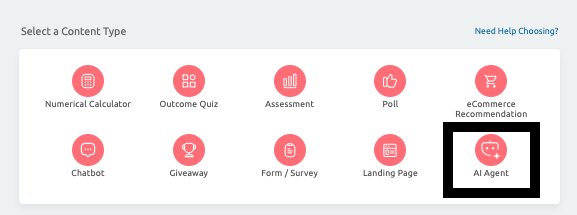
Step 1: Create the AI Agent
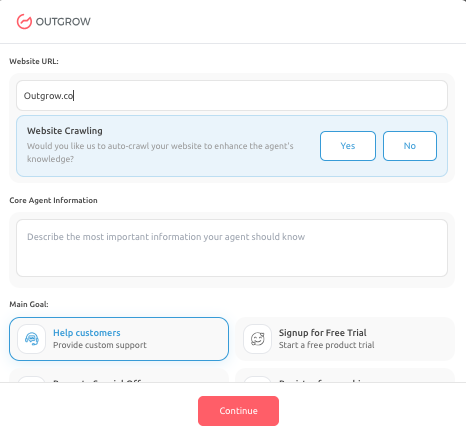
Log in to Outgrow and select AI Agent as your content type. You will be prompted to enter your website URL or sitemap link. The platform fetches your pages and uses them as the agent’s initial knowledge base. This step alone means your AI Powered Conversational Agent already knows your product and content before a single conversation happens.
Step 2: Provide Core Agent Information
In the Core Agent Information field, describe your business clearly. Include the following:
- What your business does and the problems you solve
- Your key products or service offerings
- Your target audience and their typical questions
- The type of questions users are likely to ask
The more precise this description, the more accurate and consistent your AI Powered Conversational Agent will be across every conversation.
Step 3: Select the Main Goal
Choose the primary objective your AI Powered Conversational Agent should work toward. Available options include:
- Help Customers to answer queries and provide support
- Signup for Free Trial to guide users toward starting a trial
- Promote Special Offer to highlight a discount or campaign
- Register for a Webinar to capture event registrations
- Other to define a fully custom goal
This selection directly shapes how the AI behaves, what follow up questions it asks, and what outcome it drives users toward.
Step 4: Configure Data Sources
Train your AI Powered Conversational Agent with relevant knowledge using three available methods:
- Source Link: Add URLs, fetch pages, select the relevant ones, and start training. The platform tracks training status in real time.
- Upload Source: Upload PDFs, DOCX files, or CSV documents such as product manuals, pricing sheets, FAQ documents, or policy guides. If your source material is still in Word, converting a Word doc to a PDF first keeps formatting consistent across every file in your knowledge base.
- Text Area: Paste content directly for quick additions. This is useful for announcements, offers, or time sensitive updates.
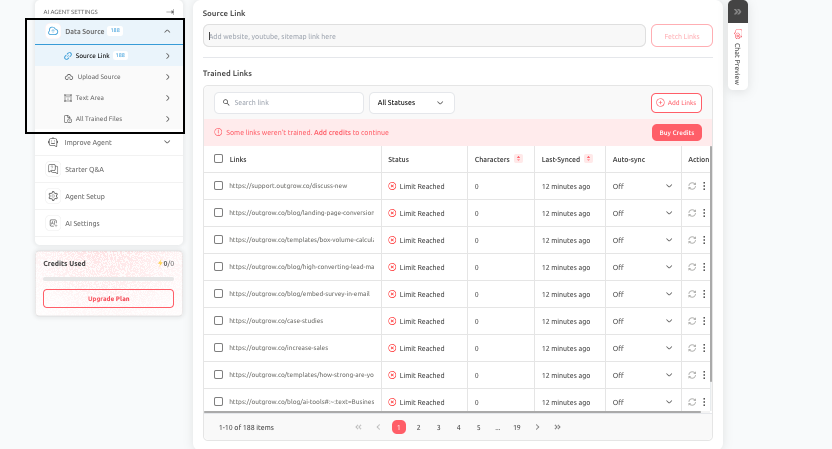
Best practice: Train only on high quality and relevant content. Avoid training on navigation pages, cookie notices, or generic boilerplate. Regularly review and update your data sources as your product evolves.
Step 5: Configure AI Agent Settings
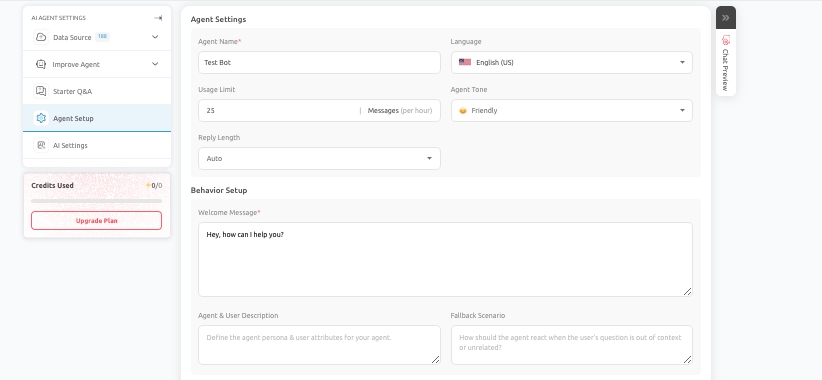
Fine tune how your AI Powered Conversational Agent communicates and behaves. Key settings include:
- Agent Name: The internal name used to identify this agent.
- Language: The primary language for all conversations.
- Agent Tone: Choose between friendly, professional, or neutral to match your brand voice.
- Reply Length: Control whether responses are concise or detailed.
- Welcome Message: The first message users see. Make it clear, helpful, and action oriented.
- Fallback Scenario: Define what happens when the agent encounters a question outside its scope.
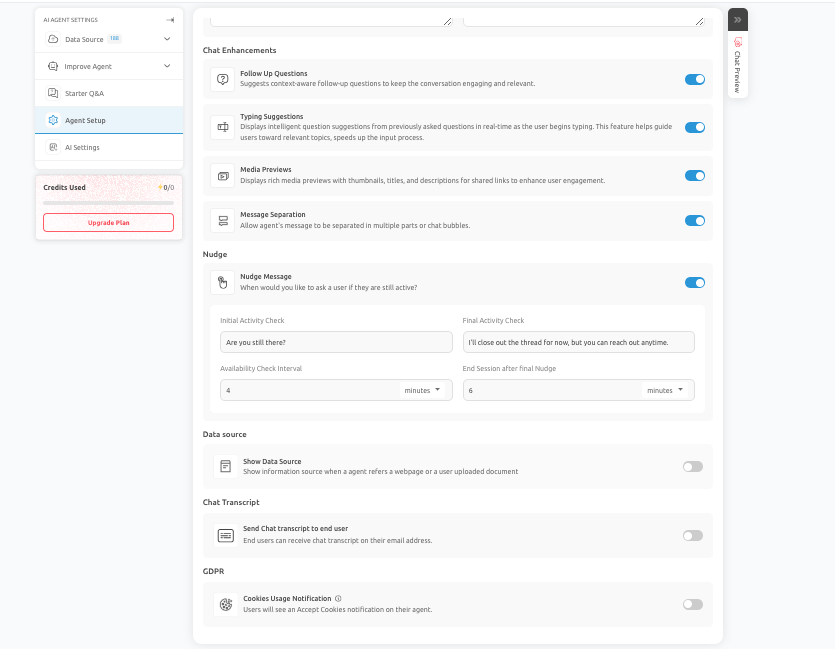
- Chat Enhancements: Enable follow up questions, typing suggestions, media previews, message separation, nudge settings, and GDPR compliance notifications.
Step 6: Select AI Model and Configure Prompt
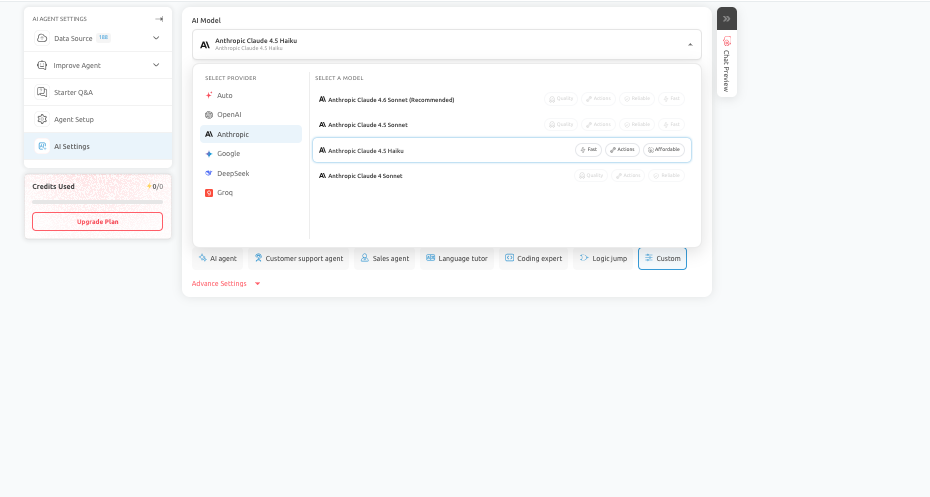
Choose the AI model that fits your use case. For reference:
- Premium support or sales conversations work best with GPT-5 or Claude Sonnet
- High volume FAQ or self service bots work well with GPT-5 Mini or Claude Haiku
- Data intensive analytical assistants are well suited to Gemini Pro Preview
Once you select your model, click Generate Prompt. The platform creates a structured AI prompt based on your goal and business information automatically. If you want to sharpen it further, use Enhance Prompt. This feature improves structure, clarity, and behavioral alignment without requiring any manual prompt writing.
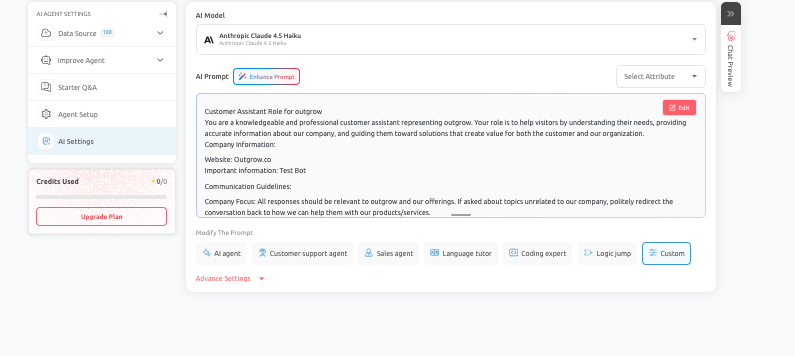
Important: Always review the generated prompt before publishing. Make sure it reflects your business objective, stays within the intended scope, and is tested against real user questions before going live.
Step 7: Test Using Chat Preview
Before publishing, use Chat Preview to simulate real conversations. Test your AI Powered Conversational Agent against the following scenarios:
- Common questions users typically ask
- Incomplete or ambiguous inputs
- Edge cases and off topic queries
- The full goal driven flow from first message to conversion
Do not test only the ideal path. Probe the experience the way a real user would. This is where most avoidable issues are caught before they reach your audience.
Step 8: Test Before You Publish
Use Chat Preview to test typical user questions, incomplete answers, objections, and happy path scenarios. Confirm that your AI Powered Conversational Agent asks the right follow up questions, collects the correct information, and moves users toward the intended next step.
Step 9: Publish and Monitor
When Chat Preview testing confirms the experience is solid, publish your AI Powered Conversational Agent to the appropriate channels. After launch, use Outgrow’s built in analytics to review conversation outcomes, lead capture rates, resolution data, and sentiment trends. Use these insights to refine the agent’s prompt, data sources, and settings on an ongoing basis.
Advanced Features
Tag Based Lead Segmentation
AI Powered Conversational Agents can apply tags to leads based on conversation outcomes, responses, or intent signals. This means the leads that enter your CRM are pre segmented. High intent prospects are flagged differently from informational inquiries, letting your sales team prioritize without manual review.
Segment Based Routing
Configure the AI Powered Conversational Agent to route users to different outcomes based on their responses. A pricing question from an enterprise visitor can route differently from the same question asked by a small business user. You can point each segment toward different email sequences, follow up actions, or team notifications.
Integration Management Tools
AI Powered Conversational Agents connect with your existing marketing and sales stack. CRM integrations, webhook triggers, and native Outgrow integrations allow conversation data to flow automatically into tools like HubSpot, Salesforce, Mailchimp, and hundreds more without any manual data transfer.
Best Practices for Maximum ROI
Strategic Tagging System
Use tags deliberately. Define a tagging taxonomy before launch so the data flowing into your CRM is structured and actionable from day one.
Regular Monitoring
Review your AI Powered Conversational Agent’s conversation logs at least weekly, especially in the first month. Early performance data reveals gaps in your data sources and prompt logic faster than any other signal.
Testing Protocol
Run structured quality assurance before every significant update. Treat your AI Powered Conversational Agent like a customer facing product. Any change to the prompt, data sources, or settings should go through Chat Preview before it reaches users.
Optimize Your Content Flow
Start with one clear goal and one strong use case. Agents with a single focused objective consistently outperform agents trying to serve multiple goals at once. Expand scope only after the core experience is performing well.
Leverage Full Platform Capabilities
Connect your AI Powered Conversational Agent to Outgrow calculators, quizzes, and assessments to build multi step interactive experiences that move users deeper into your funnel.
Troubleshooting Common Issues
Authentication Failures
If your AI Powered Conversational Agent fails to connect to an AI model provider, verify that your API key is active and has sufficient quota. Check that the correct model is selected for your plan and that your API key has not exceeded rate limits. Reconnecting the API key from the settings panel typically resolves this issue.
Leads Not Appearing in Waiting Status
If leads captured by your AI Powered Conversational Agent are not appearing in your CRM or Outgrow dashboard as expected, confirm that your data destination is correctly configured, that the field mapping aligns with your CRM schema, and that the conversation flow reaches the intended capture point. Use Chat Preview to trace the full flow end to end.
Incorrect Data in Fields
If the data collected by your AI Powered Conversational Agent contains formatting errors or unexpected values, review the prompt instructions for data collection steps. Add explicit formatting guidance in the prompt. For example, specify that phone numbers should be collected in a particular format or that email fields must be validated before the conversation proceeds.
Duplicate Contacts
Duplicate leads can occur when a user completes the same AI Powered Conversational Agent flow more than once, or when field mapping creates new records instead of updating existing ones. Enable deduplication logic in your CRM integration settings to prevent this. If the issue persists, review whether your conversation flow has a natural stopping point that prevents repeat completions.
Integration Scenarios and User Experiences
Existing Users on First Time Setup
If you are an existing Outgrow user, AI Powered Conversational Agents will appear as a new content type in your dashboard. Your existing integrations and CRM connections carry over automatically. You can publish your first AI Powered Conversational Agent and have it sending leads to your existing workflows without any additional configuration.
Account Management
Teams managing multiple AI Powered Conversational Agents across different campaigns or client accounts can use Outgrow’s workspace management to keep agents organized by brand, goal, or channel. Usage limits, model selection, and analytics are all configurable at the individual agent level, giving team leads full visibility and control across every deployment.
SaaS Demo Booking
A SaaS company places an AI Powered Conversational Agent on its pricing page. When a visitor asks about integrations, the agent explains the relevant features, asks about the visitor’s CRM stack, collects the business email, and offers to book a demo all in one conversation. The lead appears in HubSpot tagged as a demo requested with the CRM preference pre-filled.
E Commerce Product Discovery
An e-commerce brand deploys an AI Powered Conversational Agent on its homepage. A visitor types that they need running shoes under a set budget. The agent asks whether they prefer road or trail, suggests three products with links, and offers a discount code in exchange for an email address. The contact is added to a post purchase email sequence automatically.
Conclusion: AI Powered Conversational Agents
By completing the steps outlined in this guide, you will have successfully created and launched a fully functional AI Powered Conversational Agent within Outgrow. Each step in this process contributes to the overall performance and effectiveness of your agent, so it is important to configure and test carefully before publishing.
AI Powered Conversational Agents are now live on Outgrow. Whether your goal is lead generation, support automation, demo booking, or event registration, this release gives you a single end to end platform to build AI experiences that are both intelligent and outcome driven.
Log in to your Outgrow account to access the AI Agent content type and launch your first agent.
Feel free to use our chat tool on the bottom right or reach out to us at Questions@Outgrow.Co if you have any questions, and our team can help you with a quick solution.
Frequently Asked Questions
AI Powered Conversational Agents are a new content type on the Outgrow platform that lets businesses build and deploy intelligent, goal driven chatbot experiences. They combine AI language models with structured business logic to drive specific outcomes such as lead generation, demo booking, support resolution, or event registration without requiring any coding or prompt engineering skills.
Standard chatbots are either rule based and too rigid requiring manual scripting, or open ended AI with no business direction. Outgrow’s AI Powered Conversational Agents combine both. They are not only a rule based chatbot nor only a general AI chat interface. They bring AI intelligence together with structured goal driven behavior, automated prompt generation, built in analytics, and multi channel deployment all in one guided workflow.
Supports OpenAI GPT-5/GPT-5 Mini, Anthropic Claude 4.6 Sonnet/4.5 Haiku, Gemini 3 Pro Preview, and DeepSeek. Switch models anytime based on budget/use case.
No technical skills needed. Generate Prompt and Enhance Prompt automatically create and refine AI instructions for marketing and sales teams without coding experience.
Deploy agents on websites, standalone Outgrow links, WhatsApp, Facebook Messenger, Telegram, and Instagram, all managed from one centralized Outgrow setup.
Track resolution rates, sentiment, popular topics, lead captures, visitor behavior, and conversation logs using Outgrow’s built-in analytics dashboard.
Fallback settings let agents escalate to humans, redirect users, or collect unanswered questions. Test fallback behavior in Chat Preview before launch.

Ankit Upadhyay is a Digital Marketing and SEO Specialist at Outgrow. With a passion for driving growth through strategic content and technical SEO expertise, Ankit Upadhyay helps brands enhance their online visibility and connect with the right audience. When not optimizing websites or crafting marketing strategies, Ankit Upadhyay loves visiting new places and exploring nature.